


















Writing a Killer Follow-up Email After No Response
Following up with someone after they have not responded to your initial email can be a tricky situation. However, if done correctly, it can be an effective way to get the response you are looking for. Here are some tips on writing a killer follow-up email
Following up with someone after they have not responded to your initial email can be a tricky situation. However, if done correctly, it can be an effective way to get the response you are looking for.
Here are some tips on writing a killer follow-up email that will get you the response you need:
-
Be polite and professional: Remember that you are following up because the recipient has not responded to your initial email, not because they are ignoring you. Use a professional tone and keep your language polite.
-
Referencing the original email: Start your follow-up email by referencing the original email you sent. This helps the recipient to quickly see what you are following up on and makes it easier for them to respond.
-
Provide additional information: If you have any additional information or updates that might help the recipient make a decision, include them in your follow-up email. This could be a reminder of the deadline or any other relevant information.
-
Ask if there is anything you can do to help: Sometimes, people don’t respond because they are busy or don’t know what to say. Asking if there is anything you can do to help can be a great way to get the conversation started again.
-
Keep it short and sweet: Follow-up emails should be short and to the point. Don’t include unnecessary information or try to cram too much into the email.
-
Make it easy to respond: Make sure that your follow-up email is easy to respond to. Include clear call-to-action statements and avoid making demands or ultimatums.
-
Use a friendly closing: End your follow-up email with a friendly closing. Thank the recipient for their time and express your hope that they will be able to respond soon.
By following these tips, you can write a killer follow-up email that will get you the response you are looking for. Good luck!
Ready to send your first campaign?
Install Mail Merge for Gmail from the Google Workspace Marketplace and send up to 50 personalized emails per day for free.
Get started for freeMore reading
More from Tips
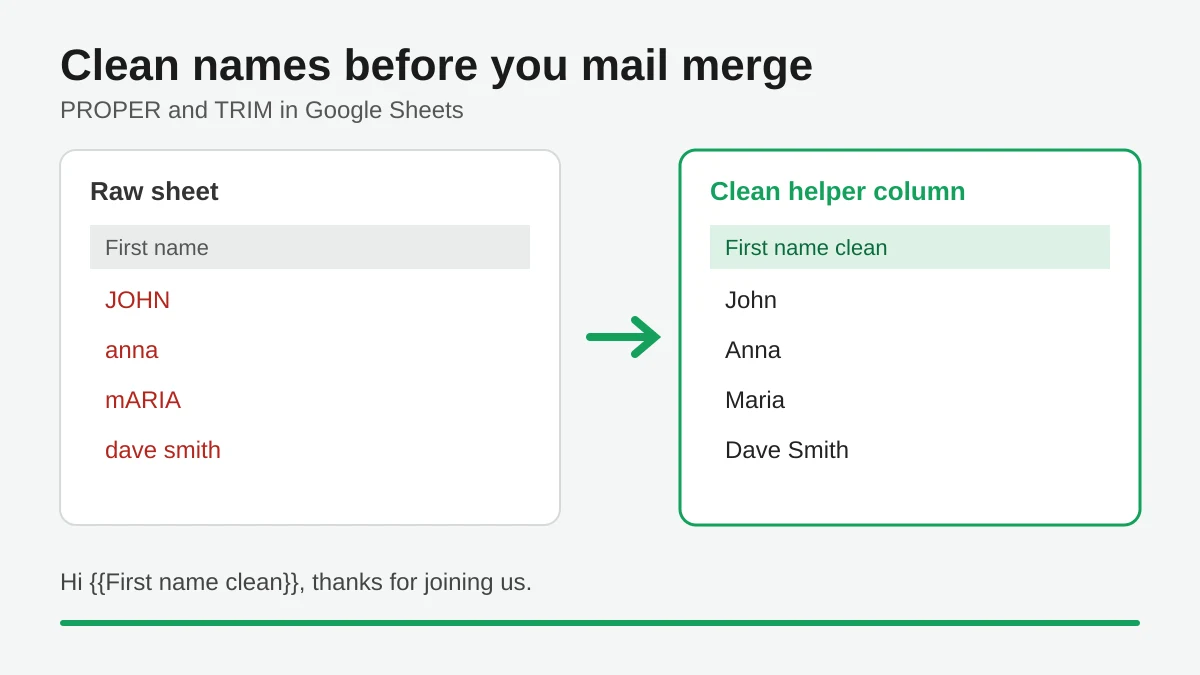
Mail Merge Names Capitalization: Clean Your Google Sheet Before You Send
Fix wrong capitalization and stray spaces in names before a mail merge. Use PROPER, TRIM and a helper column in Google Sheets so every merged email greets people correctly.
Track Email Opens in Gmail
Learn to track email opens in Gmail with clear setup steps, Sheets status updates, troubleshooting tips, and privacy guidance for reliable outreach results.
10 Email Campaign Best Practices for Better Results
Use these 10 email campaign best practices to improve targeting, deliverability, engagement, testing, compliance, and conversions with Mail Merge for Gmail.