


















Best Mail Merge App for Gmail: 10 Top Picks
Compare the best mail merge app for Gmail options across personalization, tracking, quotas, attachments, scheduling, pricing, and deliverability.

What should a Gmail mail merge tool do beyond replacing a first name? The practical problem is broader than bulk sending. Teams want to keep Gmail familiar, control recipient data in Google Sheets, personalize messages, attach the right files, schedule delivery responsibly, and understand what happened after sending without weakening deliverability discipline.
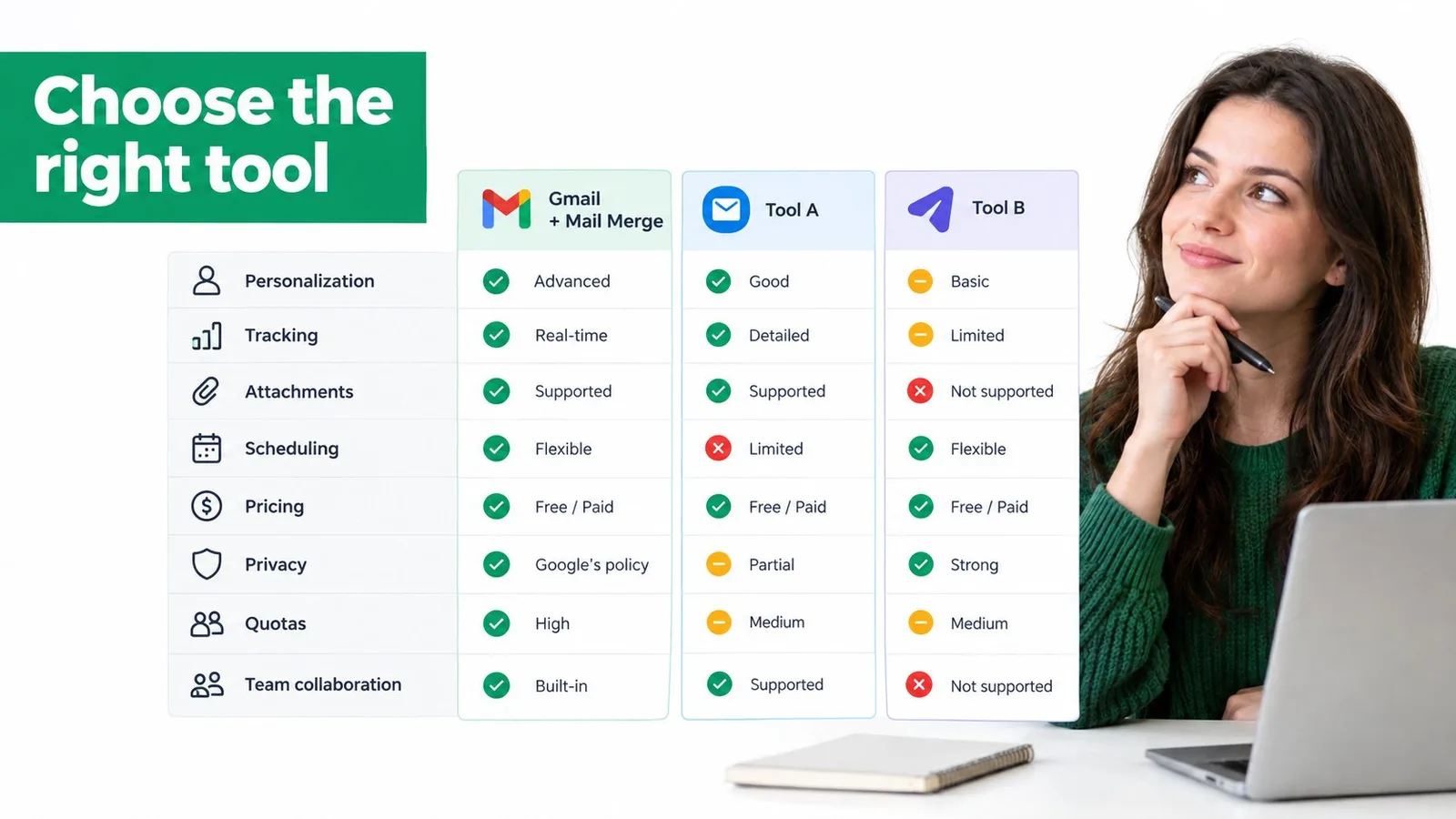
This comparison ranks the best mail merge app for Gmail options by real workflow fit, not by feature volume. The criteria are personalization depth, subject-line control, attachments, tracking, scheduling, follow-up automation, quotas, privacy, pricing clarity, setup effort, and team collaboration. The list separates lightweight spreadsheet-first tools from CRM, sales-engagement, collaboration, and tracking platforms because those categories solve different problems.
Mail Merge for Gmail is the benchmark for a native Gmail plus Google Sheets workflow. It keeps campaign data in a spreadsheet and supports personalized, trackable messages inside Google Workspace. That makes it relevant to small businesses, sales teams, recruiters, educators, nonprofits, and event organizers. It won’t be the right choice for every sender, though. High-volume outreach, advanced sequencing, CRM reporting, shared inbox operations, and complex sales automation can justify a heavier platform.
Gmail remains strategically important because Google reported more than 2.5 billion users in December 2024, while industry roundups published for 2026 estimate approximately 1.8 billion monthly active users worldwide. Gmail also represented about 24.11% of email opens in Litmus client-share data cited in 2026, according to Gmail usage and email client statistics. The audience is large, but the sustainable tool is the one that matches your actual workflow.
1. Mail Merge for Gmail
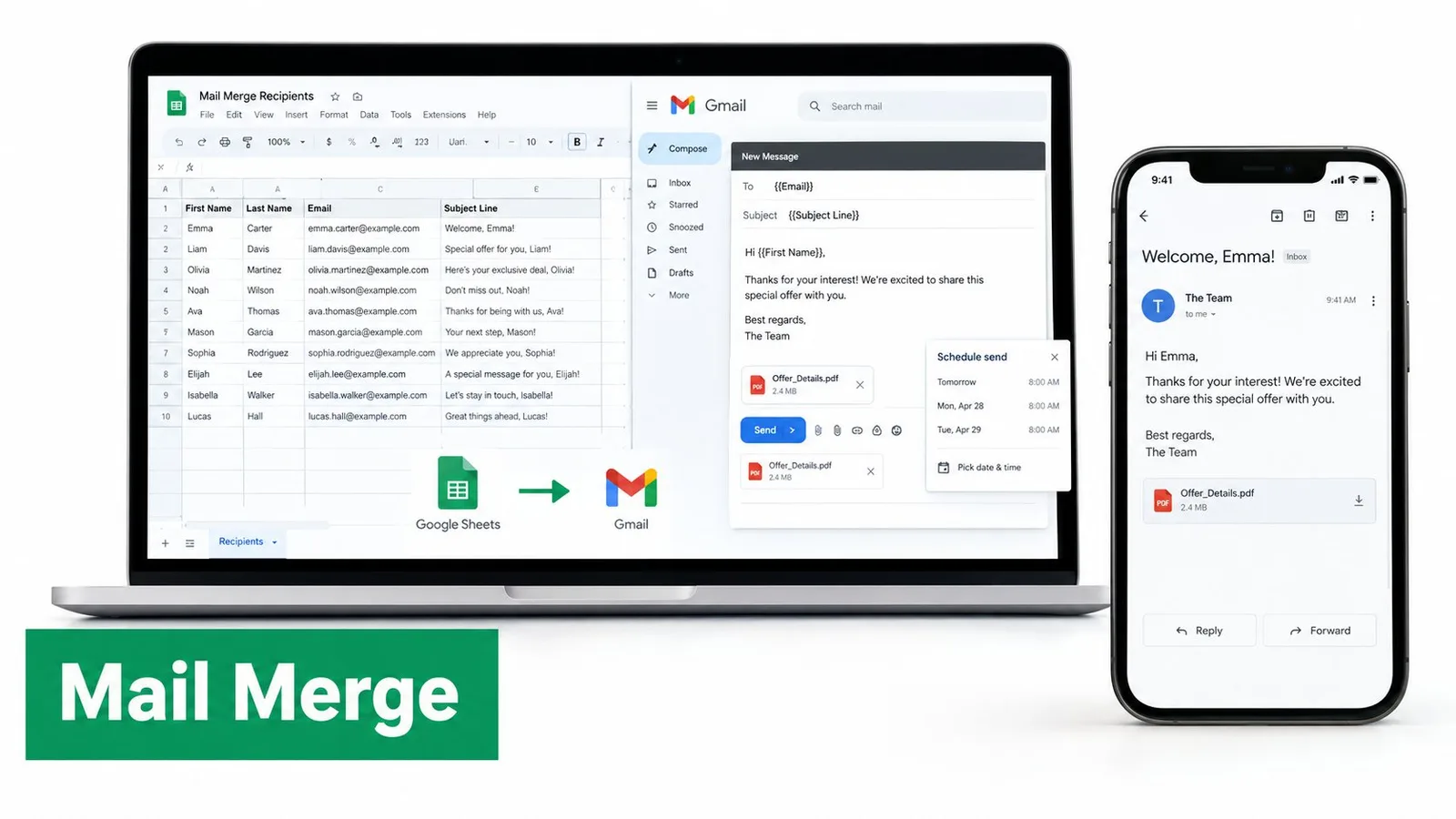
For teams that already work in Google Sheets, Mail Merge for Gmail offers one of the closest matches to a native Gmail workflow. Recipients stay in a spreadsheet, while users select or create a template, preview personalized messages, and send through Gmail. This setup suits customer updates, recruiting messages, school announcements, nonprofit outreach, and event invitations where spreadsheet control matters more than a separate CRM or sales console.
Personalization covers subject lines and body content, with support for CC/BCC, attachments, custom HTML templates, and imported templates. Recipient rows can record statuses such as Sent, Opened, Clicked, and Replied, giving teams a practical reporting layer without exporting campaign data. Real-time open and click tracking, scheduling, unsubscribe handling, and shared team analytics add structure while keeping the work inside Google Workspace.
Why it fits spreadsheet-first teams
The privacy model may matter to teams handling candidate information, student communications, customer records, or internal lists. Mail Merge for Gmail states that it doesn’t read your inbox, keeps data within your Google account, and supports GDPR compliance. It offers a free tier, Personal, Professional, and Lifetime options. The product describes the free plan as supporting 50 emails per day, Personal as 250 per day at $2.99 per month, Professional as up to 1,500 per day at $3.99 per month, and Lifetime as a one-time $149 payment. Check the live pricing and plans page before purchasing because plan details can change.
Setup remains relatively direct, but the product is not a substitute for every sales or marketing system. Teams that need complex segmentation, advanced A/B testing, branching journeys, shared inbox operations, or extensive CRM reporting may need a broader platform. A comparison of native Gmail mail merge versus an add-on helps clarify the workflow trade-offs.
Best fit: Choose it when Gmail and Google Sheets should remain the system of record, and when attachments, row-level tracking, privacy, and a short setup path matter more than advanced journey building.
Pros
- Native workflow: Send through Gmail while managing recipient data in Google Sheets.
- Deep personalization: Merge subject lines, body text, CC/BCC fields, attachments, and HTML templates.
- Spreadsheet analytics: Write delivery and engagement statuses back to individual rows.
- Privacy-first design: Keep campaign data in Google and avoid inbox access.
- Flexible purchasing: Use the free tier, monthly plans, or a Lifetime license.
Cons
- Platform quotas: Gmail and Google Workspace caps still constrain sending.
- Limited journey depth: It is not a replacement for an ESP with advanced segmentation and branching automation.
- Tracking context: Opens and clicks provide useful signals, but privacy controls and automated scanning can make engagement data imperfect.
2. GMass
GMass is built for Gmail-based campaigns and cold outreach rather than a minimal spreadsheet add-on. It combines automated follow-ups, sequencing, A/B testing, spam testing, custom tracking domains, API access, Zapier integration, quota-aware sending, and external SMTP. That combination suits outbound sales teams that need behavioral follow-ups, scheduling, and campaign controls without moving into a separate sales platform.
Its main differentiator is sending flexibility. GMass can use external SMTP and inbox rotation for workflows that exceed the ordinary Gmail route, but those options increase operational responsibility. Teams must review where message content and recipient data travel, whether the setup meets internal policy, and which party owns compliance and deliverability decisions. A higher technical ceiling does not remove the need for consent, list hygiene, suppression handling, or controlled pacing. Guidance on sending bulk emails from Gmail with the right safeguards provides useful context for those decisions.
Power comes with setup cost
GMass fits technically confident SDRs, founders, recruiters, and outbound teams better than users sending a single personalized announcement. Conditional follow-ups, testing, tracking, and infrastructure choices require more configuration before launch. That effort can be justified when sequences and engagement-based actions matter. It is less suitable when the workflow begins with spreadsheet rows, personalized attachments, and a straightforward scheduled send.
Tracking can support campaign decisions, but opens and clicks remain imperfect signals because privacy controls and automated scanning affect engagement data. External SMTP may also introduce additional vendor review and configuration work.
Check the pricing page directly because plans, limits, and SMTP-related options can change. GMass ranks highly for sequencing and scale-oriented controls, while Mail Merge for Gmail is a better match for teams that prioritize Google-native data, privacy, attachments, and a shorter setup path. Teams needing shared pipeline management, advanced CRM reporting, or broader sales engagement automation should compare both against a dedicated CRM or sequencing platform.
3. Mailmeteor
Mailmeteor suits teams that want a spreadsheet-led mail merge connecting Gmail, Google Sheets, and Google Docs. It supports personalized campaigns, tracking for opens, clicks, replies, and bounces, unsubscribe management, scheduling, sequences, and automatic follow-ups. Its quota-aware sending can pause when an account reaches Gmail’s daily limit, reducing the risk of treating a spreadsheet list as permission to continue sending.
The workflow is accessible to nontechnical users. A communications coordinator can build a campaign from familiar Google data, then apply guidance on spam prevention and deliverability before sending. Optional custom tracking-domain support gives organizations more control over link presentation, although tracking settings should receive a privacy review before deployment.
A practical alternative to SMTP-based scale
Mailmeteor’s main boundary is its dependence on Gmail’s sending capacity. It does not provide a native SMTP bypass. Google lists 1,500 daily recipients for Workspace accounts and 100 daily recipients for consumer Gmail accounts for Apps Script-based mail merge workflows, according to this Google Sheets mail merge quota guide. Account type and campaign volume therefore affect whether the product fits a recurring outreach program or a smaller scheduled send.
Pricing may require sign-up or contact with support, making costs and plan limits harder to verify than a public pricing grid. Before procurement, confirm recipient allowances, follow-up availability, tracking behavior, and data permissions.
Mailmeteor fits a communications coordinator or small marketing team that needs personalization, attachments, unsubscribe controls, scheduling, and follow-ups without configuring external SMTP. It fits less well when the team requires SMTP-based scale, deep CRM synchronization, or detailed sales-pipeline reporting. Those requirements point toward a broader CRM or sales-engagement platform, even if its setup is more involved.
4. Yet Another Mail Merge
Yet Another Mail Merge is designed for users who manage contacts in Google Sheets and send through Gmail. Its spreadsheet-first workflow combines Gmail templates, merge fields, scheduling, unsubscribe insertion, and tracking for opens, clicks, replies, and bounces. This direct connection between sheet rows and campaign results suits educators, nonprofits, administrators, and teams handling routine updates.
YAMM’s practical advantage is a short setup path. A sender can identify recipients in Sheets, select a template, map personalization fields, and review campaign activity without adopting a separate CRM. That makes it appropriate for announcements, fundraising outreach, class communications, and modest recurring campaigns. It is less suitable when conditional sequences, advanced experimentation, or relationship records are the main requirement.
Confirm the commercial details before rollout
YAMM does not use external SMTP to bypass Gmail capacity limits. Workspace accounts therefore remain subject to Google’s account and mail merge rules, including the 10,000 total-recipient, 3,000 external-recipient, and 1,500 mail merge-recipient daily limits described in the official sending limits. Administrators should compare those platform limits with the allowance on the selected YAMM plan, since the two limits serve different purposes.
Pricing may vary by region and may be easier to confirm after sign-in. That makes direct plan verification important for teams comparing add-ons against a fixed budget. Quotas also affect scheduling: a campaign that fits one day at low volume may require a longer send window as the recipient list grows, with deliverability practices still determining whether messages reach inboxes.
YAMM’s strongest fit is spreadsheet-led work where personalization, basic attachments, scheduling, unsubscribe controls, and campaign tracking matter more than CRM depth. If Mail Merge for Gmail’s deeper attachment handling, row-level statuses, or privacy positioning is unnecessary, YAMM covers the core workflow with less setup. Teams expecting automated sequences or pipeline reporting should evaluate a broader sales-engagement or CRM platform before committing.
5. Streak
Streak is a CRM that lives inside Gmail, and its mail merge capability becomes valuable when outreach must connect to pipelines, tasks, snippets, link tracking, and relationship records. Instead of treating a spreadsheet as the central database, Streak organizes contacts and deals around CRM workflows inside the inbox. That makes it a better fit for sales teams managing opportunities than for an educator sending a single announcement.
Its mail merge feature supports personalization and automatic follow-ups, while the surrounding CRM gives managers a place to track stages, tasks, and ownership. The integration feels coherent because the sender doesn’t have to switch between Gmail and a separate CRM window. Teams can keep email activity close to the pipeline that gives the message business context.
Buy the CRM only if you need the CRM
Streak is heavier than a dedicated mail merge add-on. If the team already has a reliable spreadsheet and only needs personalized subjects, body text, attachments, scheduling, and row-level reporting, a CRM subscription adds complexity without solving the central problem more efficiently. Per-user pricing can also be higher than lightweight mail merge plans, so the business case depends on whether pipeline visibility offsets that cost.
Streak documents daily recipient caps in relation to Gmail and Google Workspace rules. The 1,500-recipient mail merge limit is also documented by Google for Workspace mail merge workflows in the Workspace update describing Gmail and Sheets integration. Teams should verify how Streak’s own limits interact with the account’s overall sending activity before planning a campaign.
Choose Streak when every outbound message should update a sales process. Don’t choose it just because it has a mail merge button.
6. Mixmax
Mixmax is a sales-engagement platform that includes mail merge, rather than a spreadsheet-first add-on. Its Gmail workflow combines sequences, an AI sequence builder, meeting scheduling, templates, tracking, and integrations with Salesforce and HubSpot. That combination makes it relevant to sales teams that need personalization, follow-ups, CRM context, and engagement reporting in one operating system.
The practical question is whether the campaign needs that operating layer. A sales representative can coordinate templates, meetings, automated follow-ups, CRM records, and analytics without turning a spreadsheet into a pipeline. Attachments and row-level statuses may matter less in this workflow than sequence management and recipient activity. For a team managing opportunities, that trade-off can reduce tool switching and clarify ownership.
Strong for revenue teams, excessive for simple outreach
Mixmax fits outbound sales teams that need scheduled sequences and tracking around Gmail. It is less suitable for a founder sending investor updates, a recruiter sending candidate notes, or an administrator distributing personalized documents. Those users may not need AI-assisted sequencing, CRM synchronization, or sales analytics, and the added configuration can make a simple merge harder to maintain.
Pricing, quotas, and advanced capabilities vary by plan. Review the Mixmax pricing details against sequence volume, attachment needs, tracking requirements, and CRM access before committing. Gmail sending limits still apply, and teams should separate account-level sending capacity from sequence-recipient limits and integration availability. Clean lists and relevant personalization remain necessary for deliverability.
Mixmax ranks above lighter tools when sales engagement is the requirement. For spreadsheet-first outreach with attachments, scheduling, and per-row reporting, Mail Merge for Gmail is the more direct fit.
7. Right Inbox
Right Inbox is a Gmail productivity extension for mail merge, sequences, templates, recurring emails, reminders, and scheduled sending. Its main advantage is a short setup path. A solo sender or small team can import contacts from a CSV or spreadsheet, write a personalized message, and add follow-up reminders without adopting a CRM or sales-engagement platform.
Support for Chrome, Safari, and Firefox helps teams use the extension without standardizing on one browser. Its Google Workspace Marketplace listing also makes installation familiar to Google users. Compared with broader sales platforms, the interface keeps the workflow closer to everyday Gmail, which suits routine outreach and recurring follow-ups.
The trade-off is analytical depth
Right Inbox provides less campaign analysis than Mixmax or Yesware. That limits its fit for managers who need detailed reporting, CRM synchronization, behavior-based routing, or shared pipeline oversight. A consultant sending proposals, a small business following up with leads, or a coordinator managing reminders may value the simpler workflow more than advanced sales analytics.
Attachments, personalization, scheduling, and lightweight sequencing cover common Gmail tasks, but users should confirm how each plan handles campaign volume and available features. Paid tiers are positioned as low-entry options with broad access, while current pricing and usage conditions should be checked on the Right Inbox pricing page. Gmail sending quotas still apply, and the extension does not remove Google’s anti-spam requirements. Clean lists, relevant personalization, reasonable pacing, and appropriate unsubscribe handling remain necessary for deliverability.
Right Inbox sits between a basic merge utility and a sales platform. It ranks below Mailmeteor and YAMM for spreadsheet-centered campaigns with stronger row-level workflows, but suits Gmail-first senders who want merging, reminders, and scheduling in one lighter tool. Teams needing deeper tracking or CRM processes should compare it with a broader platform before choosing it.
8. Yesware
Yesware is built for sales outreach, with Gmail campaigns, multi-touch and multi-channel steps, templates, meeting scheduling, CSV imports, and CRM features. Its Gmail add-to-campaign flow is useful for representatives who want to enroll contacts while working in the inbox rather than preparing every campaign from a spreadsheet.
The platform occupies a useful middle position. It offers more sales structure than a basic mail merge extension, but it can be easier to approach than a full CRM or complex engagement system. Training resources and transparent plan differences also help sales managers standardize how teams create campaigns, schedule follow-ups, and review results.
Watch the campaign recipient allowances
Yesware’s free and Pro tiers cap monthly campaign recipients, which can push a growing team toward Premium or Enterprise. The issue isn’t just the list size. Sales teams need to understand whether limits apply per user, per campaign, or across a billing period, then compare that allowance with expected enrollment and follow-up activity.
Salesforce functionality is available on Enterprise plans according to the product positioning supplied for this comparison. That makes Yesware more attractive to organizations where CRM synchronization is essential, but less attractive to a small business that only needs Gmail, Google Sheets, and personalized attachments.
Yesware should be selected for sales process visibility, not for mail merge alone. If the team wants campaign steps, reporting, and CRM alignment, it deserves consideration. If it wants spreadsheet rows to show Sent, Opened, Clicked, and Replied statuses after a simple send, a dedicated Gmail add-on is likely easier to sustain.
9. Gmelius
Gmelius combines Gmail sequences with collaboration features, including shared inboxes, shared drafts, labels, Kanban boards, workflow automation, analytics, and integrations with Slack, HubSpot, and Salesforce. Its strongest use case is a team that handles customer conversations collectively and also needs structured outreach.
That distinction changes how campaigns work. A support or customer-success team may need to assign conversations, share context, coordinate drafts, and automate follow-ups from the same workspace. Gmelius connects those activities more naturally than a standalone mail merge add-on because the shared inbox is part of the product’s core design.
Collaboration can justify the heavier footprint
Gmelius is not the efficient choice for a person who wants to merge a spreadsheet into Gmail. Its pricing and usage limits are oriented around broader collaboration rather than a simple per-campaign sending allowance. Teams should therefore evaluate shared inboxes, ownership rules, workflow automation, and analytics before judging the product’s mail merge value.
The platform’s integrations can be useful when Gmail is only one part of the service process. A shared label or draft can carry team context that a row in Google Sheets won’t capture. On the other hand, that context comes with a larger footprint, more configuration, and a greater need for internal governance.
Choose Gmelius when collaboration is the primary requirement and email sequences support that operation. Choose Mail Merge for Gmail when the spreadsheet is the primary workspace and the team doesn’t need shared inbox management.
10. Mailtrack Campaigns
Mailtrack, also known as Mailsuite, started as a Gmail open and click tracking tool. Its Campaigns feature adds simple group sending, scheduled delivery, recipient-level engagement statistics, basic list handling, and Premium daily reports. The fit is clear: small campaigns where identifying engagement matters more than detailed personalization or complex sequences.
Accessibility is its main advantage. Gmail users who already need tracking can add a light campaign workflow without adopting a sales or CRM platform. The free plan supports unlimited tracked emails with a signature, while Premium and Lifetime options extend the feature set. Plan terms can change, so confirm current limits and pricing before choosing it.
Tracking-first means merging is secondary
Mailtrack Campaigns is not a spreadsheet-first mail merge engine. Tutorials indicate a campaign cap of approximately 200 recipients per campaign, which makes it better suited to an invitation, follow-up group, or limited announcement than a larger outreach program. It also offers less depth than dedicated tools for merge fields, attachments, sequencing, quota management, and sales workflows.
The tracking signals need context. Opens and clicks can be distorted by security systems, privacy settings, and how recipients handle messages. Replies, meetings, registrations, and other business outcomes provide stronger evidence of campaign performance.
Mailtrack works well when tracking is the primary requirement and campaign sending is occasional. Choose Mail Merge for Gmail when spreadsheet-based personalization, attachments, scheduling, and row-level reporting must operate together. Choose a CRM or sales-engagement platform when the workflow also requires pipeline ownership, coordinated follow-ups, or broader account history.

Top 10 Gmail Mail Merge Apps, Features & Pricing
| Product | Core features | UX & Reliability ★ | Unique / Target ✨ 👥 | Pricing & Value 💰 |
|---|---|---|---|---|
| Mail Merge for Gmail 🏆 | Sheets-driven personalization; per-row Sent/Opened/Clicked/Replied; real-time tracking; scheduling; unsubscribe; custom HTML | ★★★★★ (4.9/5, 6,110+ reviews), fast & simple | ✨ Native Gmail + Sheets workflow; GDPR/privacy-first; 👥 SMBs, recruiters, educators, event organizers | 💰 Free (50/day); Personal $2.99/mo (250/day); Pro $3.99/mo (1,500/day); Lifetime $149 |
| GMass | Sequences & follow-ups; A/B testing; external SMTP & inbox rotation; deliverability tools | ★★★★☆, power-user, robust | ✨ SMTP & rotation to scale; 👥 sales pros & high-volume senders | 💰 Freemium → paid tiers; SMTP for large volume |
| Mailmeteor | Personalized sends from Sheets; opens/clicks/replies; unsubscribe & sequences; quota-aware sending | ★★★★, privacy-focused, easy | ✨ Minimal permissions; 👥 teams needing compliance & simple UX | 💰 Freemium; affordable paid plans |
| Yet Another Mail Merge (YAMM) | Sheets templates; tracking (opens/clicks/replies); scheduling; quota guidance | ★★★★, simple, reliable | ✨ Spreadsheet-first simplicity; 👥 educators & nonprofits | 💰 Freemium; region-based paid tiers |
| Streak (Mail Merge in Streak CRM) | Mail merge + auto follow-ups inside Gmail; pipelines, tasks, snippets | ★★★★, polished CRM integration | ✨ CRM + merge in inbox; 👥 sales teams wanting CRM workflow | 💰 CRM‑priced per user, higher than basic add‑ons |
| Mixmax | Sequences, AI sequence builder, templates, meeting scheduling, deep CRM integrations | ★★★★☆, feature-rich for sales | ✨ AI + Salesforce/HubSpot reporting; 👥 sales ops & revenue teams | 💰 Premium plans; higher cost for advanced features |
| Right Inbox | Merge, sequences, templates, reminders, send‑later; cross‑browser support | ★★★★, lightweight, quick setup | ✨ Low-cost simplicity; 👥 solo users & small teams | 💰 Low entry price; unlimited features on paid tiers |
| Yesware (for Gmail) | Campaigns, multi-touch sequences, templates, CRM integrations (Salesforce) | ★★★★, sales-centric, well-documented | ✨ Strong Salesforce sync; 👥 sales reps & teams | 💰 Mid→Enterprise pricing; caps on lower tiers |
| Gmelius (Sequences) | Sequences + shared inboxes, Kanban boards, automation, team analytics | ★★★★, collaboration-focused | ✨ Combines merge with shared inbox/workflows; 👥 support & CS teams | 💰 Mid‑high; priced for collaboration suites |
| Mailtrack (Mailsuite) “Campaigns” | Open & click tracking; basic campaign composer & scheduling; per-recipient stats | ★★★★☆/★★★, very easy, lightweight | ✨ Simple tracking-first; 👥 individuals & tiny campaigns | 💰 Very low-cost Premium; free tier with signature |
Choose the Gmail Workflow You Can Sustain
There isn’t one universal winner because the tools sit in different categories. Mail Merge for Gmail is the strongest recommendation for users who want Gmail plus Google Sheets to remain the center of the workflow. It combines deep personalization across subject lines, body content, CC/BCC, attachments, and custom HTML with previewing, scheduling, unsubscribe handling, real-time tracking, and per-row statuses written back to the spreadsheet. Its privacy-first design, inbox non-access, Google-account data model, and transparent free, monthly, and Lifetime options also reduce the operational burden for small businesses, startups, recruiters, educators, nonprofit coordinators, and event organizers.
Choose GMass when advanced sequencing, conditional follow-ups, A/B testing, spam testing, API access, or external SMTP options matter more than the simplest setup. That flexibility can support complex cold outreach, but it requires closer review of infrastructure, permissions, deliverability, and data handling. A higher-volume route doesn’t remove Gmail policy obligations or the need for responsible list management.
Choose Mailmeteor or YAMM for straightforward spreadsheet-led outreach. Mailmeteor is especially appealing when privacy, unsubscribe controls, follow-ups, and quota-aware pausing are priorities. YAMM remains a practical choice for familiar Google Sheets campaigns, particularly when users value a simple interface and documentation over advanced automation. Confirm current plan allowances before launch because commercial terms and account-level limits can differ.
The remaining options become more suitable as the workflow moves away from pure mail merge:
- Streak fits teams that want a Gmail-native CRM, pipelines, tasks, and mail merge in one system.
- Mixmax fits sales organizations that need sequences, meeting scheduling, CRM integrations, and revenue reporting.
- Yesware fits sellers who need campaigns, training, and CRM-connected reporting from Gmail.
- Gmelius fits support and customer-success teams that need shared inboxes, collaboration, and automation.
- Right Inbox fits solo users and small teams that want lightweight sequences, reminders, recurring emails, and send-later tools.
- Mailtrack Campaigns fits tracking-first users who only need small, simple campaign sends.
Before increasing volume, verify the plan’s quota and the Google account’s actual sending limit. Google documents separate limits for ordinary sending and mail merge, including 1,500 mail merge recipients or messages per day, while Apps Script quotas differ between Workspace and consumer accounts, as shown in the Google Workspace sending-limit documentation and the Apps Script quota reference. Treat those limits as a planning constraint, not a target.
Test merge fields, fallback values, subject lines, HTML formatting, and attachments with a small internal list before sending externally. Schedule thoughtfully instead of releasing every message at once, include unsubscribe handling where appropriate, and monitor replies and meaningful clicks alongside opens. The best Gmail mail merge app is the one your team can operate consistently while respecting quotas, recipient expectations, privacy requirements, and the limits of Gmail itself.
Mail Merge for Gmail keeps personalized Gmail campaigns in a familiar Google Sheets workflow, with subject and body merge fields, attachments, scheduling, unsubscribe handling, tracking, and row-level engagement statuses. Visit Mail Merge for Gmail to review the free and paid options, then test a campaign before committing your team to a larger workflow.
Ready to send your first campaign?
Install Mail Merge for Gmail from the Google Workspace Marketplace and send up to 50 personalized emails per day for free.
Get started for freeMore reading
More from Guides
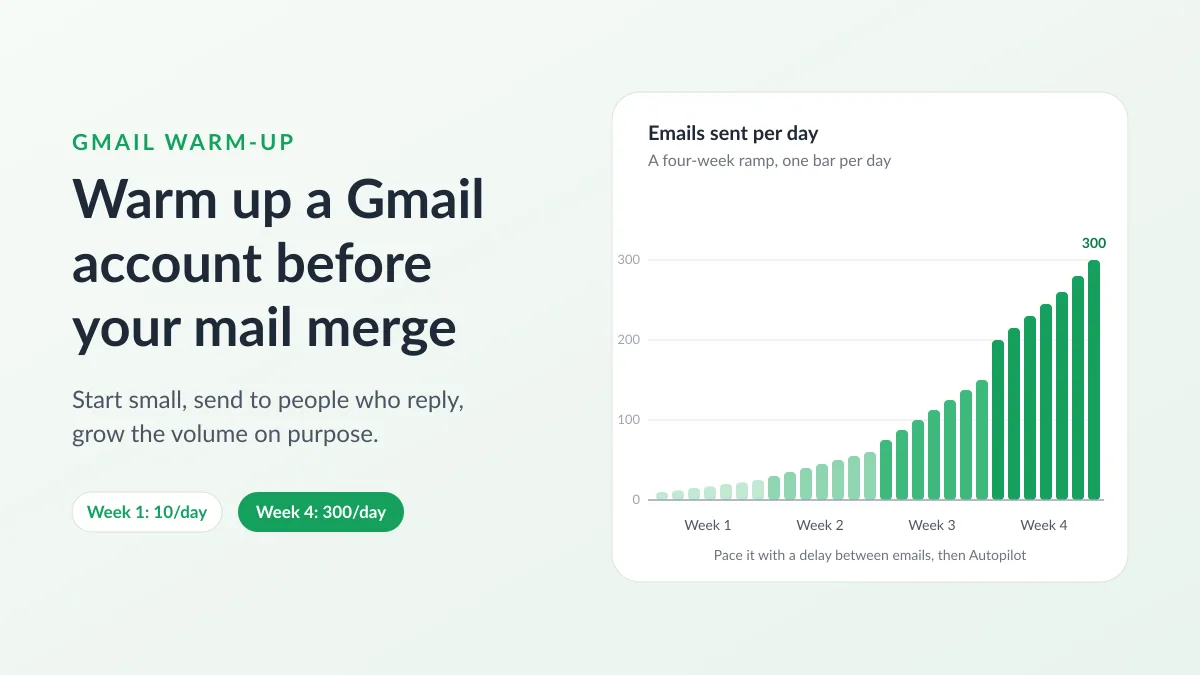
Gmail Warm-Up: How to Warm Up a Gmail Account Before a Mail Merge
Gmail warm-up explained with Google's own ramp-up rules: who needs it, a four-week manual schedule from Google Sheets, and how Mail Merge's warm-up works.
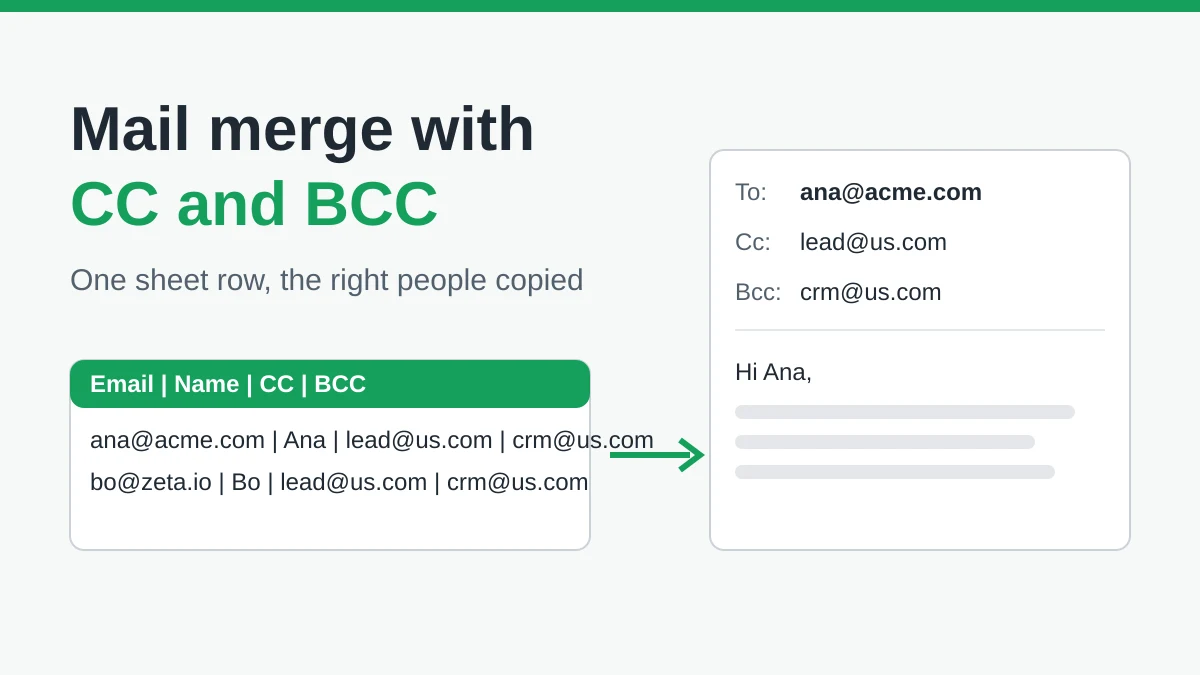
Mail Merge with CC and BCC in Gmail: Copy the Right People on Every Email
Learn how to run a mail merge with CC and BCC from Google Sheets, set up the columns, preview the result and see how copied recipients count toward your daily quota.
Gmail Sending Limit Reached: What It Means and How to Finish Your Campaign
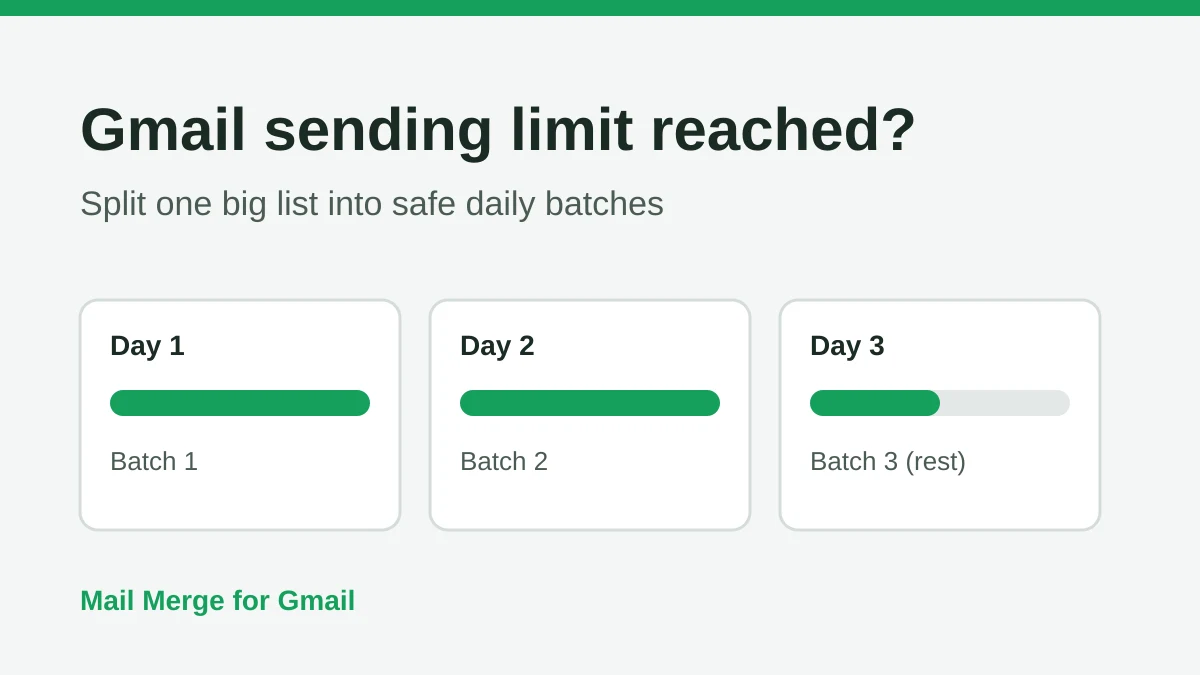
Hit the Gmail sending limit reached error? Learn the real daily limits, when you can send again, and how to split a mail merge into safe daily batches.