


















Data Privacy Compliance for Gmail Outreach
Learn data privacy compliance for small businesses, with practical email workflows, consent templates, breach steps, and a Mail Merge checklist.
You’ve imported a spreadsheet of prospects, drafted a personalized Gmail campaign, and scheduled the send. The list contains names, work email addresses, company details, previous interactions, and perhaps tracking results from an earlier campaign. Everything feels familiar, but each step involves decisions about data privacy compliance, from where the contacts came from to why you’re emailing them, who can access the sheet, and when the records should be deleted.
A mail-merge tool can simplify delivery, but it can’t decide whether your business has a lawful basis, whether the recipient received an adequate notice, or whether a particular campaign is permitted in the recipient’s jurisdiction. Those decisions require a documented review of the people, fields, purposes, systems, recipients, retention period, and available rights involved in the workflow.
Why Gmail Outreach Creates Privacy Risk
A small business might begin with a reasonable goal, such as inviting customers to a product update or contacting prospects about a service. Someone exports contacts into Google Sheets, adds a first-name column, inserts a company-specific sentence, and sends the campaign through Gmail. The same sheet may later receive delivery statuses, open events, click events, replies, and unsubscribe requests.
The risk doesn’t appear only when an email is sent. Collection, import, personalization, tracking, sharing, storage, and deletion are all processing decisions. An address copied from a public directory can still relate to an identifiable person. An open or click event can also become part of that person’s record when it’s associated with an email address or contact row.

The workflow creates several accountability points
The sender, usually the business, chooses why the campaign exists and which audience will receive it. That typically makes the business responsible for deciding the purpose, lawful basis, notice, audience, retention approach, and response process for privacy requests.
A platform or add-on may perform assigned operations, such as reading recipient rows, generating messages, sending emails, or writing statuses back to a spreadsheet. Those activities may be governed by contractual processing commitments, security controls, and account settings. They don’t transfer the business’s responsibility for deciding whether the campaign should happen.
A familiar tool doesn’t make a processing activity automatically compliant.
Convenience can increase exposure because one spreadsheet may support repeated campaigns. A list collected for a customer update might later be reused for sales outreach, event invitations, or product research without a fresh purpose review. The more fields and systems involved, the harder it becomes to explain what happened unless the team maps the workflow before sending.
A practical risk scan before importing
Ask these questions while the campaign is still a draft:
- People: Who are the contacts, and could any group require special handling?
- Fields: Which columns are needed for this message?
- Purpose: Why are you sending this campaign, and does that match the original collection context?
- Recipients: Who will receive the email, and who else can view the sheet or analytics?
- Systems: Will the data move through Google Sheets, Gmail, a mail-merge service, link tracking, or shared dashboards?
- Retention: How long will the source list, send history, engagement data, and suppression records remain available?
- Rights: How can a recipient unsubscribe, request access, ask for correction, or seek deletion?
The CMS GDPR Enforcement Tracker recorded 2,685 fines totaling about €6.11 billion by 1 March 2026, with insufficient legal basis and failures involving general data-processing principles among its most common violation categories. The lesson for a small outreach team is practical: privacy failures often arise from ordinary operational choices, not only from complex security incidents.
Understanding the Core Concepts
Data privacy compliance means handling personal data in a way that follows the rules applicable to the activity and allows the business to demonstrate what it did. In a Gmail campaign, that means identifying the data, defining the purpose, selecting and documenting a lawful basis, explaining the processing to recipients, protecting the records, honoring rights, and retaining evidence.
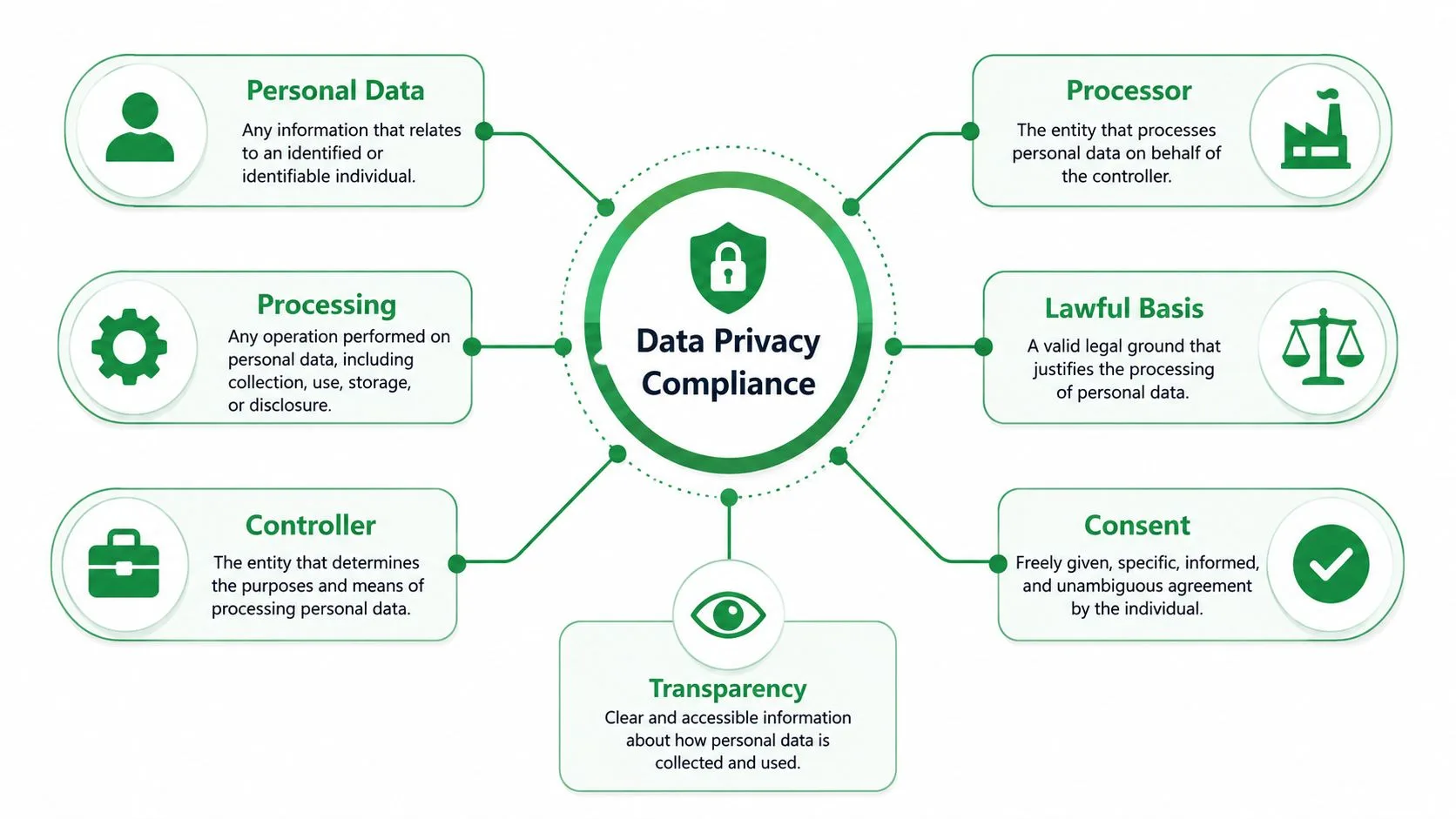
Personal data is information connected to an identifiable individual. A work email address may qualify even when it appears on a company website, especially when the address identifies a person. Processing covers operations such as collecting, importing, organizing, storing, accessing, personalizing, sending, tracking, sharing, and deleting that information.
The legal ideas behind one campaign
The controller decides why and how personal data is processed. In most business outreach, the sender’s organization fills this role because it chooses the audience, message, campaign purpose, and retention approach.
A processor handles personal data for the controller under instructions. A service that performs assigned mail-merge operations may be a processor for those activities, depending on the actual arrangement and facts. A recipient is a person or organization that receives or gains access to the data, which can include an internal sales team, a shared analytics group, or an external service provider.
A lawful basis is the legal reason supporting the processing. Consent must be freely given, specific, informed, and unambiguous, expressed through a statement or clear affirmative action. Transparency means explaining relevant details in a way people can understand, including who is processing the data, why, what categories are involved, who may receive it, how long it will be kept, and how people can exercise their rights.
The GDPR and UK GDPR may apply to covered personal-data processing. For unsolicited electronic marketing in the EU, the ePrivacy framework generally takes an opt-in approach, subject to a narrow soft opt-in for certain existing-customer communications. National rules and sector requirements can add conditions, so a campaign aimed at several markets needs a jurisdiction review.
Controller and processor in plain language
Think of an email campaign as a delivery route. The business chooses the destination and the reason for the shipment. Each service provider handles only the assigned part of the journey.
| Role | Typical email activity | Key responsibility |
|---|---|---|
| Controller | Selects contacts and defines the campaign | Establishes purpose, lawful basis, notices, rights handling, and evidence |
| Processor | Performs instructed data operations | Processes data under documented instructions and agreed safeguards |
| Sender or campaign owner | Reviews the list and launches the message | Confirms audience, content, exclusions, and approval before sending |
| Internal recipient | Views a sheet or campaign report | Uses access only for an authorized business purpose |
A processor agreement is important, but it doesn’t make the sender’s campaign lawful by itself. The business still needs to assess its own list, notice, purpose, and evidence.
For a practical look at engagement measurement and its privacy implications, review click-tracking software for email campaigns. Then document the roles of Gmail, Google Sheets, and the specific Mail Merge for Gmail service you intend to use. Verify the current product documentation and terms, because similarly named Gmail tools can have different data flows and commitments.
Key Privacy Obligations Across the Email Workflow
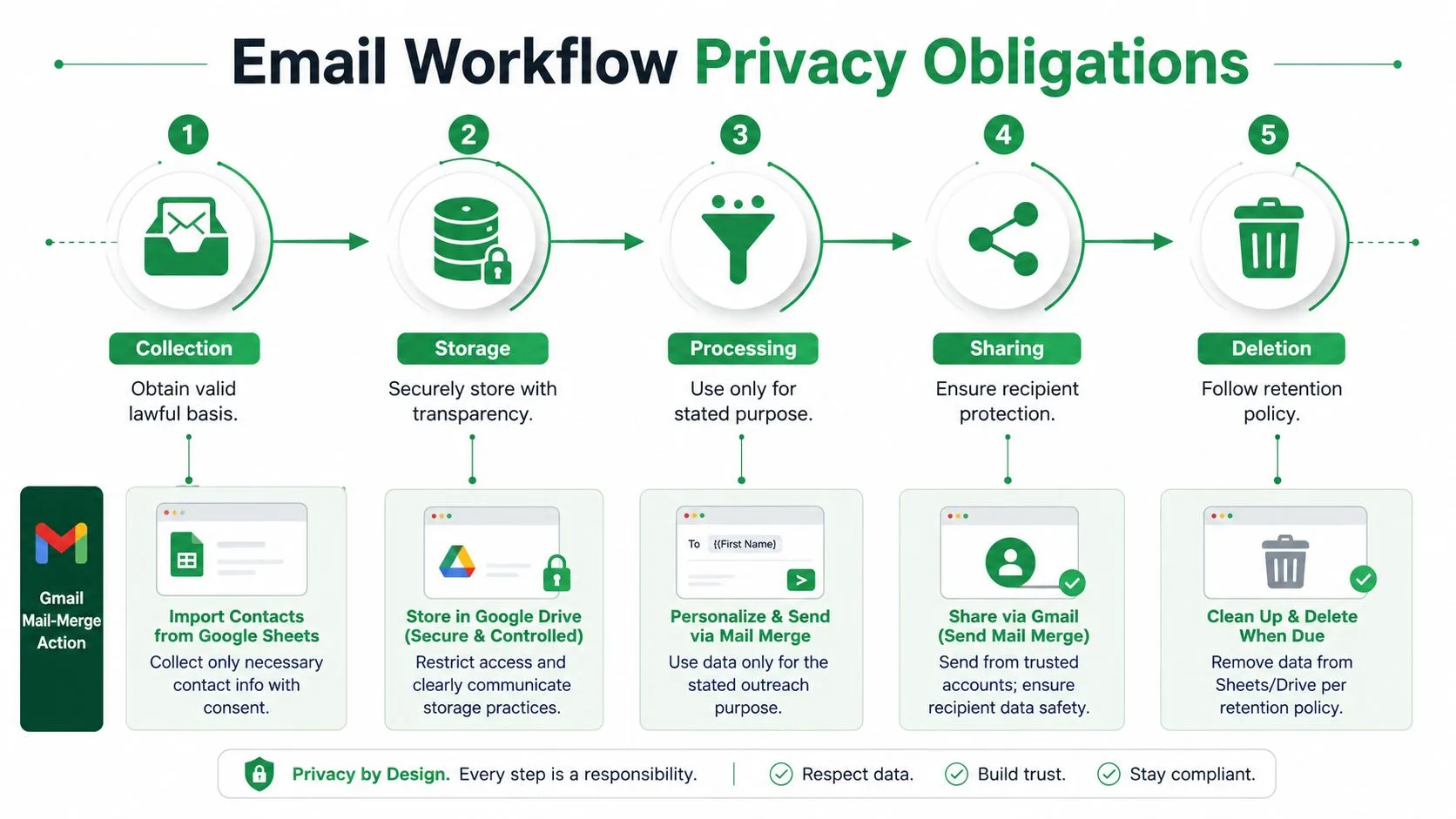
Privacy compliance works best as a lifecycle rather than a final approval checkbox. Every stage should answer four questions: what data is involved, why is it needed, who can access it, and what happens next?
Collection and lawful purpose
Start with the source. Record whether the contact joined a newsletter, purchased a product, requested information, attended an event, or appeared in a business directory. The source doesn’t automatically establish permission to send every kind of message.
Write the campaign purpose in one sentence, such as: “Send existing customers an update about the service they purchased.” If the proposed message doesn’t fit that sentence, pause and reassess the lawful basis, notice, and audience.
An email address can remain personal data even when publicly available. Public visibility doesn’t erase obligations around lawful processing, transparency, purpose limitation, or objections. If the campaign uses names, job titles, company information, purchase history, or inferred interests, document why each field is necessary.
Storage and minimization
A useful spreadsheet often contains less than the team first expects. For a simple invitation, the necessary fields might be an email address, a greeting name, and an exclusion status. A sales sequence may need a company name and assigned sender, but that doesn’t automatically justify importing notes about unrelated conversations or personal circumstances.
Use a dedicated campaign sheet instead of a full CRM export. Remove unused columns before sharing the file, restrict Google Workspace access to people who need it, and keep suppression records available so an opted-out contact isn’t accidentally re-added.
Practical rule: If a column doesn’t change the message, determine eligibility, manage delivery, or honor a right, challenge its place in the campaign sheet.
Personalization, tracking, and reuse
Personalization is still processing. A sentence that references a person’s role, prior inquiry, or company relationship should be accurate, relevant, and consistent with the purpose explained to the person.
Tracking needs its own review. Open and click events can become contact-level records, particularly when the event is written back to a row or connected to an identifiable email address. Decide whether tracking is necessary, explain it where required, limit access to the resulting analytics, and avoid treating engagement as permission for unrelated campaigns.
Purpose limitation also applies after sending. A list collected for a product update shouldn’t automatically become a cold-sales list. Reuse requires a fresh assessment of compatibility, lawful basis, transparency, and applicable electronic-marketing rules. The guidance on cold emailing and regulations can help identify questions for that review, but it isn’t a substitute for jurisdiction-specific legal advice.
Security, pseudonymization, and rights
Use encryption offered by the services in your workflow, least-privilege access, strong account protections, and a documented retention schedule. Privacy-by-design guidance emphasizes minimizing collection, pseudonymizing data early where appropriate, and limiting access by purpose across the data lifecycle, as described in the privacy-by-design guide.
Pseudonymization doesn’t make the data anonymous. A coded campaign ID remains capable of being linked back to a person if the key or additional information exists. Under the EDPB guidance on pseudonymisation, that additional information must be kept separately and protected with technical and organizational measures. Delete linkage copies when they’re no longer needed.
Maintain a record of the source, purpose, lawful basis, notice version, audience selection, send date, tracking choice, access permissions, suppression updates, rights requests, and deletion action. Pause the campaign if you can’t explain any of those points.
Consent and Lawful-Basis Examples
The same Gmail workflow can support very different legal decisions. The correct starting point depends on how the relationship began, what the message promotes, where the recipient is located, and what the person was told.
| Scenario | Audience and context | First question |
|---|---|---|
| Newsletter signup | People actively requested recurring updates | Did the form clearly identify the organization, mailing purpose, and withdrawal method? |
| Existing customers | People who bought a product or service | Does the proposed message fit the narrow soft-opt-in conditions or another applicable route? |
| Cold outreach | People with no established marketing relationship | Is unsolicited electronic marketing permitted for this audience, and what consent or local exception applies? |
Newsletter signup
A consent-led newsletter should use a clear affirmative action. The checkbox should identify the organization and the specific mailing purpose rather than hiding several unrelated uses in one statement. Keep the form wording, privacy notice version, timestamp, source page, and resulting contact record.
Consent must be freely given, specific, informed, and unambiguous. A preselected box or vague statement such as “I agree to receive updates and other communications” may fail to show what the person accepted. Withdrawal should be as easy as giving consent, and the suppression record should prevent future promotional sends.
Existing-customer marketing
The EU ePrivacy framework allows a narrow soft opt-in for marketing a company’s own similar products or services to existing customers when specific conditions are met. The data must have been collected in a sale context, the customer must have been clearly told about the opportunity to object, and the opt-out must be easy and free of charge.
That route isn’t a general permission to market anything to anyone who has ever bought from the business. Check the product relationship, the original notice, the similarity of the proposed offering, the recipient’s objections, and the rules in the relevant country.
Cold outreach and legitimate interests
A legitimate-interest assessment may support some direct-marketing processing under GDPR. It doesn’t automatically satisfy electronic-marketing rules, which may still require prior consent in many cases. The business should document the interest, necessity, balancing factors, expectations, safeguards, objection route, and the separate electronic-marketing analysis.
Retain the campaign purpose, audience criteria, source record, notice shown, consent mechanism where used, assessment reasoning, date, suppression history, and approval. Don’t use one consent template for every audience. If the jurisdiction, relationship, message, or data source is uncertain, obtain qualified local legal advice before sending.
Templates for Notices and Consent
Templates can reduce drafting time, but they can’t fill gaps in the actual data flow. Replace every bracketed placeholder, remove statements that don’t apply, and make sure the wording matches what your Gmail, Google Sheets, tracking, analytics, and retention process really does.
Privacy-notice starting point
Privacy notice excerpt: [Organization name] will use your [data categories, such as email address and name] to [specific campaign purpose]. We rely on [lawful basis]. Your data may be accessed by authorized staff and service providers that help us manage [email delivery, campaign administration, or analytics]. We’ll keep it for [retention approach or period], unless we need to retain a suppression record or meet a legal obligation. You can request access, correction, deletion, or restriction where applicable, and you can object to marketing or withdraw consent by contacting [contact route]. Our full privacy notice is available at [accurate policy link].
Required information: Organization identity, purpose, data categories, lawful basis, relevant recipients, retention approach, rights, and a working contact route.
Optional reassurance: You may explain security measures, describe how tracking works, or identify a privacy contact, but only if the statements are accurate and kept current.
Consent statement
Consent statement: I agree that [organization name] may send me [specific newsletter, product updates, or event communications] to the email address I provide. I understand that I can withdraw my consent at any time by using the unsubscribe option or contacting [contact route]. I understand that consent isn’t required for unrelated purposes, which are handled separately.
Use an unchecked box or another clear affirmative action where appropriate. Don’t bundle a newsletter, promotional offers, partner messages, and unrelated profiling into one click unless the applicable requirements and wording support that arrangement.
Unsubscribe and rights requests
Unsubscribe: Please remove [email address] from [specific mailing]. I no longer want to receive these messages.
Access or deletion request: Please provide the personal data associated with [email address] and [request type, such as access, correction, or deletion]. Please contact me at [reply address] if you need information to verify my identity securely.
Keep the request, verification steps, action taken, date, operator, and suppression result. A generic privacy policy may not answer campaign-specific questions, so compare the final notice with the actual spreadsheet columns, tracking settings, recipients, and deletion path before publication.
Mail Merge for Gmail Compliance Checklist
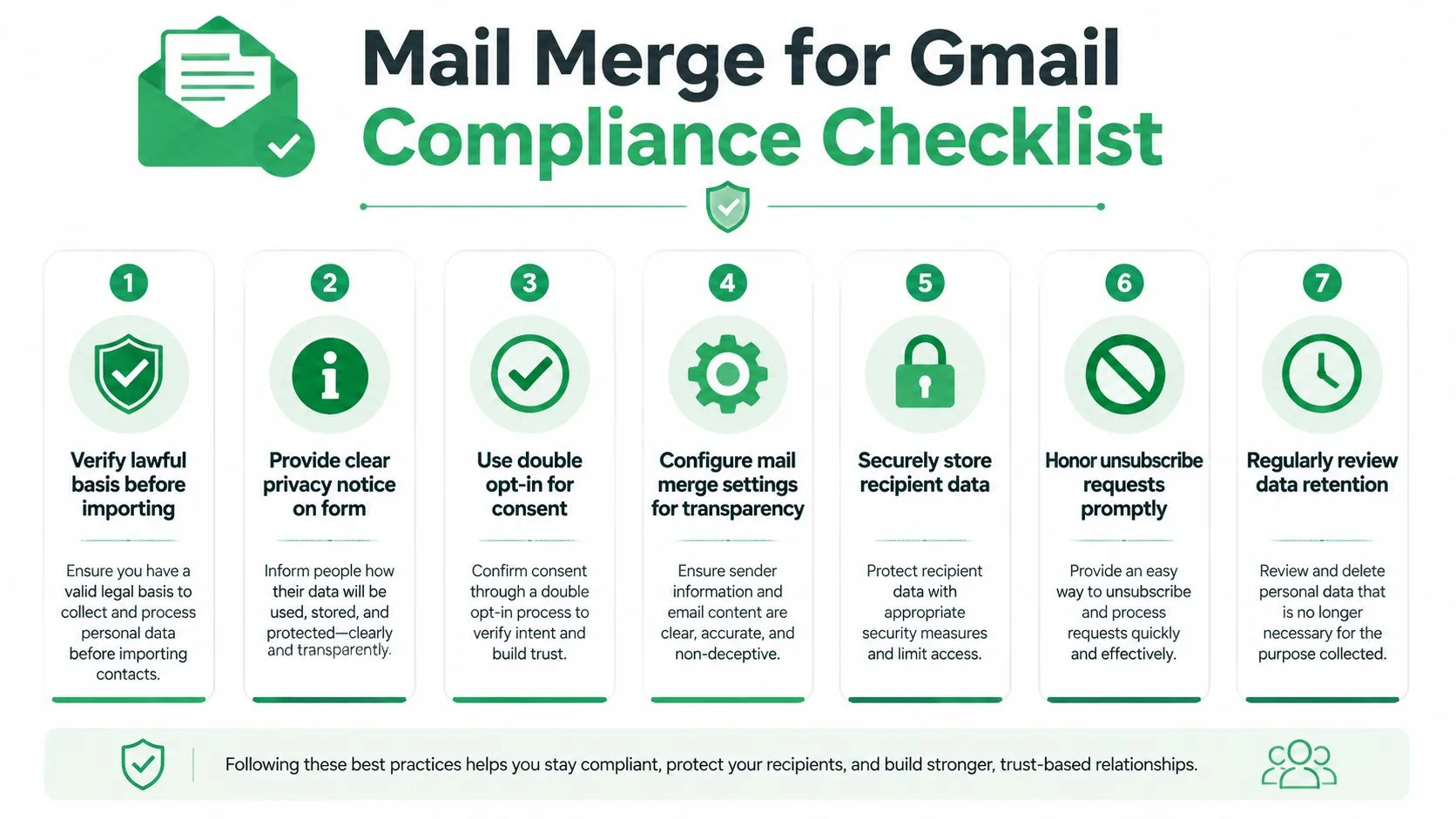
A product-specific review should begin with documentation, not assumptions. Mail Merge for Gmail is a Google Workspace add-on that can use Google Sheets contact data to send personalized messages through Gmail, but teams should verify the current product documentation and terms and confirm that the product they’re evaluating is the intended service, not a similarly named Gmail mail-merge tool.
Assign ownership before configuration
The business or campaign owner should approve the lawful basis, audience, purpose, notice, and message. The Workspace administrator should review sharing, add-on permissions, account policies, and whether staff can access or export the relevant sheet. The privacy or legal owner should review processor terms, transfer provisions, retention expectations, and the rights process.
Record the product name, documentation version or review date, approved account, authorized users, data categories, and the decision owner. A processor contract can describe the provider’s commitments, but it doesn’t prove that the sender collected the contacts lawfully or gave an adequate notice.
Review the sheet and message
Before import or send, check:
- Recipient column: Confirm every address belongs to the approved audience and remove accidental personal addresses, duplicates, and former contacts.
- Personalization fields: Use only fields needed for the message. Test missing values so the template doesn’t expose internal notes or produce misleading content.
- CC, BCC, and attachments: Confirm that recipients can’t see other addresses and that attachments don’t contain excess personal data or information intended for another person.
- Template content: Match the message to the stated purpose, identify the sender clearly, and include an accessible unsubscribe or objection route where required.
- Suppression list: Compare the send list with opt-outs, previous objections, bounced addresses, and deletion requests before launch.
- Tracking choice: Decide whether open and click tracking is necessary, what notice supports it, who can view results, and how long event data will remain.
- Scheduling: Verify that a scheduled send won’t continue after a list changes, a person opts out, or the campaign is paused.
The email list management guide offers operational questions for maintaining recipient data, but your own approval record should reflect the actual campaign.
Evidence before and after sending
Pre-send checklist: Confirm source, purpose, lawful basis, notice, audience, tracking decision, access permissions, template, exclusions, attachments, and deletion path.
Post-send checklist: Save the approved list version, send timestamp, delivery results, engagement settings, replies, unsubscribe events, suppression updates, rights requests, incidents, and the planned deletion date. Limit team analytics sharing to people with a business need, and remove access when the campaign ends.
The sender owns the decision to send. The platform owns the processing commitments it makes under its terms. The business still owns the review and evidence showing why this campaign was appropriate.
Breach Response and a Sustainable Compliance Plan
If a spreadsheet is shared incorrectly, an attachment reaches the wrong person, or a campaign exposes recipients, contain the issue first. Preserve the relevant sheet permissions, message, recipient list, delivery record, and audit evidence, then identify the affected people, systems, and service providers.
Assess the facts with the responsible privacy and security owners. Under GDPR Article 33, a controller must notify the competent supervisory authority without undue delay and, where feasible, no later than 72 hours after becoming aware of a personal-data breach. A later notification requires an explanation, and other jurisdictions may impose different duties.
For the first 30 days, assign an owner, map the workflow, restrict spreadsheet access, verify notices and suppression handling, set deletion dates, and train senders. Each quarter, review lists, permissions, processor terms, tracking choices, rights requests, incidents, and tool changes. Seek qualified legal advice when the audience, jurisdiction, data type, transfer, or incident facts are uncertain.
The financial stakes reinforce the need for a maintained process. IBM reported a $4.88 million global average data-breach cost in 2024, while GDPR penalty ceilings can reach €10 million or 2% of worldwide annual turnover for less severe violations and €20 million or 4% for more severe violations, as summarized in this overview of GDPR financial exposure.
Mail Merge for Gmail offers Gmail-based personalization, spreadsheet-driven sending, scheduling, tracking, unsubscribe management, and campaign status updates for teams that want to keep outreach in Google Workspace. Visit Mail Merge for Gmail to review the current workflow and then apply the privacy controls, ownership checks, and evidence practices that fit your campaigns.
Ready to send your first campaign?
Install Mail Merge for Gmail from the Google Workspace Marketplace and send up to 50 personalized emails per day for free.
Get started for freeMore reading
More from Guides
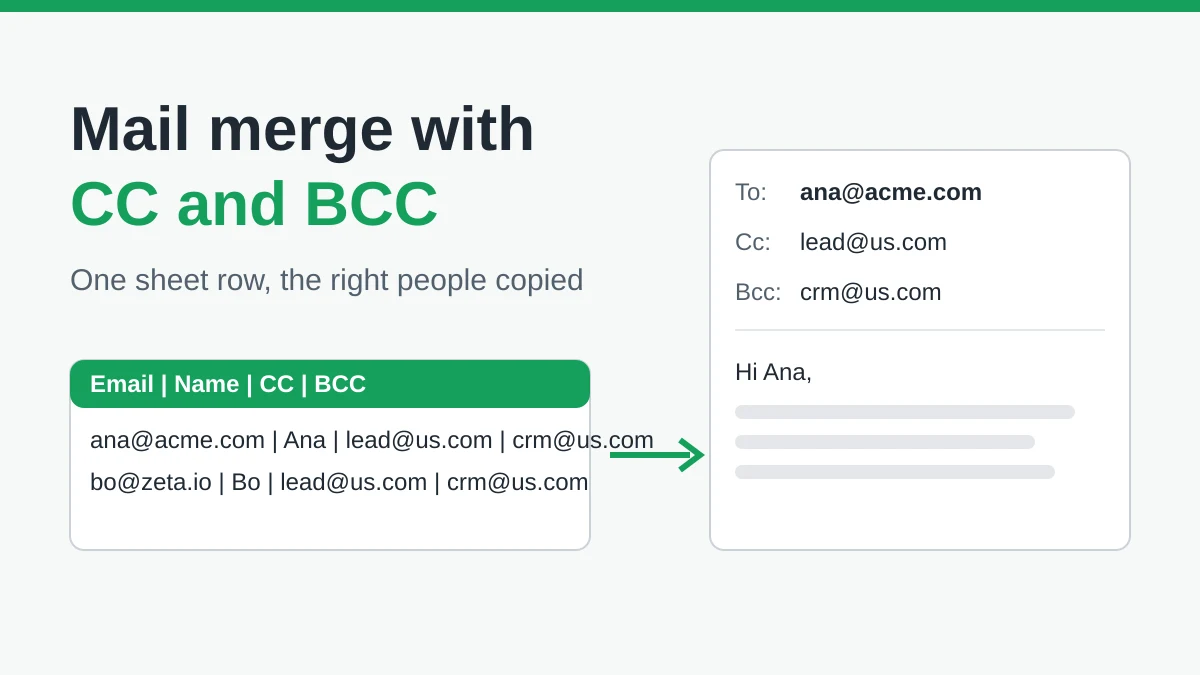
Mail Merge with CC and BCC in Gmail: Copy the Right People on Every Email
Learn how to run a mail merge with CC and BCC from Google Sheets, set up the columns, preview the result and see how copied recipients count toward your daily quota.
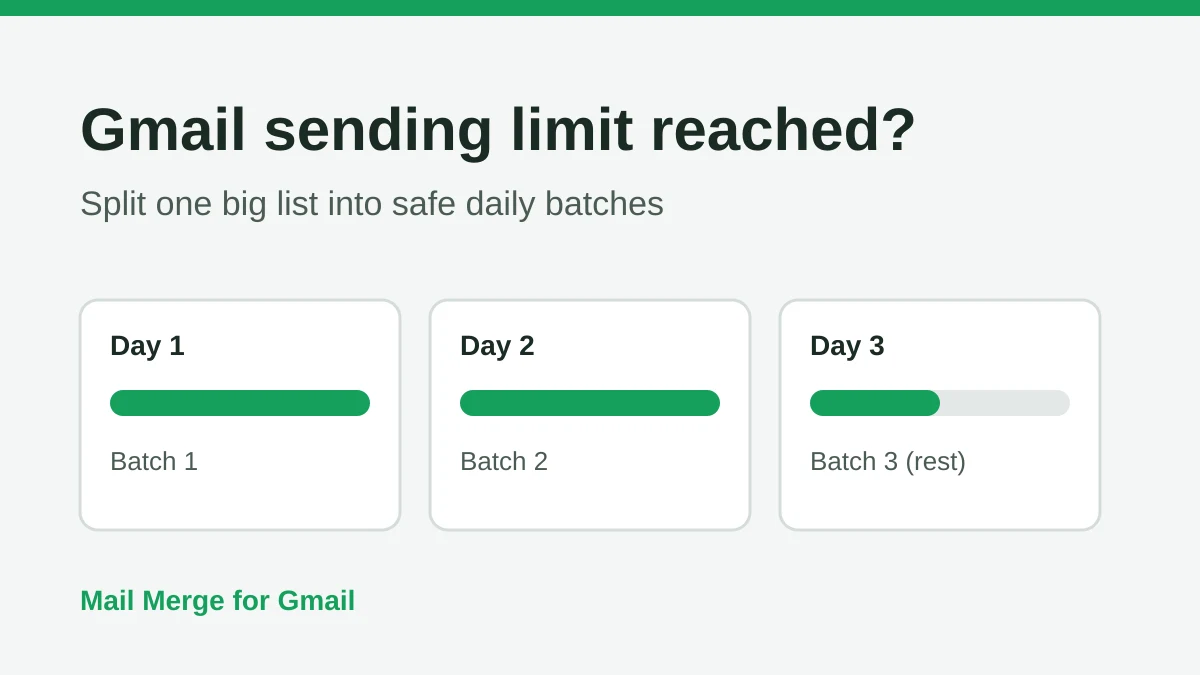
Gmail Sending Limit Reached: What It Means and How to Finish Your Campaign
Hit the Gmail sending limit reached error? Learn the real daily limits, when you can send again, and how to split a mail merge into safe daily batches.
Personalized Email Gmail: The Complete Guide
Master your personalized email Gmail workflow. Learn to merge Sheets data, track opens, and scale one-to-one outreach without leaving your inbox.