


















10 Email Campaign Best Practices for Better Results
Use these 10 email campaign best practices to improve targeting, deliverability, engagement, testing, compliance, and conversions with Mail Merge for Gmail.
Better emails don’t start with clever copy. They start with reliable data, clear permission, useful segmentation, relevant personalization, readable design, controlled sending, and measurement tied to a real business goal. A polished message sent to the wrong audience, an outdated list, or an inbox that never receives it won’t produce a meaningful result.
That matters even more in Gmail workflows, where teams often manage campaign data in Google Sheets and send from a familiar inbox. Mail Merge for Gmail can support that process by reading recipient fields from a spreadsheet, personalizing messages, scheduling sends, managing unsubscribes, and writing campaign statuses back to individual rows. But no tool can repair poor data, weak targeting, or an unclear offer.
These email campaign best practices follow the campaign from preparation to follow-up. You’ll see how to organize a practical operating system in Google Sheets, where Mail Merge for Gmail fits, what to test first, and why opens alone no longer tell you whether a campaign worked.
1. Segment Your Audience for Targeted Campaigns
A single list rarely represents a single audience. Prospects, customers, candidates, donors, students, and event attendees have different needs, objections, and reasons to respond. Segmenting them before writing the email lets you change the offer and call to action, not just the greeting.
Start with a manageable structure in Google Sheets. Add separate columns for industry, company size, role type, location, customer stage, and engagement status. A sales team might separate technology prospects from professional-services prospects. An educator might distinguish students by course enrollment. An e-commerce team can use purchase history to recommend products that fit prior behavior.

Keep the first segmentation pass practical
Begin with three to five meaningful groups, then expand only when each segment can receive a distinctly different message. A segment that changes nothing in the email adds spreadsheet maintenance without improving relevance.
Use filters or views in Sheets to isolate each audience, then connect the relevant rows to a Mail Merge for Gmail campaign. Before sending, check that every recipient has the correct segment identifier and that the template matches it. Guidance on contact database management can help teams keep those fields consistent as lists evolve.
Review segment definitions regularly, especially after a purchase, job change, event registration, or change in engagement. The same database can support email marketing for wealth managers when contacts are grouped by client needs and relationship stage rather than treated as one undifferentiated audience.
2. Maintain a Clean, Verified Email List
List hygiene is a deliverability control, not administrative housekeeping. Invalid addresses create bounces, former subscribers create complaints, and inactive contacts can distort your view of campaign quality. A clean list gives your messages a better chance of reaching people who want them.
Use Google Sheets as the working record, but give each contact an explicit status. Useful columns include consent source, consent date, unsubscribed, hard bounce, last engagement, and suppression reason. After every Mail Merge for Gmail campaign, review delivery results and remove hard bounces from future sends. Never assume that a failed delivery is temporary.
Build suppression into the workflow
An unsubscribed column should be a sending rule, not a note someone remembers to check. Filter out anyone marked unsubscribed, bounced, or complained before importing the campaign range. For new subscribers, active opt-in and address verification reduce the risk of sending to mistyped or unauthorized addresses. The email list management guidance also reinforces the need to keep opt-outs and problematic addresses out of active campaigns.
A practical maintenance rhythm is to review disengaged contacts after a sustained period without activity, then decide whether to re-permission them or suppress them. Don’t buy lists. Permission, accurate records, and prompt removal of bounces and complaints protect both your audience relationship and sender reputation.
Deliverability results show why this matters. The 2025 benchmark cited by Sender Reputation reported 84.8% global inbox placement, with 6.1% of messages landing in spam and 9.1% missing entirely. In other words, roughly one in six marketing emails failed to reach the inbox before engagement was measured.
3. Personalize Subject Lines and Email Content
Personalization should change the reason someone receives the email, not merely insert a first name. A recruiting message can reference the recipient’s role and relevant team. An event invitation can reflect past attendance. A nonprofit thank-you can connect a donor’s support to a specific program or outcome.
Google Sheets works well as a lightweight personalization layer. Store fields such as first name, company, role, location, recent interaction, and recommended next step in distinct columns. Mail Merge for Gmail can use those fields in subject lines and body copy, while a fallback value prevents an empty placeholder from appearing when a field is missing.
Make relevance easy to verify
Preview a sample from each segment before sending. Check spelling, capitalization, company names, dates, links, and any sensitive details. A technically correct merge can still feel careless if a prospect’s company name is outdated or the message mentions an event they didn’t attend.
Personalization also needs restraint. Using a first name may feel natural in a relationship-based message, but forced familiarity can weaken trust in cold outreach. Personalize the value proposition and call to action before adding decorative details. The practical guidance on dynamic email content is useful when teams need more than a name field.
The available industry summary reports personalized emails at a 14.3% open rate versus 10.9% for non-personalized emails, while another cited comparison found 19.5% for personalized subject lines versus 15.1% without personalization. Those figures come from World Metrics’ personalization summary. Treat them as directional benchmarks, not a promise for your audience. Your own click, reply, and conversion data should decide whether personalization is earning its place.
4. Write Subject Lines, Copy, and CTAs That Earn Action
Good email copy answers three questions quickly: why this person, why now, and what should they do next? A subject line should accurately frame the message. The body should make one useful point. The primary call to action should require as little interpretation as possible.
Write around the campaign goal. A sales email might ask the recipient to schedule a demonstration. A recruiting message can direct a candidate to the role page. An event invitation may focus on registration or calendar addition. A newsletter can send readers to one specific article instead of presenting a collection of competing links.
Use action-oriented language such as Schedule, Download, Apply, Register, or Start. Replace generic link text with words that describe the destination. If urgency is real, state the relevant deadline. Don’t manufacture scarcity to force a click.

Reduce friction without hiding context
A primary button can be supported by a text link for readers who use keyboard navigation, blocked images, or plain-text views. Use a readable contrast between button and background, and keep the surrounding copy specific enough that the recipient understands the outcome before clicking.
Subject line testing can start with length, benefit, question, or audience relevance. One 2025 benchmark across 3.6 million campaigns reported an average open rate of 43.46%, compared with 42.35% in 2024. The same benchmark summary reported that subject lines between 20 and 40 characters were 45% more likely to be among the most-opened sends. It also found that custom preheaders made top campaigns 23% more likely to appear among stronger performers. Use those findings as test ideas, then judge success by the action your campaign is meant to produce.
5. Create Mobile-Responsive Email Templates
A mobile-ready email should be readable before the recipient zooms, scrolls sideways, or hunts for a small link. Use a simple structure with a clear hierarchy, short paragraphs, compressed images, descriptive alt text, and buttons that are comfortable to tap. A single-column layout is usually easier to maintain across Gmail, Apple Mail, and Outlook apps than a complex multi-column design.
Keep the design focused on the message rather than decoration. An e-commerce recommendation needs an obvious product image, price context, and route to purchase. A candidate email needs a readable role summary and an application link. An event invitation should make registration and calendar actions work smoothly on a phone.
Preview before the real send
Use Mail Merge for Gmail’s preview workflow to inspect representative rows from Google Sheets. Test missing fields, long names, long company names, links, images, and fallback text. Send yourself a test in Gmail, then check the same message on a phone and another major client where possible.
Buttons should have enough spacing to prevent accidental taps, and body text should remain comfortable to read without enlarging. Keep the most important content near the top, but don’t compress the email so aggressively that the recipient loses the reason to act.
The same template should also work when images don’t load. A text-based explanation, descriptive link, and clear sender identity protect the campaign when rendering differs from your design preview.
6. Protect Deliverability Through Timing and Sending Discipline
There isn’t one universally correct send hour. Timing depends on recipient time zone, work pattern, relationship stage, and the urgency of the message. A business prospect may be more reachable during working hours, while a customer or community audience may check messages on a different schedule.
Add a time zone column to Google Sheets when location-aware sending matters. For a B2B audience, begin with a controlled window during normal business hours, then compare results by segment. Schedule campaigns in Mail Merge for Gmail instead of rushing every audience into one send. Scheduling helps separate campaign preparation from execution, which makes errors easier to catch.
Watch the inbox, not just the clock
Deliverability depends on authentication, list hygiene, complaints, bounces, and relevance as much as timing. Validity’s deliverability benchmark recommends SPF, DKIM, and DMARC, active opt-in, verification of new addresses, sending to engaged subscribers, and prompt removal of bounces, opt-outs, and complaints.
Current operational guidance targets a 98% to 99% delivery rate, at least 95% inbox placement, a spam complaint rate below 0.1%, and a hard bounce rate below 2%, according to MessageFlow’s deliverability guide. These are control targets, not guarantees. Track them in a campaign sheet and pause or narrow sending when complaints or bounces move in the wrong direction.
Gmail-specific placement can also vary. Brevo’s benchmark report reported 53.7% of marketing email reaching Gmail’s Primary tab in its cited 2026 benchmark, down from 58.72% in Q1 2024. That volatility makes monitoring more useful than relying on a calendar rule.
7. Maintain Compliance with Spam Laws and Regulations
Compliance starts with knowing why each person is on the list. Record the consent source, sender identity, organization details, and communication purpose in Google Sheets. Your email should make it clear who sent it, why the recipient received it, and how they can stop future messages.
Include an accurate From name, honest subject line, physical business address where required, and a prominent unsubscribe route. Mail Merge for Gmail’s unsubscribe management can help apply the operational rule, but the team still needs to ensure the data is updated and excluded from future sends.
Treat opt-outs as immediate instructions
Don’t keep a separate personal list of people who asked not to be contacted. Mark the opt-out in the shared sheet, suppress the address from active campaign ranges, and preserve the record needed to demonstrate that the request was honored. The same process should cover former employees, candidates, donors, customers, and prospects.
Rules differ across jurisdictions, including CAN-SPAM, GDPR, and CASL. Double opt-in can help confirm new subscriber intent, especially when personal data is involved. Purchased lists create avoidable permission and reputation problems, even when the addresses appear valid.
Privacy also affects personalization. Collect only the fields you can explain and use responsibly. If an AI assistant helps draft variations, have a person review the source data, audience fit, and wording before the message goes out. Speed isn’t a defense for sending inaccurate or intrusive content.
8. Use A/B Testing to Optimize Email Elements
A/B testing works when you make a clear comparison, not when you change everything at once. Choose one variable, such as the subject line, call to action, send timing, or opening paragraph. Keep the audience, offer, and measurement window stable enough that the result has a useful interpretation.
Google Sheets can hold a simple testing log. Add columns for test name, hypothesis, control, variant, audience, send date, primary metric, and decision. Separate the variants using filtered rows or carefully labeled tabs, then use Mail Merge for Gmail to send the correct version to the intended group.
Test decisions that matter
A sales team might compare a question-led subject line with a benefit-led alternative. An e-commerce team could compare two descriptions of the same offer. A nonprofit might test emotional framing against a factual explanation. After the test, record not only the winner but also the audience and context. A result that works for new prospects may not work for existing customers.
Don’t declare a winner from the first few opens. Give recipients enough time to respond, and prioritize clicks, replies, registrations, purchases, or another business action over a superficial lift in opens.
A practical constraint matters here. The plan should specify a sufficient audience for the chosen statistical method. Don’t claim certainty from a tiny group, and don’t use an arbitrary sample threshold as proof of validity. If the audience is small, treat the result as a directional learning and repeat the test before making a broad change.
9. Track, Analyze, and Optimize Campaign Performance
Open rate remains useful as a diagnostic, but it shouldn’t carry the entire evaluation. Apple Mail Privacy Protection and broader deliverability changes have made opens less dependable as a measure of human attention. Validity’s 2025 benchmark report highlights inbox placement, spam-folder placement, and complaint rates as increasingly important, with global inbox placement cited at 84.6% in 2024 to 2025 and about one in six marketing emails not reaching the inbox.
Start with the outcome. A sales campaign may prioritize replies and qualified meetings. An event campaign may prioritize registrations. An e-commerce campaign may prioritize completed purchases. A newsletter may use clicks and engaged visits. Add UTM parameters to links and maintain a Google Sheets dashboard that connects delivery, clicks, replies, and conversions.
Mail Merge for Gmail can write per-recipient statuses such as Sent, Opened, Clicked, and Replied back to the spreadsheet. Use those fields to find patterns by segment, template, sender, and sequence step. Then connect the links to your analytics or CRM so campaign activity can be compared with actual business outcomes.
Use benchmark context carefully
Benchmarks help identify a question, not settle it. Klaviyo’s email benchmarks reports an average campaign open rate of 31%, with the top 10% reaching 45.1%. It reports an average campaign click rate of 1.69%, with the top 10% reaching 3.38%. Automated flows in the same benchmark show a 5.58% average click rate and 10.48% for the top performers, while placed-order rates are 2.11% for automated flows and 0.16% for campaigns.
Use those figures to decide what to investigate, then improve one variable at a time. A high open rate with weak clicks may indicate a promise the body doesn’t fulfill. Strong clicks with few conversions may indicate a landing-page or offer problem.
10. Build Relationships Through Follow-Up Sequences
A follow-up sequence should advance the conversation, not repeat the original request. Map the journey in Google Sheets before sending: first contact, useful resource, objection handling, proof or context, and final invitation. Each row can include the recipient, sequence stage, scheduled date, template name, exit condition, and status.
A sales sequence might move from an introduction to a relevant value proposition, then a case study, social proof, and a final ask. Recruiting teams can introduce a role, explain benefits, share a team story, and remind interested candidates to apply. An onboarding sequence can welcome a new user, explain a feature, offer a success tip, and ask for a check-in.
Add value and clear exits
Space follow-ups far enough apart for the recipient to respond and make a decision. The appropriate interval depends on urgency and relationship context. If someone replies, unsubscribes, bounces, or completes the desired action, stop the sequence immediately.
Use Mail Merge for Gmail scheduling to queue planned messages, but keep the spreadsheet as the source of truth. A status column should show whether a contact is active, replied, converted, or suppressed. Personalize every step where the data supports it, but don’t add personal details just to make the email look customized.
Practical rule: Every follow-up should make sense if the previous email was ignored.
Limit the sequence to the number of messages your audience can reasonably tolerate. If responses decline, complaints rise, or recipients repeatedly receive the same ask, shorten the sequence or replace a sales message with useful information.
Top 10 Email Campaign Best Practices Comparison
| Technique | 🔄 Implementation Complexity | 💡 Resource Requirements | ⚡ Speed / Efficiency | 📊 Expected Outcomes (⭐) | Ideal Use Cases |
|---|---|---|---|---|---|
| Segment Your Audience for Targeted Campaigns | Medium–High, needs data model and ongoing maintenance | Clean contact data, spreadsheet fields, segmentation rules, time | Moderate, initial setup slow, execution efficient | ⭐⭐⭐⭐, higher opens, CTRs, conversions; better deliverability | Targeted marketing, B2B outreach, personalized e‑commerce recommendations |
| Maintain a Clean, Verified Email List | Medium, recurring process (monthly recommended) | Email verification tools (possible cost), suppression lists, staff time | Fast impact on deliverability once cleaned | ⭐⭐⭐⭐, lower bounces, improved sender reputation, reduced costs | Any sender with large or aging lists; cold outreach and compliance‑sensitive orgs |
| Personalize Subject Lines and Email Content | Medium, templates + conditional logic; needs fallbacks | Accurate recipient data, template system, testing time | High for sends (with merge); content prep takes time | ⭐⭐⭐⭐⭐, dramatically higher opens/CTRs when data is accurate | Sales outreach, recruiting, fundraising, high‑value account engagement |
| Write Subject Lines, Copy, and CTAs That Earn Action | Low–Medium, copy skill and testing required | Copywriting time, basic A/B tests, mobile checks | High, quick to implement, immediate measurable effects | ⭐⭐⭐⭐, clearer CTAs → higher clicks and conversions | Demo scheduling, event invites, product announcements, downloads |
| Create Mobile-Responsive Email Templates | Medium–High, responsive coding and thorough testing | Designer/developer time, device/client testing tools | Moderate, development slower, execution fast and consistent | ⭐⭐⭐⭐, improved mobile engagement and conversion rates | Consumer brands, e‑commerce, mobile-first audiences |
| Protect Deliverability Through Timing and Sending Discipline | Medium, requires analytics and scheduling rules | Historical send data, scheduling tools, timezone data | Moderate, may delay sends but increases open efficiency | ⭐⭐⭐, better inbox placement and optimized open windows | Global audiences, B2B outreach, high-volume campaigns |
| Maintain Compliance with Spam Laws and Regulations | Medium, process, documentation, and consent tracking | Legal/ops time, unsubscribe automation, consent records | Low (slows some flows) but prevents penalties | ⭐⭐⭐⭐, legal protection, sustained deliverability and trust | Regulated industries, GDPR/CAN‑SPAM environments, multinational sends |
| Use A/B Testing to Optimize Email Elements | Medium, requires discipline and statistical rigor | Sufficient sample sizes, tracking, logging test results | Slow to produce definitive results (needs volume/time) | ⭐⭐⭐⭐, incremental, evidence‑based performance gains | High‑volume senders, teams optimizing subject lines, CTAs, timing |
| Track, Analyze, and Optimize Campaign Performance | Medium–High, tracking, attribution, reporting setup | Analytics tools, UTM/CRM integration, dashboards, analyst time | Ongoing, continuous process; insights accumulate over time | ⭐⭐⭐⭐, clear ROI measurement and informed optimizations | Growth marketing, revenue‑focused teams, CRO initiatives |
| Build Relationships Through Follow‑Up Sequences | Medium–High, sequence planning and conditional flows | Content for multiple steps, scheduling/automation tools | Slower conversion timeline but efficient long‑term | ⭐⭐⭐⭐, higher conversion and response rates vs single sends | Sales sequences, onboarding, lead nurturing, event reminders |
Turn Best Practices Into a Repeatable Campaign System
The strongest email programs don’t treat these recommendations as isolated tricks. They use a repeatable operating system that connects the spreadsheet, message, sending process, and business outcome. Google Sheets provides a flexible control layer, while Mail Merge for Gmail can handle the practical execution when the campaign already has sound data and a clear purpose.
Start by cleaning the spreadsheet. Confirm that every address has a legitimate permission basis, remove hard bounces and unsubscribes, verify new addresses, and check that the sender domain has appropriate authentication. Add fields for consent, segment, time zone, personalization, campaign status, and conversion outcome. A spreadsheet that only contains names and email addresses can’t support reliable targeting or useful analysis.
Next, define one primary audience and one primary conversion goal. Segment the recipients using fields that change the message, then write a subject line, preheader, body, and CTA for that group. Personalize the value proposition where the data is accurate, include fallback text where it isn’t, and preview representative rows before sending. Check the email on mobile, verify links, review accessibility, and confirm that the unsubscribe process works.
Schedule carefully rather than treating send time as a superstition. Use a controlled audience for the first test, compare one variable at a time, and monitor delivery, inbox placement, bounces, complaints, clicks, replies, and conversions. Open data can provide context, but privacy protections and inbox filtering mean it shouldn’t be your only definition of success.
Document the result in Google Sheets. Record what changed, which segment received it, what the primary outcome was, and what decision follows. If the campaign produced clicks but few conversions, inspect the offer or landing page. If delivery weakened, fix list quality and authentication before rewriting the subject line. If replies were strong in one segment, consider adapting that message for a closely related audience rather than sending it to everyone.
For teams that need a practical Gmail workflow, Mail Merge for Gmail combines spreadsheet-based recipient data with personalized sending, previewing, scheduling, unsubscribe management, and per-row status tracking. It can support customer updates, sales outreach, recruiting communication, nonprofit announcements, and event invitations without forcing the team to abandon Google Workspace. An appointment-setting team can apply the same discipline to outreach supporting an Appointment Setter, provided the list is permissioned where required, the message is relevant, and follow-ups stop when the recipient opts out or responds.
The next improvement should be small and observable. Change one subject line, one segment rule, one CTA, or one send-time assumption. Keep the result in the sheet, learn from the evidence, and let the campaign system become more reliable with every send.
Mail Merge for Gmail lets you import recipients from Google Sheets, personalize subject lines and body content, preview messages, schedule campaigns, manage unsubscribes, and track statuses such as sent, opened, clicked, and replied from Gmail. Visit Mail Merge for Gmail to connect your spreadsheet workflow with a more controlled approach to email campaign best practices.
Ready to send your first campaign?
Install Mail Merge for Gmail from the Google Workspace Marketplace and send up to 50 personalized emails per day for free.
Get started for freeMore reading
More from Tips
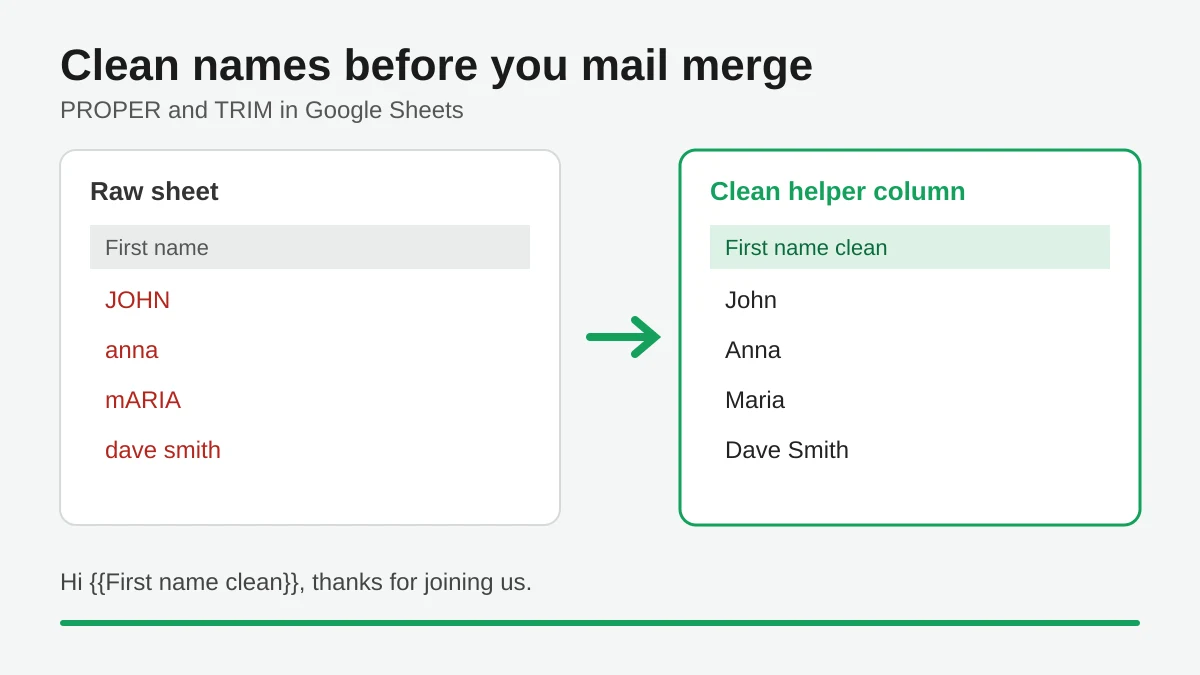
Mail Merge Names Capitalization: Clean Your Google Sheet Before You Send
Fix wrong capitalization and stray spaces in names before a mail merge. Use PROPER, TRIM and a helper column in Google Sheets so every merged email greets people correctly.
Track Email Opens in Gmail
Learn to track email opens in Gmail with clear setup steps, Sheets status updates, troubleshooting tips, and privacy guidance for reliable outreach results.
Best Email Testing Tools: Boost Deliverability in 2026
Discover the top email testing tools to ensure flawless renders and high inbox placement before every send.