


















Sales Email Automation: The Complete Guide for 2026
Learn how sales email automation works, why it matters, and how to set up tracked, personalized campaigns that boost replies and pipeline in 2026.
You’ve got the spreadsheet open, the inbox is already noisy, and the clock is moving faster than your follow-up list. Maybe you’re a founder with a few hundred leads from a webinar, or an SDR staring at names you meant to contact yesterday. The problem isn’t that you don’t know what to send. The problem is that sending one by one stops matching the pace of the pipeline.
Sales Email Automation closes that gap. It turns a list of contacts into a repeatable outreach system that still feels personal, while keeping track of what happened to each message so you can follow up with people who engaged. Done well, it saves time without turning your inbox into a spam cannon.
When Sending One by One Stops Working
The first sign usually isn’t dramatic. It’s the morning you plan to send 40 follow-ups, then spend two hours answering internal messages, fixing a quote, and hunting for a missing field in your CRM. By lunch, half the list is still untouched, and by tomorrow some of those leads will be cold enough to ignore.
A small team can’t keep up with manual outreach forever. The issue isn’t effort, it’s repetition. Every time you rewrite the same opener, copy data into a message, and guess whether a prospect opened it, you’re doing work that a system can do more consistently.
The shift from send and hope to send and learn
Manual email feels simple because you control every line. It also gives you very little feedback. You know an email went out, but you don’t get a clean view of who opened, clicked, replied, or needs a follow-up.
Automation changes that by creating a trail. Each contact can move through the same workflow, but with different names, offers, or timing, and the result can be tracked row by row instead of buried in one giant sent folder. That matters because sales work gets better when you can see what happened and react fast.
Practical rule: if a message needs to be sent to more than a handful of people, it should probably be part of a repeatable workflow, not a one-off copy-and-paste ritual.
That’s why this topic matters before you build your next campaign. The win isn’t just speed. It’s being able to send, measure, and improve without losing the human feel that gets replies in the first place.
What Sales Email Automation Actually Means
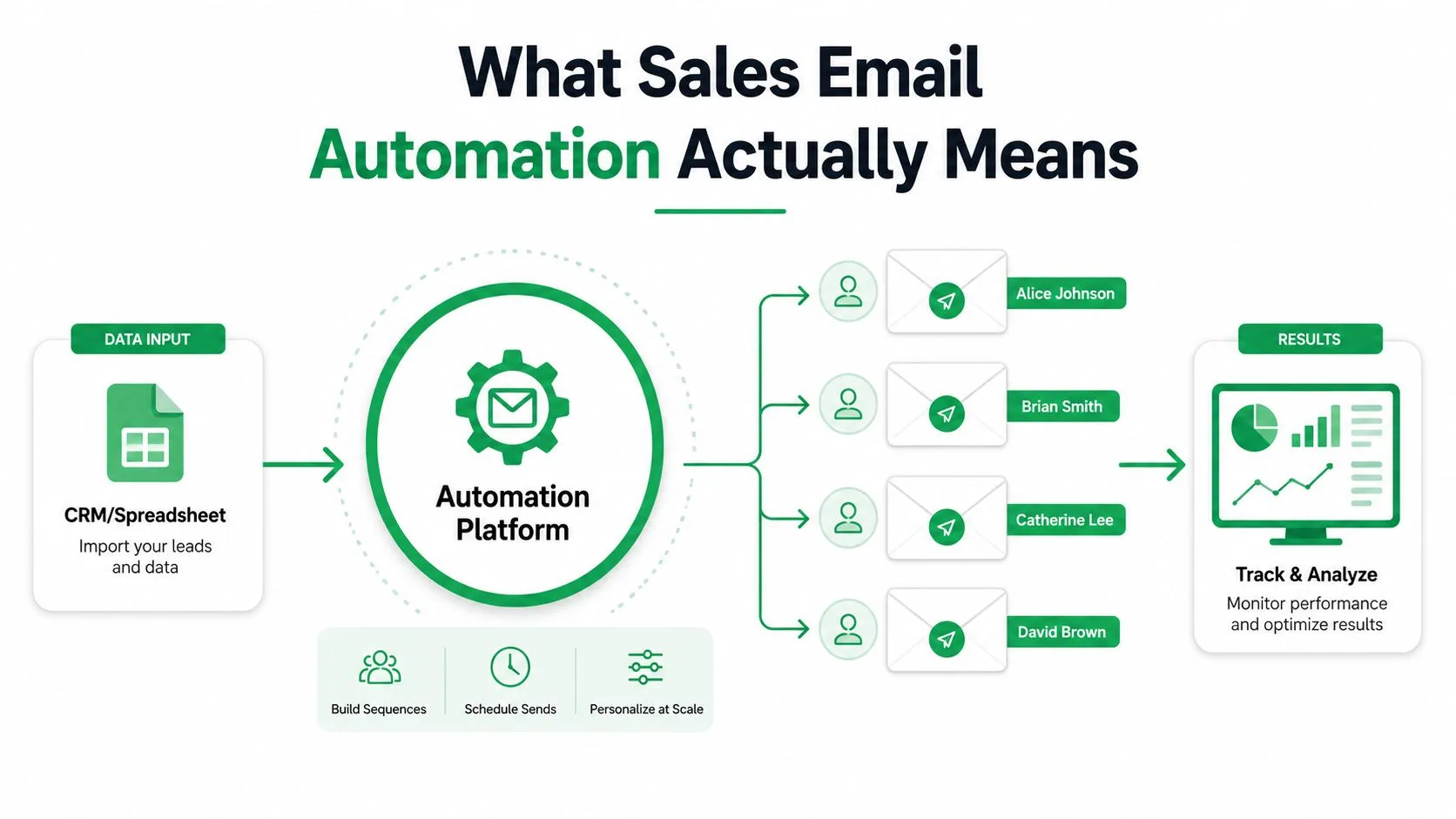
Sales email automation is a system for sending personalized sales emails from structured data, then writing the response signals back so the team can act on them. The data usually lives in a spreadsheet or CRM. The message is built from a template. The system fills in the right fields, sends at the right time, and records what happened next.
The easiest way to think about it is a restaurant. The host seats the tables, the chef cooks the food, and the server keeps service moving. Automation is the host and the service desk. The salesperson is still the closer, the person who handles the reply, the objection, and the meeting.
What it is not
It’s easy to confuse this with other email tools, and that confusion causes bad buying decisions. A plain mass-mail tool blasts the same message to everyone with little or no personalization. A newsletter platform is built for content distribution and audience updates, not lead-by-lead sales motion. A heavy CRM sequence engine may be useful for a larger team, but it can be more machinery than a solo operator needs.
The biggest difference is intent. In sales, the goal is usually a reply, a meeting, or a clear next step. That changes how you write, how you segment, and what you measure. A host-like analogy helps here too, because the tool handles routing and timing while the human still handles the conversation.
A simple sentence you can use with your team
Sales email automation is a way to send the right sales message to the right person at scale, then track what happens so the next send is smarter than the last one. If you can say that clearly, you understand the category well enough to start using it.
For a practical example of how follow-up flows are usually structured, this automated follow-up email guide is useful context.
Why Automation Beats One-Off Campaigns
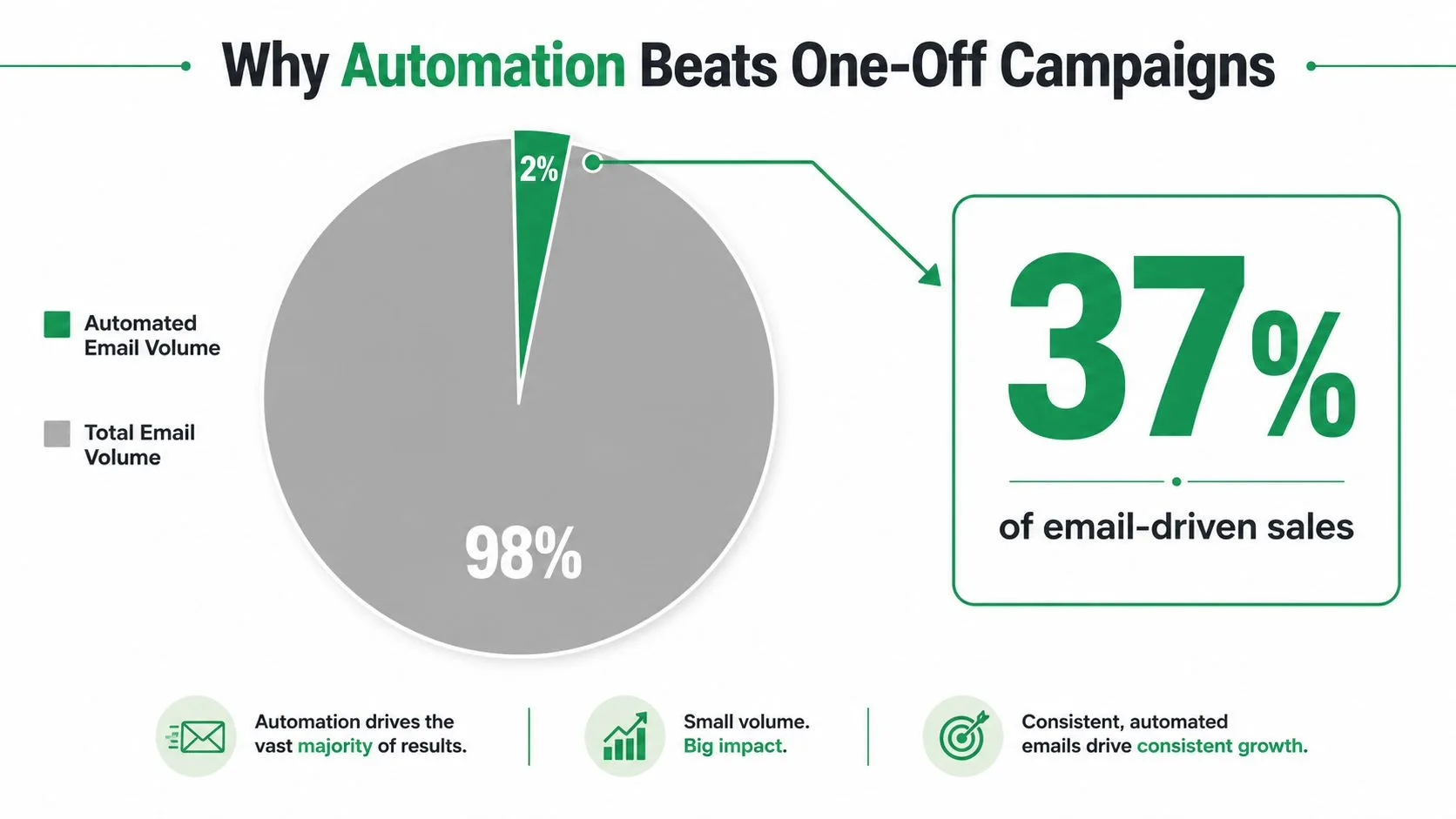
The strongest case for automation comes from the gap between effort and output. In Omnisend’s 2024 benchmark, automated emails made up just 2% of total email volume yet generated 37% of all email-generated sales. That’s why automated flows are so hard to ignore, they do far more than their share of the work. The same benchmark reported 52% higher open rates, 332% higher click rates, and 2,361% better conversion rates than regular campaign emails, which shows how much stronger triggered and segmented sends can be than broad blasts. Those figures are summarized in the Omnisend email automation analysis.
Why the timing matters
A one-off campaign depends on luck. It lands when it lands, and everyone gets the same thing. Automation can respond to behavior, sequence logic, or contact stage, so the message arrives when the buyer is more likely to care.
That doesn’t just help conversion. It also gives you better feedback. If a message is triggered by a form fill, a demo request, or a past interaction, you can read the response as a reaction to a real moment instead of a random send. Sales teams learn faster when the email is tied to the buyer’s action.
The market signal is clear
This isn’t a niche tactic anymore. Grand View Research data cited in industry summaries puts the global marketing automation market at $6.65 billion in 2024 and projects it to reach $15.58 billion by 2030, a 15.3% CAGR. Industry roundups also say 72% of B2B companies already use some form of email marketing automation, and 71% of marketers use automation for email marketing, which tells you the operating model is mainstream, not experimental. That market context is summarized in the marketing automation statistics overview.
So the argument isn’t that automation is trendy. It’s that modern sales teams are already working inside an automated email environment, and the teams that use it well get more signal from every send.
The Core Workflow Behind Every Automation
The simplest working model starts with three steps. First, you bring in contacts from a spreadsheet or CRM. Second, you build or pick a template with placeholders for names, company data, or other fields. Third, you preview, send, and watch status columns update per row so you know what happened.
That’s the shape of most tools, even when the interface looks different. Mail Merge for Gmail uses that same flow inside Google Sheets and Gmail, which makes the process easier to picture if you already live in Google Workspace. You import recipients, choose or create a template, then preview and send while the row-level status data updates back in the sheet.
Where personalization goes deeper than first names
Good sales automation isn’t limited to one merge field in the greeting. It can personalize subject lines, body copy, CC, BCC, attachments, and even custom HTML. That matters because sales emails fail quickly when they feel generic. A buyer can forgive a short message. They usually won’t forgive a message that sounds like it was written for everyone.
The practical benefit is control. You can keep the structure consistent while changing the part that makes the message relevant. That’s much easier to manage in a spreadsheet than in a manual send process.
A strong workflow doesn’t hide the sender behind automation. It gives the sender cleaner data and fewer repetitive tasks.
Why row-level tracking changes the job
Once each recipient has its own row status, your work changes from guessing to reviewing. You can see who was sent, who opened, who clicked, and who replied. That makes follow-up less chaotic, because the next step is based on the signal you got, not on memory.
For teams using Gmail and Sheets, the biggest shift is psychological as much as operational. The campaign stops feeling like one giant email blast and starts feeling like a managed list of conversations. That’s the point where automation becomes a sales motion, not just a time-saver.
Choosing and Testing the Right Message Angle
Many sales teams spend too much time polishing the subject line and not enough time asking whether the message is leading with the right problem. A weak angle can make a strong template underperform. A sharp angle can make average copy work better than expected.
The better test is simple. Pick three or four distinct angles, hold everything else constant, and run each version against at least 200 contacts. Judge the result by reply quality and meetings booked over a two- to three-week window, not by open rate alone. That approach is more useful than tiny copy tweaks because it tests the idea, not just the wording.
Angle beats wording when the offer is off
If one version leads with speed, another with pain reduction, and another with proof, you’re testing what the prospect cares about most. That’s a different question from whether “Hi John” performs better than “Hello John.” Subject-line testing still matters, but it sits one layer below the bigger issue.
Per-row tracking becomes valuable. You can see which contacts responded to which angle, then compare the quality of the replies, not just the volume. If one angle attracts curiosity but no meetings, that’s not a win. It’s a signal to adjust the value proposition.
For a useful lens on this, Boocoo’s persona guide is a strong reminder that messaging works better when it maps to a real role, pain point, or motivation.
A cleaner way to think about testing
- Angle: the reason the prospect should care.
- Subject line: the doorway into the email.
- CTA: the action you want next.
- Reply quality: the metric that tells you whether the message fit the audience.
Test the message people say yes to, not just the line they happened to open.
That mindset saves a lot of wasted sends. If the angle is wrong, the automation isn’t failing. The targeting is.
Deliverability, Privacy, and the Metrics That Matter
Before the first send goes out, the technical basics have to be in place. SPF, DKIM, and DMARC should be configured first, because they help prove the message is legitimate before it reaches an inbox. Deliverability guidance also recommends keeping outbound volume around 30 to 50 emails per inbox per day and warming new inboxes gradually so you don’t trigger spam filters, with bounce rates kept under 2% by verifying addresses first. That guidance is summarized in this deliverability overview.
The operational habits that protect sender reputation
It helps to think of deliverability as a routine, not a launch event. Vary subject lines, schedule by time zone, and avoid sending the same content from the same domain to a big batch in a short window. That kind of pattern looks automated in the worst possible way.
Privacy matters here too. When data stays inside your own workspace and you’re not scraping inboxes for extra signals, the process is easier to defend internally and externally. Clear unsubscribe handling also reduces frustration, which is good for both compliance and sender reputation.
If you want a deeper technical check on the authentication side, this email authentication guide is a useful companion.
The four metrics a sales lead should watch
Most dashboards show a lot of numbers, but sales teams usually need a tighter view.
- Sent: confirms the workflow ran.
- Opened: shows whether the subject and timing got attention.
- Clicked: shows whether the message created enough interest to move.
- Replied: shows whether the campaign produced a sales signal.
Those row-level markers are more useful than vanity metrics because they help you decide what to do next. If opens are decent but replies are weak, the angle may be off. If replies are strong but clicks are low, the message may be doing its job without needing a link-heavy structure.
A note on privacy and trust
Sales email automation works better when recipients feel like they’re dealing with a real sender, not an extraction machine. That means sensible unsubscribe handling, careful list selection, and a cadence that respects the inbox. Trust isn’t separate from deliverability. It’s part of it.
Common Pitfalls and How to Avoid Them
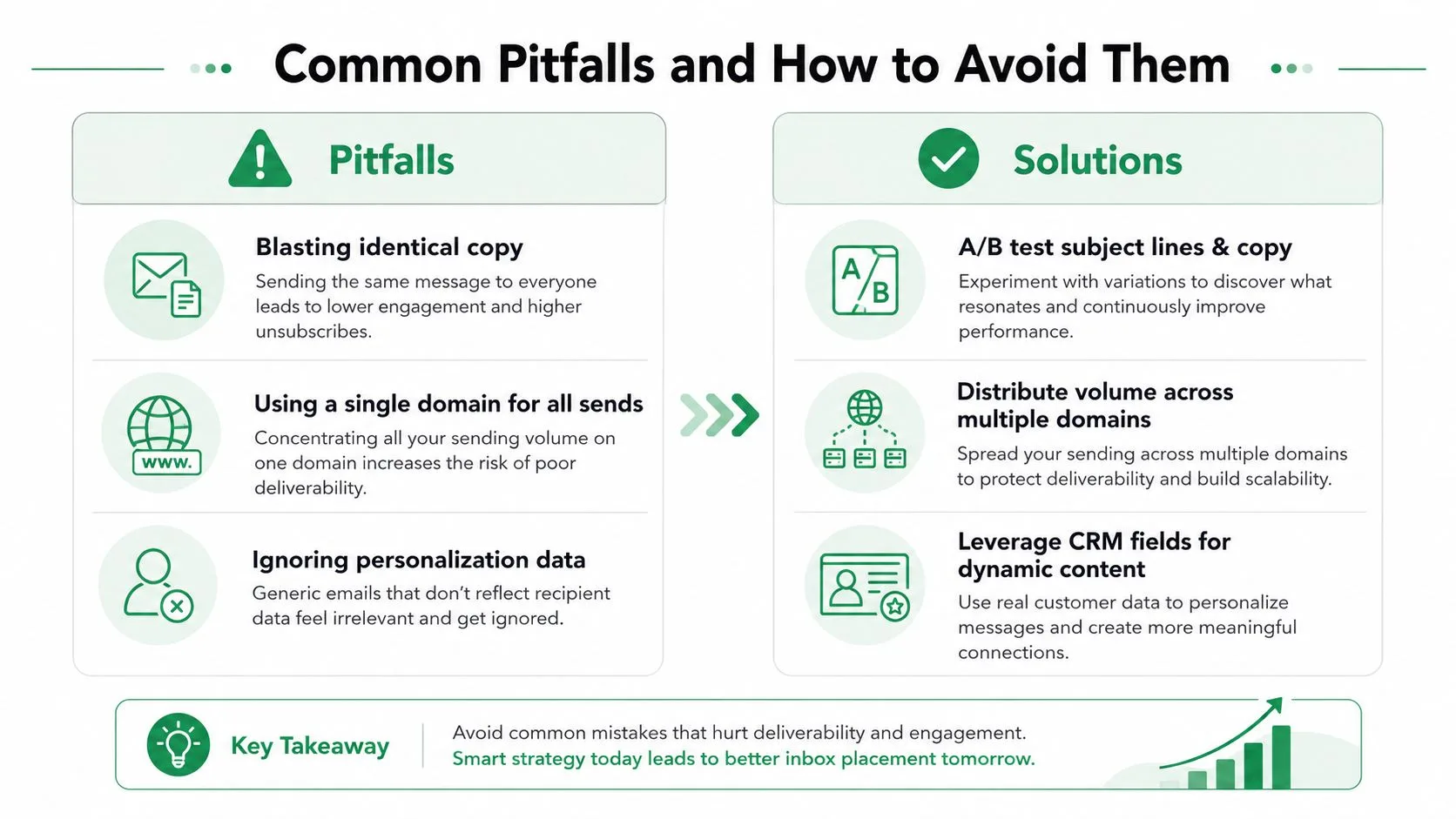
The most common mistake is treating automation like a volume lever. Teams push the same copy from the same domain, too fast, and then blame the tool when responses drop. The core issue is usually cadence, relevance, or list hygiene.
Another trap is over-optimizing the creative while ignoring the sending pattern. A polished subject line won’t rescue a bad list or a sequence that fires too aggressively. The same goes for teams that focus on open rates and ignore reply quality, which is where sales value shows up.
The fast fixes that prevent ugly campaigns
- Blasting identical copy: stagger sends, vary subject lines, and avoid short-window repetition.
- Overloading one domain: distribute volume carefully and keep warm-up discipline intact.
- Ignoring response signals: read replies, not just opens, and adjust the angle when the responses are weak.
A recent guide from Outreach AI also warns against sending bulk emails from the same domain with the same content in a short window, and it recommends time-zone-aware scheduling and A/B testing to lower risk. That advice is useful because it pushes teams to think about cadence as part of message design, not after it.
When automation goes too far
Over-automation usually shows up in behavior before it shows up in metrics. Replies slow down, people ask to be removed, and warm leads feel rushed. If your sequence keeps firing after a prospect has clearly engaged, you’re not being efficient. You’re being careless.
Reply detection and quiet hours fix a lot of that. They keep the human in the loop and stop the sequence from acting like a machine that never noticed the conversation already started. Sales automation should create room for better follow-up, not replace judgment.
Your First 30 Days With Sales Email Automation
Start small enough that you can see what’s happening. In week one, choose one campaign, build a clean sheet of 150 to 300 contacts, and set up authentication plus unsubscribe handling. If the list is messy, fix the list first. The tool can’t rescue bad data.
In week two, send a small first batch and watch the per-row statuses populate. Reply to every warm response the same day, because speed still matters once a real person writes back. If a message is getting opens but not replies, don’t add more volume yet.
A simple monthly rhythm
Week three is for iteration. Pull out the underperforming angle, write a new one with a different lead benefit, and run a controlled test. Week four is for scale only if reply quality holds, and only inside the warm-up range you can sustain. This overview of email automation platforms can help you compare tool shapes if you’re still choosing the stack.
By day 30, success should look boring in a good way. The sheet is clean, the workflow runs without hand-holding, and you can explain which angle is working and why. If you can do that, you’re no longer improvising outreach.
If you want sales email automation that stays inside Gmail and Google Sheets, keeps row-level status visible, and helps your team send personalized outreach without losing control of the workflow, take a look at Mail Merge for Gmail. It’s built for the same basics covered here, import, template, preview, send, then track what happened. Visit the product site and see whether it fits the way your team already works.
Ready to send your first campaign?
Install Mail Merge for Gmail from the Google Workspace Marketplace and send up to 50 personalized emails per day for free.
Get started for freeMore reading
More from Guides
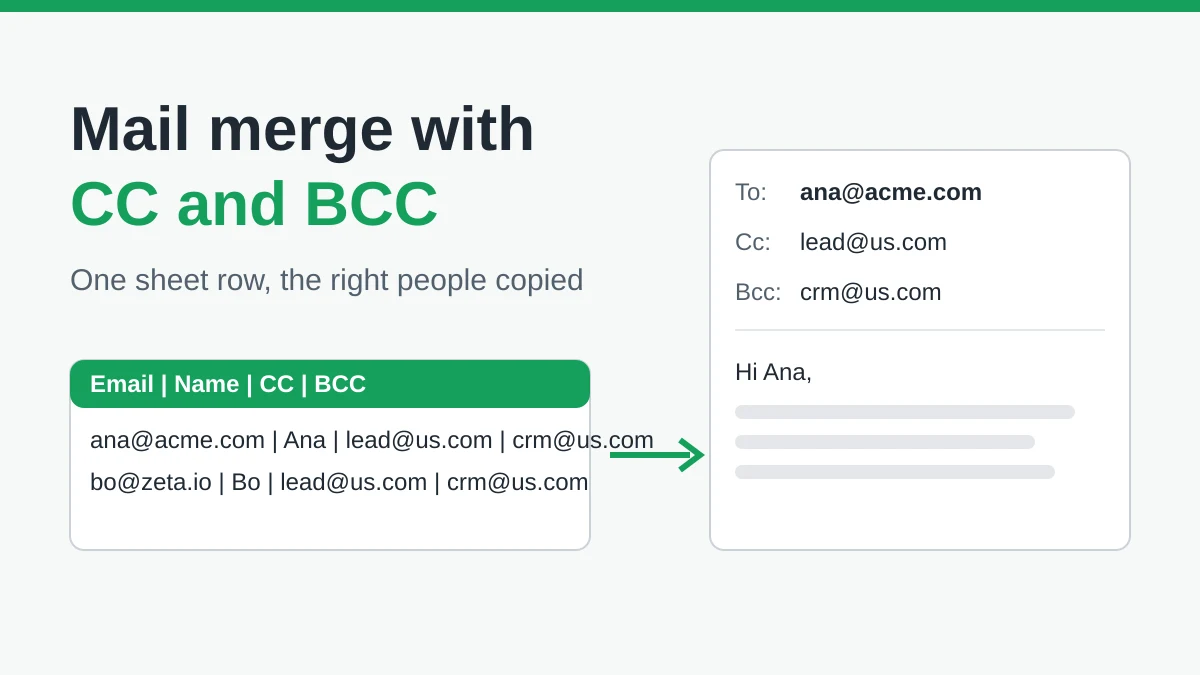
Mail Merge with CC and BCC in Gmail: Copy the Right People on Every Email
Learn how to run a mail merge with CC and BCC from Google Sheets, set up the columns, preview the result and see how copied recipients count toward your daily quota.
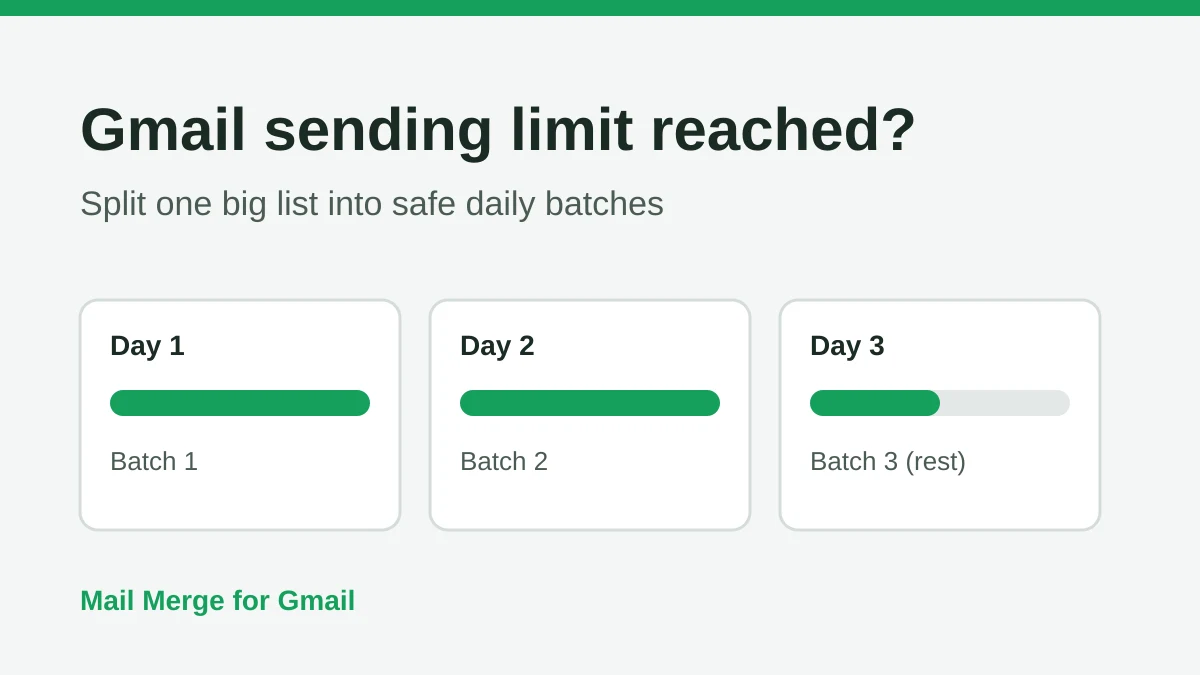
Gmail Sending Limit Reached: What It Means and How to Finish Your Campaign
Hit the Gmail sending limit reached error? Learn the real daily limits, when you can send again, and how to split a mail merge into safe daily batches.
Personalized Email Gmail: The Complete Guide
Master your personalized email Gmail workflow. Learn to merge Sheets data, track opens, and scale one-to-one outreach without leaving your inbox.