


















Soft Bounce vs Hard Bounce: Causes, Codes, and Fixes
Learn the real differences between soft bounce vs hard bounce, including SMTP codes, common causes, deliverability impact, and step-by-step remediation tactics.

Most email advice says a soft bounce is harmless because the receiving server may accept the message later. That’s only true when the failure is isolated and the retry policy is controlled. Repeated soft bounces can point to mailbox-provider throttling, sender reputation trouble, or a recipient address that has effectively stopped accepting mail.
A hard bounce is more straightforward. The address, domain, or receiving system has returned a permanent failure, so repeated attempts waste sending capacity and create an avoidable list-quality signal. The practical difference between soft bounce vs hard bounce isn’t just temporary versus permanent. It’s knowing when a retry remains rational, when a sequence should pause, and when the row should be suppressed.
Why Soft Bounces Are Not as Harmless as They Seem
A soft bounce is a temporary delivery failure, but “temporary” describes the server response, not the business risk. A full mailbox, server downtime, greylisting, or a rate limit can clear later. Yet the same response repeated across campaigns tells you that the recipient or sending pattern remains unresolved. Guidance from Suped on managing persistent bounces emphasizes the operational need to pause or suppress after repeated transient failures rather than retry indefinitely.
That distinction matters for SDRs. A prospect who soft-bounces once may deserve another attempt. A prospect who soft-bounces every time should not remain in an automated sequence just because the code starts with 4xx. The address may have a full mailbox, but it may also be receiving temporary policy deferrals because the mailbox provider dislikes the sender’s reputation or sending behavior.
Treat repeated failures as diagnostic data
A single bounce answers one question, the message wasn’t delivered on that attempt. A pattern answers a more useful question, why does this recipient or domain keep rejecting delivery?
Look for patterns such as:
- One recipient, repeated failures: The mailbox may be full, abandoned, or persistently unavailable.
- Many recipients at one domain: The receiving provider may be throttling your traffic or applying a temporary policy block.
- Bounces after a volume change: Your sending behavior may have triggered rate limiting.
- Failures tied to message changes: Size, content, or authentication issues may be involved.
Mailbox providers can treat persistent bounce activity as evidence about sender quality. Recent deliverability guidance also points to stricter compliance enforcement and the possibility that soft bounces reflect reputation warnings, blocklisting, or authentication-related deferrals, not just recipient-side problems. The useful response isn’t “retry forever.” It’s to identify the reason, control the retry window, and record the outcome per contact.
Practical rule: A soft bounce earns a retry. A repeated soft bounce earns an investigation.
Small businesses often miss this because aggregate campaign reports hide the individual rows. A modest overall bounce rate can still conceal a cluster of failures at one domain or a handful of contacts that have been retried too many times. Treating each bounce as a diagnostic event makes cleanup more precise and protects valid addresses from unnecessary suppression.
Understanding SMTP Bounce Codes and Server Responses
SMTP status-code families provide the technical basis for the soft bounce vs hard bounce distinction. The standards define 4xx responses as transient failures, where delivery may succeed after a later attempt, and 5xx responses as permanent failures, where retrying the same address generally isn’t appropriate. This framework makes bounce handling operational rather than subjective, as documented in this reference to soft and hard bounce semantics.
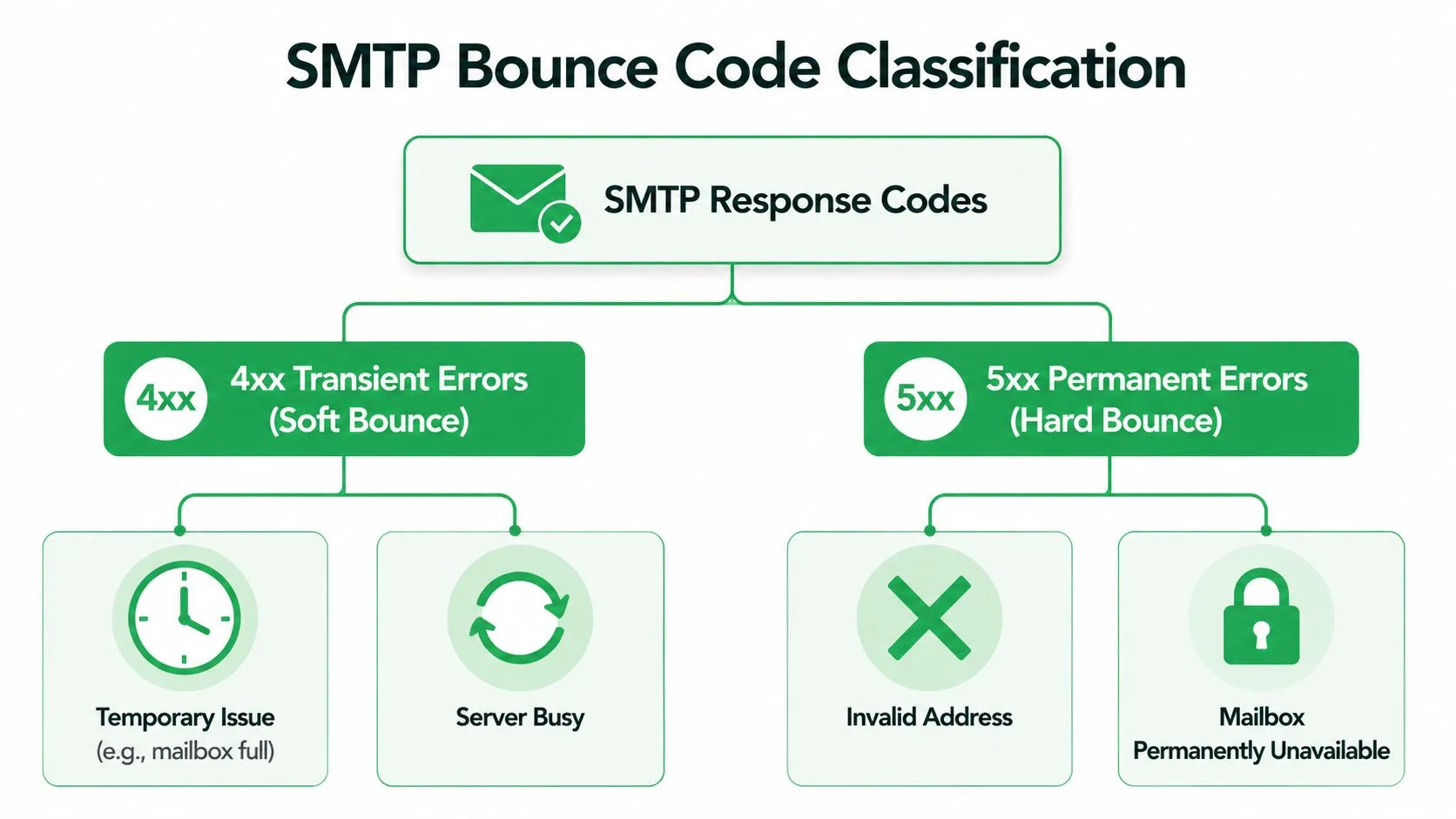
4xx means delay, not success
Common soft-bounce examples include 421, 450, 451, and 452. The exact wording varies by server, but the practical interpretation is consistent:
- 421: The service is unavailable or closing the connection temporarily.
- 450: The requested mailbox or action isn’t currently available.
- 451: A temporary processing or local server error occurred.
- 452: The server lacks sufficient resources to complete the request at that time.
These codes tell the sender to allow another attempt. A full mailbox, temporary server outage, greylisting, or rate limiting can all produce a transient failure. The code alone doesn’t tell you whether the recipient will recover, so preserve the detailed diagnostic text and the time of each attempt.
5xx means suppress the address or resolve the permanent block
Common hard-bounce examples include 550, 551, 553, and 554. They indicate that the receiving system considers the delivery failure permanent or has rejected the message in a way that shouldn’t be handled through routine retries.
- 550: Delivery is rejected, often because the mailbox is unavailable or the request is refused.
- 551: The intended mailbox isn’t local or isn’t available at that destination.
- 553: The address or mailbox syntax is invalid, or the recipient is not accepted.
- 554: The transaction is refused as a permanent failure.
A hard bounce can result from a nonexistent mailbox, invalid domain, or explicit server rejection. Suppress the address immediately unless you have a verified correction. For a plain-language explanation of how bounce-back notifications fit into the workflow, see this guide to bounce-back messages.
Soft Bounce vs Hard Bounce Comparison
The code family provides the starting point, but operators need a decision framework. A soft bounce keeps a possible delivery path open, while a hard bounce tells you that continuing to send to the same address is counterproductive. The table below separates the technical signal from the action your team should take.
Soft Bounce vs Hard Bounce at a Glance
| Attribute | Soft Bounce | Hard Bounce |
|---|---|---|
| Delivery status | Temporary failure | Permanent failure |
| SMTP family | 4xx, including 421, 450, 451, and 452 | 5xx, including 550, 551, 553, and 554 |
| Typical causes | Full mailbox, server downtime, greylisting, rate limiting, or temporary policy deferral | Invalid mailbox, nonexistent domain, invalid address, or permanent rejection |
| Retry behavior | Retry within a controlled window | Don’t retry the same invalid address |
| List action | Monitor, retry, then pause or suppress if persistent | Suppress immediately |
| Diagnostic meaning | The recipient or provider may recover, or may be signaling sender-related trouble | The destination is not currently a viable delivery target |
| Reputation concern | Repeated failures can indicate throttling or poor recipient quality | Continued attempts demonstrate poor list hygiene |
Soft bounces require judgment. A temporary server problem deserves a retry, while a recurring policy deferral deserves slower sending and an infrastructure review. If your system records only “failed,” you lose the reason needed to make that distinction. Preserve the response code, diagnostic message, recipient domain, campaign, and attempt history.
Hard bounces require less interpretation. Confirm that the address wasn’t mistyped, then suppress it. Continuing to include a permanently invalid address in later campaigns creates predictable failures and obscures the health of your current list. The Nylas bounce-code reference provides the underlying distinction between transient 4.x.x and permanent 5.x.x responses.
Greylisting is an important edge case. A receiving server may temporarily defer an unfamiliar sender, so the first response can look alarming even though a later retry succeeds. Temporary policy blocks work differently from a full mailbox, but both may appear in the soft-bounce category. That’s why the response detail and retry history matter more than the label alone.
Reading Bounce Signals in Your Mail Merge Workflow
Aggregate bounce rates tell you whether a campaign had a problem. Per-row status tracking tells you which contacts and domains caused it. For a small team working from Google Sheets, that difference turns a vague deliverability concern into a cleanup queue.
Mail Merge for Gmail writes delivery and engagement states such as Sent, Opened, Clicked, and Replied back to the spreadsheet. Its campaign reporting workflow also surfaces bounced email records, allowing you to inspect the contact rather than treating the campaign as one undifferentiated result.

Build a row-level diagnostic view
Add or reserve columns for the recipient address, domain, campaign date, bounce category, SMTP code, reason text, attempt count, and next action. You don’t need a complex database. A consistent spreadsheet record is enough to prevent the same contact from entering another sequence without review.
Start with the failure itself. A row marked as a hard bounce should move to suppression after you verify that the address wasn’t entered incorrectly. A row marked as a soft bounce should remain eligible only while the reason appears temporary and the retry count remains within your policy.
Then compare rows by domain. If several contacts at the same provider soft-bounce during one campaign, don’t assume every mailbox is full. Check whether your sending pace, authentication, or campaign pattern is causing provider-level deferral. If only one contact repeats the failure, investigate the recipient record first.
Use statuses to control follow-up
A simple workflow can assign actions:
- Retry: The row has a single transient response and no evidence of a recurring problem.
- Hold: The same recipient or domain shows repeated soft bounces and needs review.
- Suppress: The server returned a permanent failure, or transient failures have crossed your documented ceiling.
- Release: A later attempt succeeds, so the row returns to normal campaign eligibility.
The important detail is historical context. A “soft bounce” label without timestamps can’t distinguish a one-time server outage from a contact that has failed repeatedly. Keep prior campaign outcomes visible or linked to a separate log, then filter the sheet before every send.
How Bounce Patterns Affect Sender Reputation
Mailbox providers evaluate more than the success of an individual message. They can interpret hard-bounce activity as a list-quality signal and persistent soft-bounce activity as evidence of throttling, policy friction, or sender-related reputation trouble. The result may be delayed acceptance, lower inbox placement, or broader filtering.
Industry benchmarks illustrate why teams shouldn’t dismiss small-looking figures. One benchmark based on billions of emails reported an average hard bounce rate of 0.21% and an average soft bounce rate of 0.70% across industries, according to verified email bounce-rate benchmarks. A separate enterprise marketing analytics source reported a 2% hard bounce rate and a 5% overall bounce rate, showing how list quality and campaign context can produce materially different results.
Read the composition, not only the total
Two campaigns can show the same overall bounce rate while requiring opposite responses. One may contain mostly isolated soft deferrals that later clear. Another may contain permanent failures from outdated prospect data. The total number doesn’t tell you which addresses to remove or whether the sending infrastructure needs attention.
Track at least these dimensions:
- Hard versus soft mix: Permanent failures need immediate suppression, while transient failures need controlled review.
- Reason-code concentration: Repeated mailbox-full responses suggest a recipient issue, while domain-wide deferrals may suggest provider or sender friction.
- Trend by campaign: Rising bounce activity after a list import or sending change deserves investigation.
- Domain distribution: A cluster at one provider can reveal throttling that an aggregate report hides.
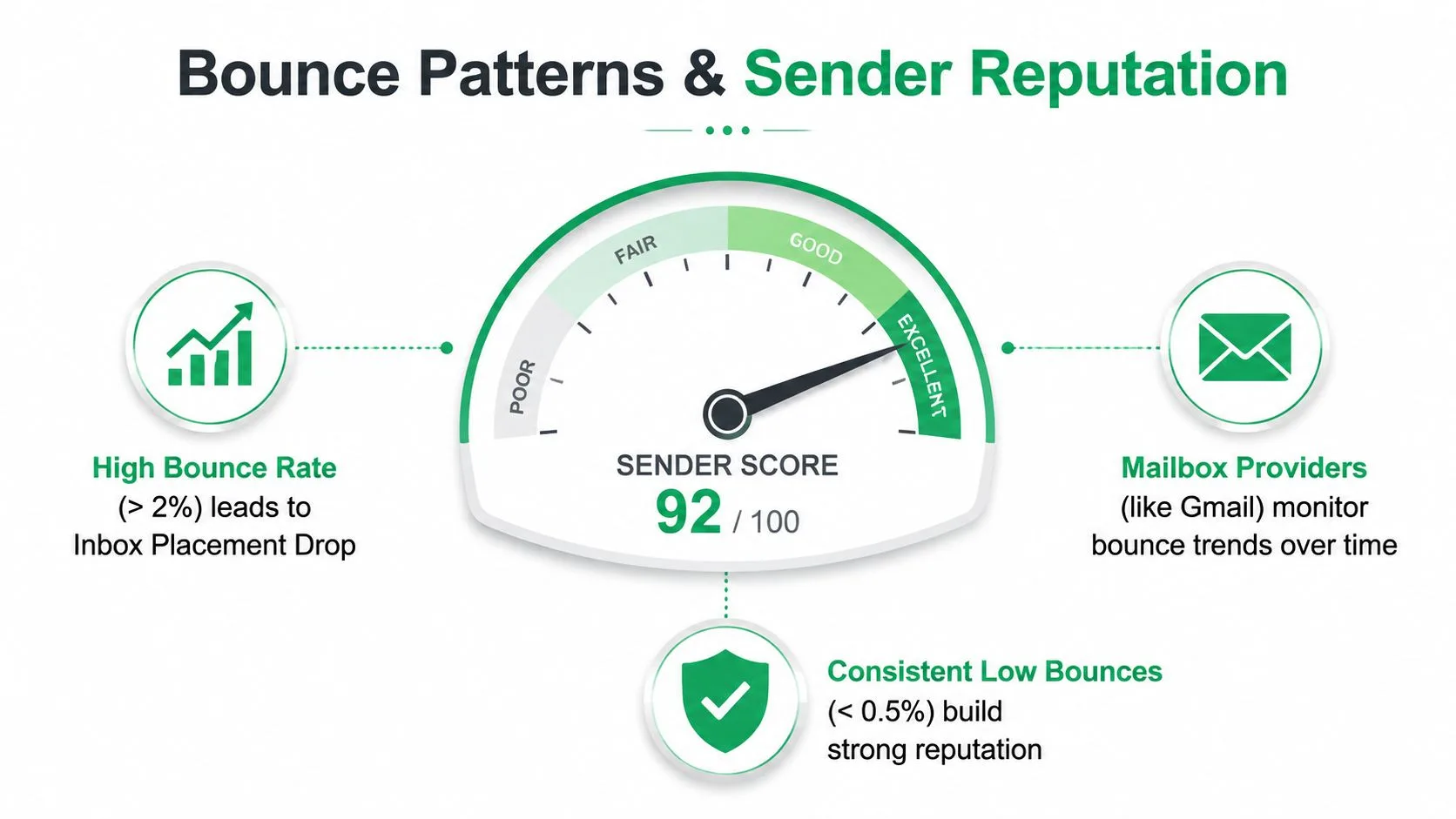
A demand-generation team also needs to protect the infrastructure behind its outreach. The demand gen guide for agencies offers broader planning context, but bounce handling remains a technical operating discipline that belongs in the campaign workflow itself.
For a deeper treatment of domain trust and sending behavior, use this resource on email sender reputation. The central point is simple: low hard-bounce activity supports clean list management, while repeated soft-bounce patterns deserve investigation before providers escalate their response.
Step-by-Step Bounce Remediation Playbook
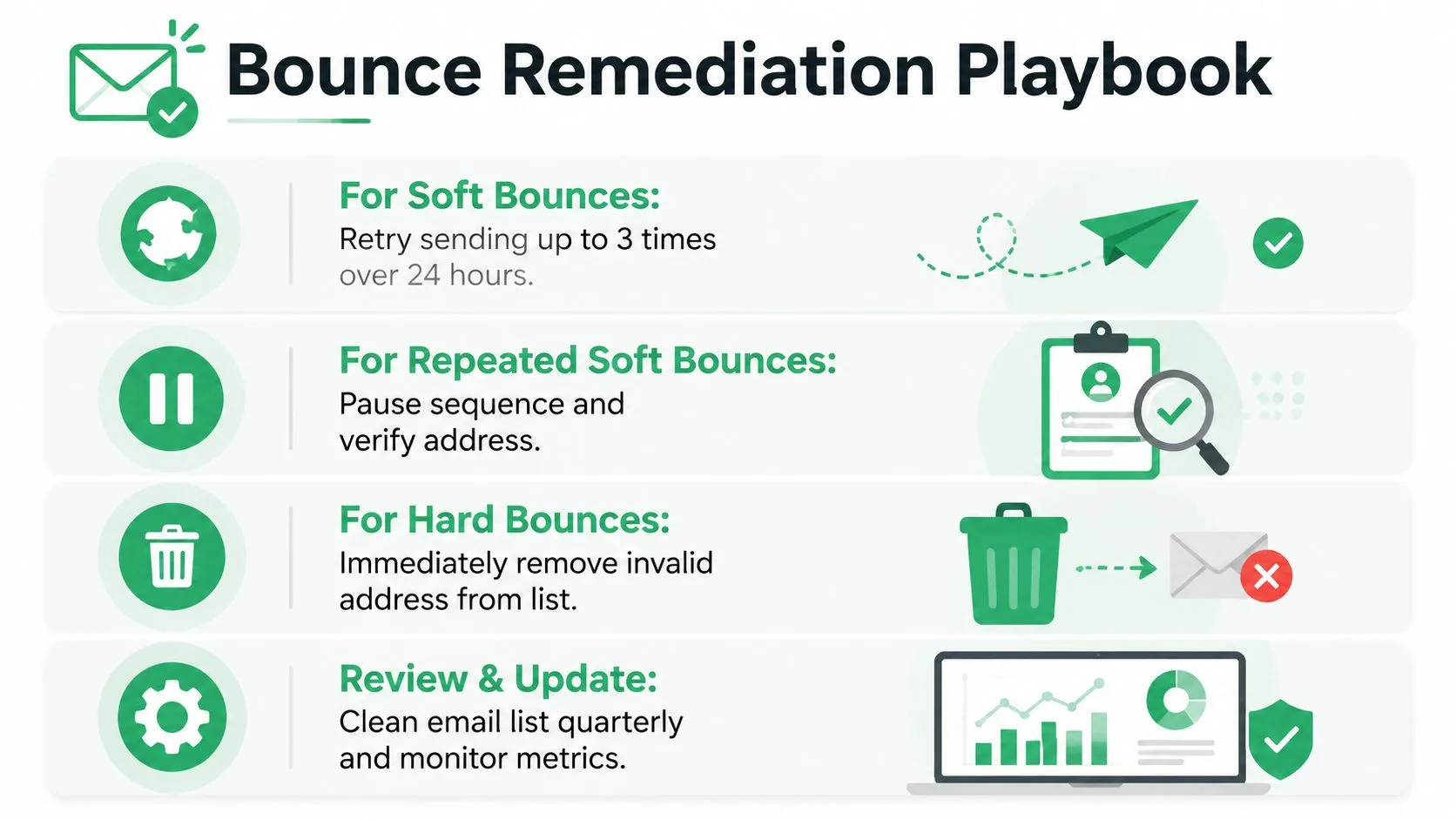
Bounce cleanup works best as a decision process, not a single delete action. Start with the server response, connect it to the recipient’s history, and then assign a next step that someone on the team can execute.
Step 1, classify the response
Separate 4xx transient failures from 5xx permanent failures. Suppress hard-bounced addresses after checking for an obvious typo. Don’t keep them in future sends while waiting for a result that the receiving server has already identified as permanent.
For soft bounces, record the reason. A full mailbox may justify a later retry. Greylisting may clear after the receiving system sees a normal retry. A temporary policy block or rate limit may require slowing the campaign and reviewing sender authentication and sending behavior before another attempt.
Step 2, apply a controlled retry window
Retrying is useful only when it has a ceiling. One documented Mailchimp policy converts a soft-bounce contact into hard-bounce cleanup after 7 soft bounces for inactive contacts and up to 15 soft bounces for contacts with prior subscriber activity. These thresholds aren’t universal laws, but they demonstrate why a team needs separate rules for low-engagement and previously active recipients.
Use your spreadsheet to track the count per recipient, not just the count per campaign. Pause a sequence when the same address repeatedly fails, even if it hasn’t reached your final suppression threshold. This prevents an automated follow-up from generating a new failure before anyone has reviewed the reason.
Step 3, remediate by cause
- Mailbox full: Pause the sequence and consider a later retry. Don’t treat continued failure as proof that the address is healthy.
- Greylisting: Allow the sending system’s retry behavior to operate, then verify whether a later delivery succeeds.
- Temporary policy block: Reduce sending pressure, inspect authentication and reputation signals, and avoid blindly repeating the same campaign.
- Hard rejection: Suppress the address immediately unless you have a confirmed correction.
Step 4, clean the campaign record
After each campaign, filter for hard bounces, repeated soft bounces, domain clusters, and rows with missing diagnostic details. Assign an owner to every held contact. A row that has no next action will eventually re-enter a send by accident.
Use this email-list cleaning workflow to make suppression and review part of routine operations rather than an emergency task.
Building a Bounce Management Policy for Long-Term Deliverability
A bounce policy should answer four questions before a campaign begins: What gets retried, for how long, after how many failures does a sequence pause, and when does suppression become permanent? Without written answers, one team member may retry a soft bounce indefinitely while another removes it after the first failure.
Time-based retry windows make the policy easier to enforce. Brevo documents a 36-hour retry period for soft-bounced messages. It also blocklists an address after five consecutive soft bounces in a campaign, according to its soft and hard bounce handling policy. That approach demonstrates an important principle, transient doesn’t mean unlimited.
Your policy should also preserve the reason code and distinguish recipient-level problems from domain-level patterns. Suppress permanent failures immediately, pause persistent transient failures, and review provider-wide deferrals before increasing send volume. Schedule regular list hygiene, document who can release a held contact, and keep suppression decisions consistent across campaigns.
Authentication belongs in the same operating plan. SPF, DKIM, and DMARC help receiving systems evaluate whether your messages are authorized and trustworthy. They won’t repair an invalid address, but they can help you investigate temporary policy-related deferrals instead of misclassifying them as harmless mailbox problems.
A practical policy is measurable without becoming complicated. Track the bounce category, response code, reason, attempt count, campaign, recipient domain, and final disposition. Review those fields after every campaign, then adjust retry and suppression rules when the evidence shows that a category is recurring.
Mail Merge for Gmail lets you send personalized campaigns from Gmail with recipient data in Google Sheets while writing per-row delivery and engagement statuses back to the sheet. Use Mail Merge for Gmail to keep bounce outcomes tied to individual contacts, pause risky rows, and clean your outreach workflow before repeated failures affect future sends.
Ready to send your first campaign?
Install Mail Merge for Gmail from the Google Workspace Marketplace and send up to 50 personalized emails per day for free.
Get started for freeMore reading
More from Comparisons

10 Email Scheduling Tools to Compare in 2026
Compare 10 email scheduling tools for sales, recruiting, events, and education, with pricing, privacy, deliverability, and Gmail workflow guidance.

Incoming Email Servers: A Practical Guide for 2026
Learn how incoming email servers work, compare IMAP vs POP3, and apply proven server settings to land more of your Gmail outreach in the primary inbox.

Top 9 YAMM Alternatives to Upgrade Your Email Marketing Strategy in 2025
Alternatives to YAMM: Discover why Mail Merge for Gmail is the #1 choice in 2025 to supercharge your email campaigns with ease and power.