


















Unsubscribe Management: A Practical Guide for Email Senders
Master unsubscribe management for email campaigns with this clear, practical guide covering legal rules, one-click headers, suppression lists, and Gmail
Unsubscribe rates more than doubled from 0.08% in 2024 to 0.22% in 2025 across MailerLite’s analysis of 3.6 million campaigns from 181,000 accounts, with North America reported at approximately 0.39%, according to Clean Email’s reporting on subscription fatigue. That change isn’t just a footer metric. It signals that recipients are making active decisions about message volume, relevance, and trust.
A reliable unsubscribe process gives people a clean exit before frustration turns into a spam complaint. It also protects the people who still want your emails by keeping your audience records accurate, your campaigns targeted, and your sending systems aligned.
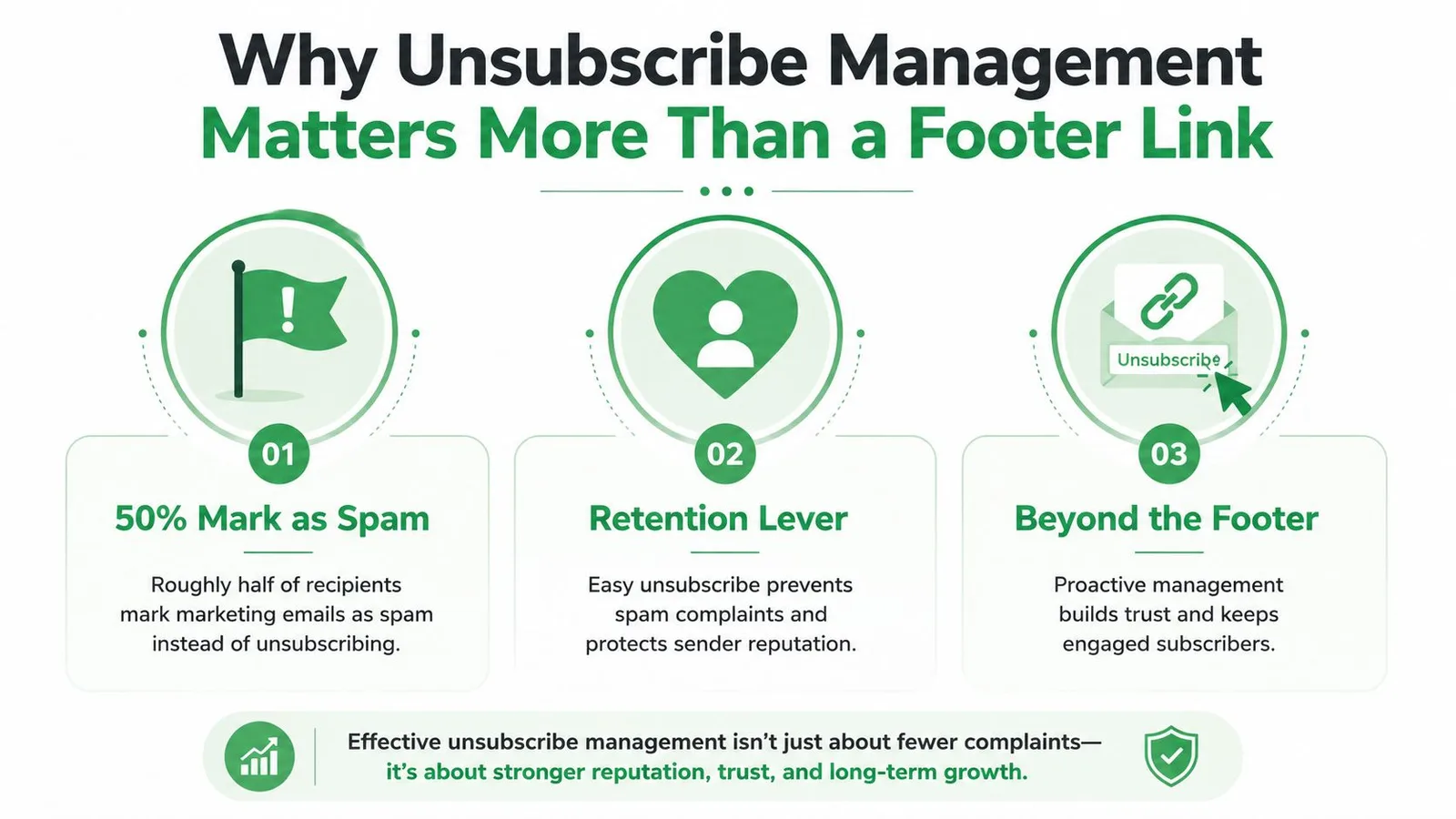
Why Unsubscribe Management Matters More Than a Footer Link
A footer link is only the visible handle on a much larger system. Unsubscribe management means letting someone opt out clearly, recording the request, confirming the right subscription change, updating suppression controls, and preventing that address from appearing in future sends.
Think of the process like a household shutoff valve. The footer link is the handle a person turns. The suppression list, email headers, CRM, spreadsheet, queued campaign, and sending tool are the pipes behind the wall. If the handle moves but one pipe stays open, the next campaign can still deliver the message the recipient tried to stop.
The complete opt-out chain
A sound workflow usually includes five connected actions:
- Visible choice: The email contains a readable unsubscribe link, not a hidden or misleading control.
- Mailbox signaling: The message includes the headers that let supported inboxes expose a native unsubscribe action.
- Confirmation path: The recipient sees that the request was accepted, without being forced through unnecessary friction.
- Suppression record: The address is added to the relevant suppression list immediately.
- Downstream propagation: CRM records, mail-merge sheets, scheduled campaigns, and other sending systems receive the same status.
The last step causes many failures. A contact can be suppressed in an email service provider while remaining active in a sales spreadsheet. A scheduled campaign may have already imported a CSV. A shared team account may continue sending because one group never received the updated status.
Operational rule: An unsubscribe isn’t complete until every system capable of sending to that person has received and enforced the suppression.
Poor hygiene creates a predictable cycle. People who can’t find an easy exit may use the spam button. Complaints can weaken deliverability, while repeated sends to people who opted out damage confidence in the sender. A clean process does the opposite. It removes disengaged recipients, preserves trust, and gives engaged subscribers a clearer reason to stay.
The practical question, then, isn’t “Where is our footer link?” It’s “Can one opt-out request stop every relevant future send?” That requires legal baselines, technical headers, preference design, cross-system synchronization, and regular testing.
The Legal and Platform Floor for Unsubscribe Compliance
Treat unsubscribe rules like a speed limit. You can build a more protective process, but you can’t operate below the minimum requirement. The legal and mailbox-provider baselines differ by market and platform, so teams need to separate what the law permits from what dependable operations should do.
In the United States, the CAN-SPAM Act took effect on January 1, 2004 and requires a functional opt-out mechanism for commercial email. Senders must honor requests within 10 business days, keep the opt-out method available for at least 30 days after the message is sent, and avoid extra conditions such as fees, logins, or requiring more than an email address, as summarized by Dorsey’s CAN-SPAM overview. The FTC compliance guide also explains that an opt-out mechanism must be able to process requests for at least 30 days after delivery.
Canada’s CASL reached a major enforcement milestone on July 1, 2014, when its first compliance deadline took effect for commercial electronic messages, including unsubscribe management and message-form requirements, according to Validity’s CASL explanation. That makes consent records and unsubscribe handling central operating data, not optional campaign decoration.
The requirements at a glance
| Requirement | CAN-SPAM (US) | CASL (Canada) | Gmail/Yahoo Bulk Sender (2024) |
|---|---|---|---|
| Clear unsubscribe method | Required | Required for commercial electronic messages | Expected for bulk sending |
| Processing timing | Within 10 business days | Must follow applicable CASL unsubscribe rules | Google guidance says requests should be processed within two days |
| Method availability | At least 30 days after the message is sent | Must remain usable as required by the regime | One-click signaling is expected |
| Extra friction | No fees, login, or excessive information | Avoid obstructive unsubscribe handling | Native one-click flow should be easy |
| Header signaling | Not the whole legal requirement | Not the whole legal requirement | List-Unsubscribe and List-Unsubscribe-Post support |
| Consent and records | Commercial-email rules apply | Consent tracking is a core obligation | Authentication and unsolicited-mail controls also apply |
Google says that starting in February 2024, senders delivering 5,000 or more messages per day to Gmail accounts must authenticate outgoing email, avoid unsolicited messages, and make unsubscribing easy. Google’s sender guidance also says large senders must offer one-click unsubscribe and process requests within two days. Gmail and Yahoo requirements are summarized in Oracle’s List-Unsubscribe documentation.
For teams reviewing their broader compliance stack, email compliance software can help centralize controls, but software doesn’t replace ownership. Legal compliance is the floor. Reputation depends on whether your systems stop sending.
How One-Click Unsubscribe Actually Works Under the Hood
One-click unsubscribe isn’t a special footer button. It’s a technical exchange defined by RFC 8058, where mailbox providers use message headers to send an automated opt-out request.
Start with the message headers. A compliant implementation needs a List-Unsubscribe header containing at least one HTTPS URI, plus a List-Unsubscribe-Post header with the value List-Unsubscribe=One-Click. The sender’s DKIM signature must cover both headers, as specified in RFC 8058.
The request flow
- The sender adds the headers. The message advertises an unsubscribe endpoint before the recipient interacts with the body.
- The inbox reads the signal. Gmail, Yahoo, or another supported client may display an unsubscribe control in the inbox interface.
- The client sends an HTTP POST. The request goes to the HTTPS endpoint without relying on cookies, a login, or redirects.
- The endpoint identifies the recipient. A token or signed identifier maps the request to the relevant contact and subscription.
- The suppression record changes. The sender adds the address to the appropriate suppression control.
- The endpoint returns success. A direct successful response confirms that the request was accepted.
The List-Unsubscribe header can also include a mailto method. That option opens a prefilled email and is useful as a fallback, but it isn’t the same as a true one-click POST flow. An HTTPS endpoint provides the cleaner automated path.
| Header Method | How It Works | Client Support | Recommended For |
|---|---|---|---|
mailto URI | Opens a prefilled email addressed to an unsubscribe mailbox | Varies by client and configuration | Fallback handling and lower-complexity programs |
| HTTPS URI | Gives the client a web endpoint for unsubscribe handling | Required for the RFC 8058 one-click pattern | Automated mailbox-provider controls |
HTTPS plus List-Unsubscribe-Post | Lets the client send the one-click POST request | Supported by providers that implement the standard | Bulk and compliance-sensitive sending |
Gmail surfaces an unsubscribe control when the sender includes both headers and supports an HTTPS POST endpoint, as described in Google one-click unsubscribe guidance. Providers don’t all render the control identically. Gmail, Yahoo, and Apple Mail may interpret headers differently, so test the actual message in the inboxes your audience uses.
The developer brief is straightforward: accept POST requests, validate the token, update suppression, avoid redirects, and return a direct success response within the sender’s service-level target. The body link still matters. Header signaling reduces friction, while the visible link explains the choice to people who inspect the email itself.
Choosing Between One-Click, Body Links, and Preference Centers
These mechanisms solve different problems. Treating them as interchangeable usually produces a weak experience for both the recipient and the sender.
One-click unsubscribe is the fastest exit. A recipient can act from the inbox without opening the message or navigating to a page. It’s especially useful for bulk and promotional streams, where a person may already know they want no more messages from that list. The tradeoff is limited context. You may learn that the recipient left, but not whether the problem was frequency, topic, timing, or poor targeting.
A body-link unsubscribe page remains the dependable workhorse. It can carry your branding, confirm the request, explain which subscription changed, and offer a clear fallback when the inbox provider doesn’t show a native control. Optional feedback can help your team diagnose fatigue, but don’t make a survey mandatory. A person who has asked to leave shouldn’t have to justify the decision.
A preference center serves the subscriber who wants less, not necessarily nothing. It can offer topic choices, lower frequency, or separate product and promotional streams. That preserves useful consent while giving the recipient control. It must still include a direct unsubscribe route that doesn’t require a login or a lengthy form.
| Mechanism | Best For | Recipient Experience | Sender Data Captured | Compliance Coverage |
|---|---|---|---|---|
| One-click headers | Bulk and promotional mail | Fast action inside the inbox | Opt-out event and relevant stream | Adds mailbox-provider signaling |
| Body-link page | Most email programs | Visible, explainable, branded exit | Opt-out, selected list, optional feedback | Provides the universal in-message route |
| Preference center | Relationship-based communication | Reduce frequency or change topics | Topic, cadence, and subscription choices | Supports control when paired with direct opt-out |
Use a practical decision rule. Bulk mail leans toward one-click, relationship mail benefits from a preference center, and every message should retain a visible body link as the universal fallback. Offering alternatives can reduce unnecessary departures, but alternatives must never obstruct the direct exit.
Keeping Suppression Consistent Across Every Sending System
A suppression entry that exists in only one tool is incomplete. The recipient doesn’t care which system caused the next message. They experience your organization as one sender, so every system must enforce the same decision.
The propagation path usually begins with the unsubscribe endpoint or body page. The email platform records the opt-out, the CRM receives a status change, the mail-merge sheet marks or removes the row, and queued or scheduled campaigns recheck the address before delivery. Gmail and Yahoo aren’t separate suppression databases you can ignore. Their inbox controls create requests that your own systems must honor.
A diagnostic checklist for the sending chain
| System | What Must Update | Risk If Skipped | Sync Method |
|---|---|---|---|
| Inbox-provider action | The POST request reaches a working endpoint | The recipient sees a control but remains subscribed | HTTPS endpoint monitoring and request logs |
| Email platform | Relevant list or global suppression status | A later campaign sends from the same platform | Native suppression event or API sync |
| CRM | Contact status, subscription field, or communication preference | Sales or service staff re-add the address | Near-real-time field synchronization |
| Mail-merge sheet | Row is flagged or excluded from the send range | A spreadsheet-based campaign sends again | Formula, webhook, or controlled import |
| Scheduled campaign | Queued recipients are rechecked | A previously built audience bypasses the new suppression | Pause, refresh, and validate before release |
| Shared team account | All senders receive the same suppression state | One team opts out while another keeps sending | Central master list and role-based process |
The most common gaps are practical. A campaign may have loaded a CSV before the opt-out arrived. A CRM-to-platform sync may run later than the sending window. A shared service account may let one team suppress a contact while another team uses an untouched copy of the list.
Send-time safeguard: Check suppression immediately before dispatch, not only when someone builds the audience.
Teams should document one master suppression source and define how every tool consumes it. Suppression list management is useful only when the list governs future sends rather than serving as a historical record.
Review the chain on a recurring schedule. Test a real opt-out from the body link and the inbox control, inspect each system, and verify that a scheduled send can’t bypass the result. That audit finds failures before a recipient has to report them.
Putting Unsubscribe Management to Work in Mail Merge for Gmail
Small teams can build a dependable workflow without waiting for a large marketing-operations project. Start with the message itself, then connect the opt-out event to a suppression sheet that controls every later merge.
First, enable the unsubscribe footer toggle in the email template. Every merged message should carry a visible body link so recipients have a clear route out. Keep the language direct and the link readable. If you’re still setting up the campaign workflow, mail merge from Google Sheets provides the basic path for importing recipients, preparing a template, and sending from the spreadsheet.

Build the suppression sheet
Create a dedicated sheet rather than hiding unsubscribed rows in an old campaign tab. Store the address, request timestamp, source campaign, subscription type, and processing status. A confirmation page or webhook can write the event into that sheet, giving the team an auditable record.
Use a formula-driven exclusion in the next merge. For example, an IF or FILTER formula can compare the active audience against the suppression sheet and pass only eligible rows to the send range. The formula isn’t the control by itself. The send process must use the filtered range, and someone should verify the result before dispatch.
A scheduled campaign needs special handling. Pause the trigger, remove or flag suppressed rows, refresh the audience, and restart the schedule only after the filtered list has been checked. Don’t assume that changing the source sheet automatically changes recipients already held in a queue.
The Mail Merge for Gmail workflow can sit alongside a CRM, but the CRM needs the same status. Mirror each suppression event back to the contact record, and make sure another team can’t export the address into a fresh campaign without the suppression check.
Use this short review before sending:
- Footer enabled: The body link is present and readable.
- Suppression connected: The opt-out event writes to the designated sheet.
- Merge filtered: The active range excludes suppressed addresses.
- Scheduled sends reviewed: Queued recipients were refreshed.
- CRM mirrored: The contact record reflects the same decision.
A short test can expose most problems. Use a controlled address, click the link, inspect the sheet and CRM, then stage a scheduled merge and confirm the address is excluded before the campaign resumes.
Common Unsubscribe Mistakes and How to Fix Them
Most failures aren’t dramatic outages. They’re small hygiene gaps that survive because each team assumes another system handled the request.
A removed spreadsheet tab can leave an older export active. A manual “not spam” request can disappear in a shared inbox. A footer rendered in tiny, low-contrast text can technically exist while remaining difficult to use. Gmail category collapse can reveal fatigue even when a campaign’s visible complaint volume looks stable.
| Common Mistake | Detection Signal and Fix |
|---|---|
| Suppression list drift | Compare CRM, platform, and spreadsheet statuses. Run a nightly or scheduled reconciliation and retain an audit log. |
| Manual opt-out requests get lost | Search support and sales inboxes for opt-out language. Route every request into the central suppression workflow. |
| Footer is hard to see | Review rendered messages on desktop and mobile. Increase contrast, spacing, and clarity without adding extra steps. |
| Category collapse is ignored | Compare engagement and complaint patterns by segment. Reduce frequency or improve targeting for fatigued groups. |
| Unengaged contacts are re-added | Check imports against the master suppression list. Run a segment-level re-permission campaign rather than silently restoring access. |
| Queued campaigns bypass updates | Reopen scheduled audiences before release. Pause the send, refresh the data, and verify suppression at dispatch. |
A rising opt-out rate can indicate that the audience wants a different cadence, not that the unsubscribe button needs to be hidden. Offer topic or frequency choices where appropriate, but don’t use them to delay someone who wants a complete exit.
The fix is recurring ownership. Assign one person to review suppression mismatches, test the footer, inspect scheduled sends, and confirm that imports respect prior opt-outs. A one-time cleanup makes a list look healthy. A repeatable workflow keeps it healthy.
Mail Merge for Gmail lets teams send personalized campaigns from Gmail and Google Sheets while using an unsubscribe footer, tracking recipient status, and excluding opted-out addresses from future merges. Visit Mail Merge for Gmail to connect your spreadsheet-based outreach with a practical suppression workflow and review the available sending and scheduling features.
Ready to send your first campaign?
Install Mail Merge for Gmail from the Google Workspace Marketplace and send up to 50 personalized emails per day for free.
Get started for freeMore reading
More from Guides
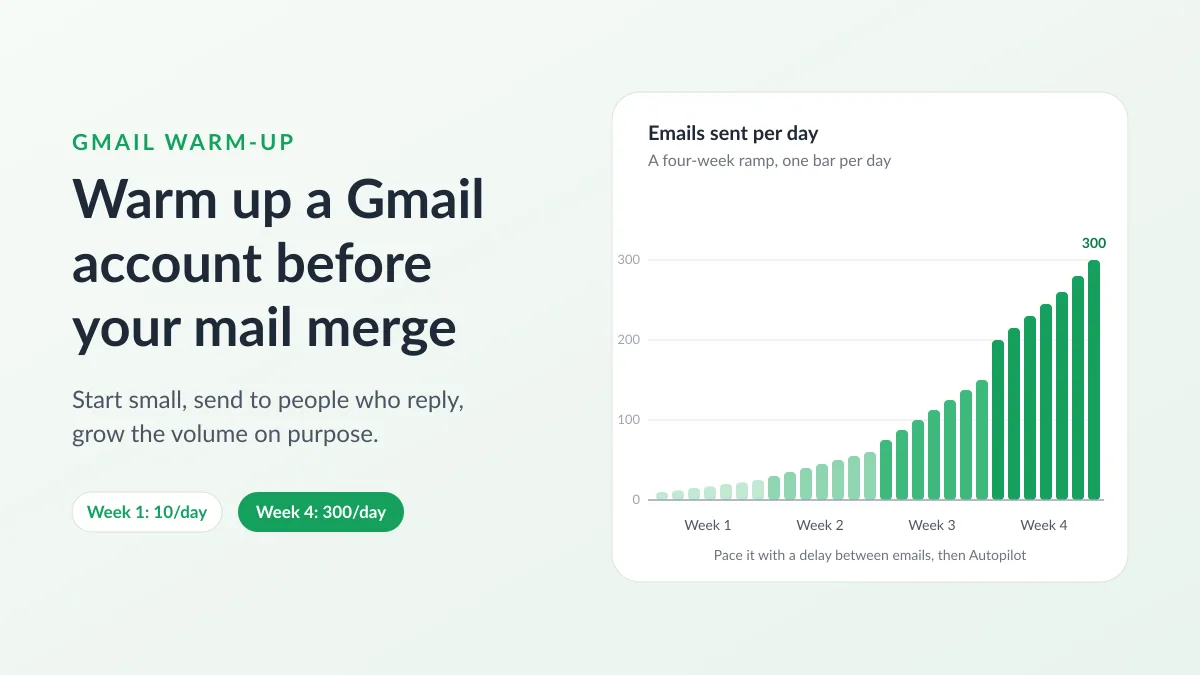
Gmail Warm-Up: How to Warm Up a Gmail Account Before a Mail Merge
Gmail warm-up explained with Google's own ramp-up rules: who needs it, a four-week manual schedule from Google Sheets, and how Mail Merge's warm-up works.
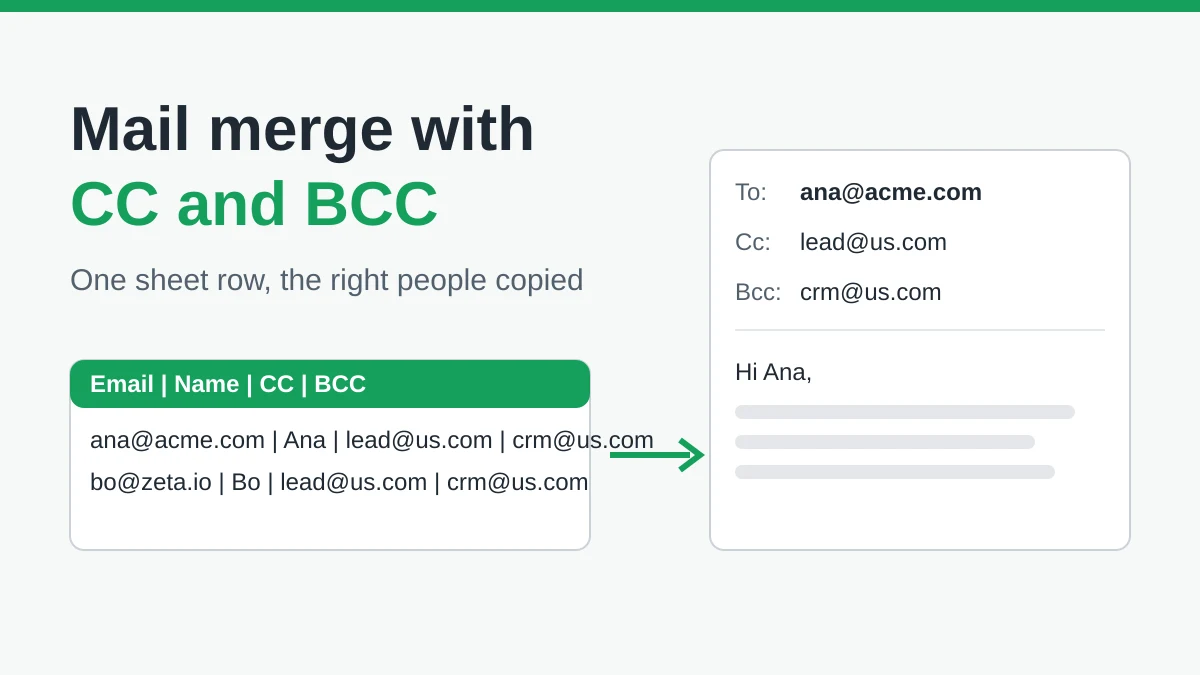
Mail Merge with CC and BCC in Gmail: Copy the Right People on Every Email
Learn how to run a mail merge with CC and BCC from Google Sheets, set up the columns, preview the result and see how copied recipients count toward your daily quota.
Gmail Sending Limit Reached: What It Means and How to Finish Your Campaign
Hit the Gmail sending limit reached error? Learn the real daily limits, when you can send again, and how to split a mail merge into safe daily batches.