


















Email Subject Line Testing: A Practical A/B Playbook
Master email subject line testing with a practical A/B playbook covering hypothesis, sample size, metrics, and winning templates to test today.
You’re staring at a scheduled send, and the subject line still feels like a guess. The body copy is polished, the offer’s decent, but the line in the inbox is doing all the first-contact work, and that’s the part many leave to taste.
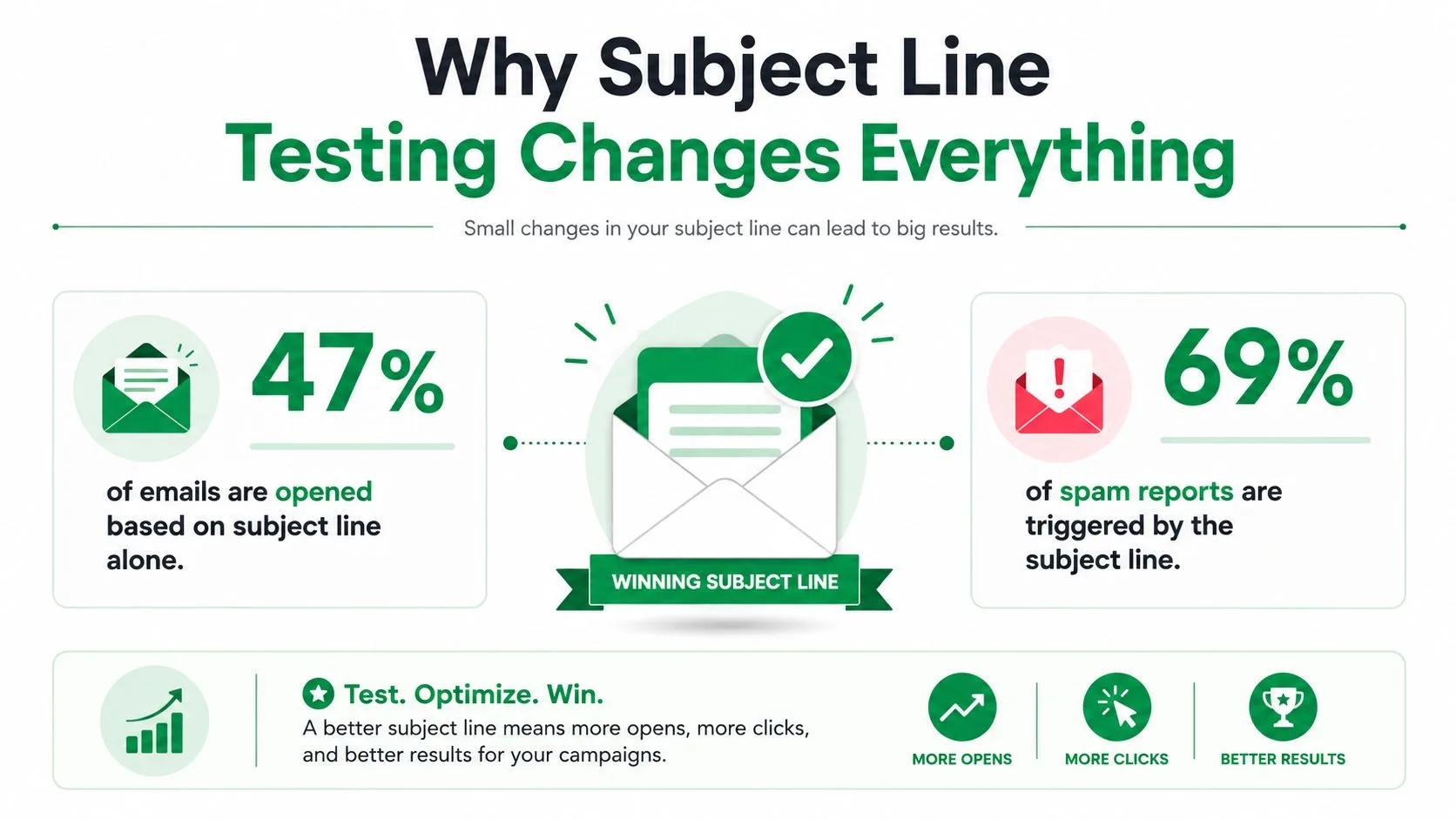
That’s a mistake. Subject lines shape whether people open, ignore, or report an email, and the numbers behind that are blunt. In one widely cited benchmark, 47% of recipients said they decide whether to open based on the subject line alone, and 69% said they report email as spam based on the subject line alone, with personalized subject lines also showing a 22% higher open likelihood in that sample and a name in the line moving opens from 15.7% to 18.3% in the sampled data Invesp’s email subject line benchmark.
If you send at volume, those small shifts are not cosmetic. A sales rep chasing replies, a recruiter nudging candidates, and a small business owner pushing a campaign tomorrow all feel the same pain, the inbox decides too much before the recipient reads a single sentence. A practical campaign doc like the one in the Alignmint email marketing docs helps with planning, but the subject line still deserves its own controlled test, because that’s where the first measurable lift usually lives.
Practical rule: treat subject line testing as a throughput play, not a branding exercise. A tiny improvement repeated across hundreds of sends compounds faster than most teams expect.
The rest of the job is simple to describe and hard to do well, write one defensible hypothesis, isolate a single variable, choose the right split, pick a win metric that isn’t lying to you, and roll the winner into a repeatable Gmail workflow without burning the list.
Why Subject Line Testing Changes Everything
A subject line can do the wrong kind of work before the email even opens. It can disappear in a crowded inbox, sound too vague to earn attention, or promise something the body never delivers. Controlled testing matters because it replaces guesswork with a comparison you can defend.
That matters whether you are sending sales follow-ups, candidate outreach, customer updates, or a newsletter. The offer can be solid, the copy can be clean, and the timing can be reasonable, but if the inbox line does not give someone a reason to click, the rest of the message never gets a fair read. In practice, deliverability work and list hygiene help, but the subject line is still one of the few levers you can change quickly and measure cleanly.
The inbox only gives you one shot
For a salesperson sending follow-ups, a recruiter reaching out to candidates, or a nonprofit sharing an update, the subject line is the headline, the filter, and often the only thing a busy person scans before deciding. It is also the fastest place to test intent. A line that says exactly enough can outperform a line that tries to sound clever.
The mistake I see most often is treating subject line choice like a creative vote. One teammate likes a pun, another prefers urgency, someone else wants personalization, and the final version is the compromise. That is committee writing, not optimization.
A better pattern is to test the angle itself. Ask whether your audience responds more to clarity, curiosity, specificity, or personal relevance, then run the test so the answer comes from behavior instead of opinions. If you are sending through a workflow like the Alignmint email marketing docs, the subject line is still the part that should be isolated first, because it is the easiest variable to control before you build the rest of the send.
Why small lifts matter more than practitioners expect
Subject line testing stops being a vanity project the moment the list is large enough to show a real difference. If you send a lot of mail, even a modest improvement in opens, replies, or downstream conversions can change the output of the whole program. The effect shows up fast in cold outreach and customer campaigns, where the subject line is the first gate.
That is also why “good enough” subject lines usually are not. The line you send tomorrow may be fine, but the tested line may be materially better, and you will not know unless you isolate the difference. In Gmail workflows that use Mail Merge for Gmail, the payoff is practical. You can split a send, compare the response, and roll the stronger line into the next batch without changing the rest of the email.
A winning subject line is rarely the flashiest one. It is the one that survives a controlled comparison.
Use the benchmark numbers as a reminder that there is upside, not as a promise. Then write one clear hypothesis, test one variable, and judge the result by reply rate and downstream conversion, not by opens alone.
Building a Testable Hypothesis From Real Data
A subject line test starts to matter when it reflects a real campaign problem, not a guess pulled from nowhere. In practice, that means using patterns from your own sends, whether you’re testing cold outreach, newsletters, or customer campaigns, and then turning that pattern into a claim you can prove or disprove.
Start with one belief, not five
Pick one variable and defend it. That variable might be personalization, length, urgency, a question, a statement, or sender name. Keep the from address, preheader, email body, links, and send time identical so the result can be traced back to the subject line itself, not to a dozen moving parts.
A usable hypothesis sounds like this, “Personalizing subject lines with the recipient’s first name will lift reply rate by more than 10% relative to a generic line for our B2B follow-up sequence.” The important part isn’t the wording, it’s the specificity. You can tell what changed, what success looks like, and what audience you’re testing.
Practical rule: if you can’t explain the hypothesis in one sentence, the test is probably trying to answer too many questions.
A test without a hypothesis leaves you comparing two guesses while tracking sits idle. The strongest subject line tests start with a reason to expect one version to perform better, even if that reason comes from a pattern you have seen in past campaigns.
Use a 20/80 holdout when the list is big enough
For larger lists, a clean way to test is to send two variants to an initial 20% split, wait for stable results, then roll the winner to the remaining 80%. That structure keeps most of the list available for the better line while still giving you a controlled comparison.
Here’s the version that breaks tests most often. A team changes subject line text, preview text, sender name, and send time all at once, then declares the winner after a few early opens. The data looks exciting, but the conclusion is useless because you can’t tell which change moved the result.
A simple pre-send checklist keeps that from happening:
- Choose one variable: Test personalization, length, or tone, not all three.
- Freeze the rest: Keep the body, links, and send time the same.
- Write the win metric first: Decide whether reply rate, click-through rate, or downstream conversion matters before launch.
- Watch for confounding: If one version also hit a different audience or time window, discount the result.
A careful hypothesis also makes the post-test conversation easier. Instead of saying a line “felt stronger,” the team can say why it won and what principle should be carried into the next send. In a Mail Merge for Gmail workflow, that kind of discipline lets you test one subject line against another, then reuse the winning line in the next batch without guessing what changed.
Choosing the Right Test Design for Your List
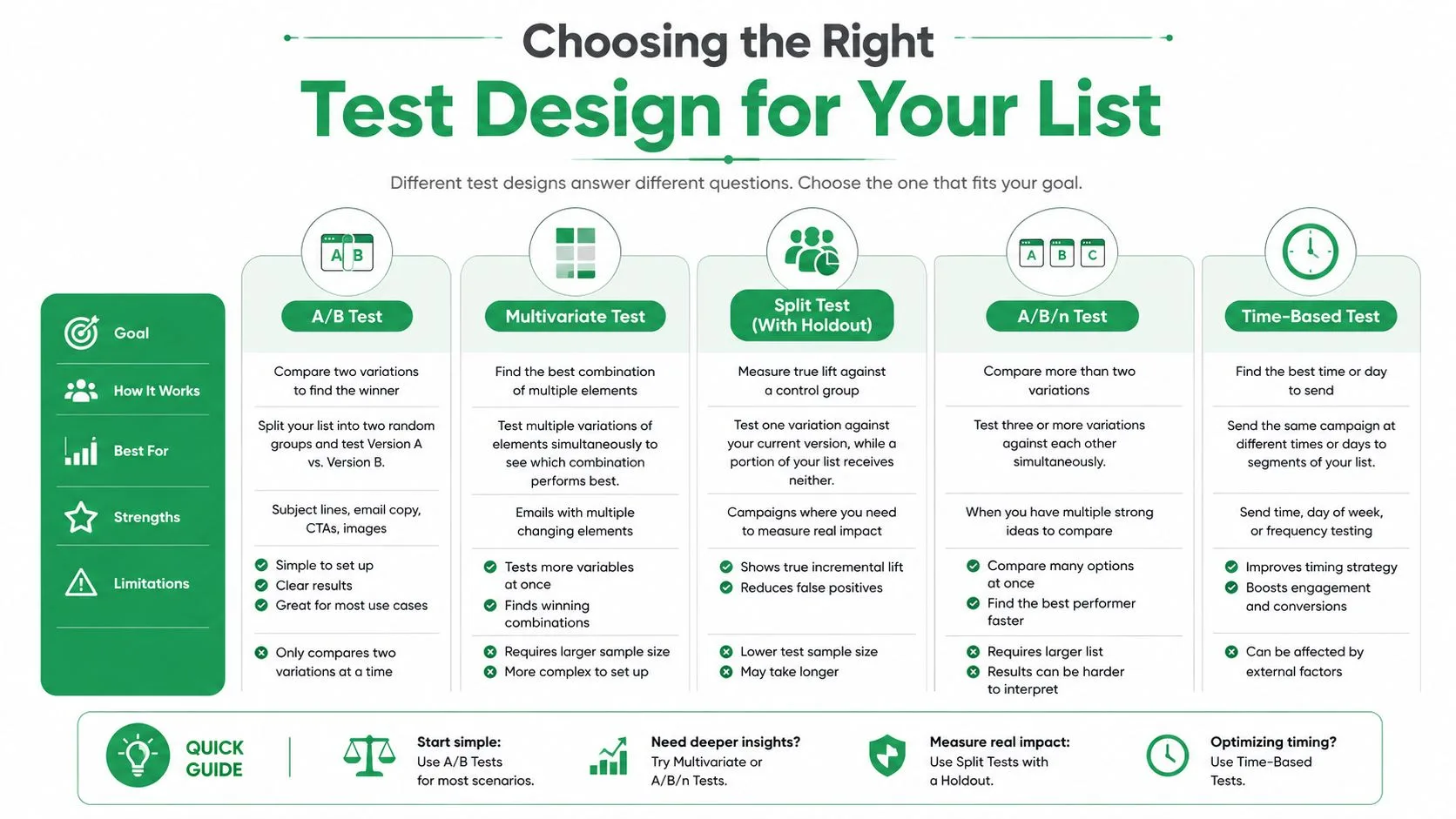
Not every list deserves the same test shape. A cold outreach sequence with a few hundred contacts needs a different structure than a newsletter sent to a broad audience, and a long-running customer list can support a more conservative rollout.
Small lists need clean A/B splits
If you’re working with under roughly a thousand contacts, a simple A/B split is usually enough. It keeps the comparison easy to read and avoids pretending you’ve run a bigger experiment than your list can support. The trap is overcomplicating the setup and then underpowering both variants.
That’s where a lot of good teams get impatient. They check too early, see a tiny lead, and move on before engagement stabilizes. A defensible read window is 24 to 72 hours, because B2B audiences often take longer to react than consumer audiences, and many results look different after the first burst of activity settles.
Newsletters and larger lists can handle more variation
If you’re testing a newsletter subject line, an A/B/n structure can make sense. Two or three contenders can compete at once when the audience is large enough and the team wants to compare several angles in a single send. That’s useful when you’re debating whether the line should be curiosity-led, benefit-led, or personalized.
For established lists, the 20/80 holdout is often the cleaner choice. You preserve most of the audience for the winner and still get a controlled sample, which matters when the cost of a bad line is not just lower opens but lower downstream activity.
Randomization is not optional
Both variants need to hit inboxes in the same window. If one version goes in the morning and the other in the afternoon, you’ve mixed in timing effects with subject line effects. The same goes for random assignment, because a non-random split can make one segment look stronger because it was easier to win.
A useful way to think about it is this. The test is only as trustworthy as the thing you didn’t change. Keep the timing identical, keep the audience randomized, and give the test enough time to breathe before you declare a winner.
Picking a Win Metric You Can Actually Trust
A subject line can look strong in the inbox and still miss the point. Open rate is the default metric because it is easy to see, not because it always reflects campaign quality. In a privacy-heavy environment, opens can be noisy, and a subject line that wins on opens alone can still lose if it drags down clicks, replies, or revenue.
Match the metric to the campaign
For cold outreach and sales sequences, reply rate or positive reply rate is usually the more honest win metric. If the goal is a conversation, a subject line that raises opens but produces no replies is not doing the job. For newsletters and product updates, click-through rate often deserves a closer look, because a line can inflate opens while weakening downstream engagement.
Open rate still has value as a directional signal, especially when you compare one campaign against your own past sends over time. It becomes a weak single source of truth if you care about qualified response or conversion. That is why the metric should be chosen before launch, not after the numbers start leaning your way.
If you need a practical way to inspect open data inside Gmail, how to track email opens in Gmail gives you the mechanics without forcing you into a separate stack.
Don’t call a winner too early
The threshold matters. A common bar is 95% confidence, and another practical rule is a p-value of 0.05 or lower before declaring a winner. Those are different ways of saying the same thing, the difference you see should be unlikely to come from random noise.
A lot of tests get ruined by impatience rather than bad copy. Someone sees a leading open rate after a few hours and ships the winner, even though the gap could flatten or reverse once more of the list engages. Waiting long enough for results to stabilize matters more than squeezing the result into a dashboard at lunch.
If your metric is open rate, ask whether it is actually measuring interest or just mailbox behavior. If it is not a reliable proxy, choose a better one before you launch.
Keep opens in context, not in control
Here is the hierarchy I use in practice. Opens are fine as a supporting signal, clicks help for many newsletters, replies matter for prospecting, and conversion matters when the email is part of a direct path to revenue or action. The right metric depends on what the campaign is supposed to do.
That framework keeps the team honest. It also prevents the common mistake of celebrating a prettier subject line that does not improve the business outcome.
Running the Test Inside Gmail With Mail Merge
The point of testing is not to build a theory doc that sits in a folder. It is to get a better email out the door this week, with a workflow the team can run without jumping between tools.
Set up the test in the sheet first
Start with a Google Sheet that holds your recipient list and the fields you need for personalization. Then create two subject line variants that change one thing only, maybe a generic line versus one that uses a merge tag like {{First Name}}. Keep the body, send time, and audience the same so the comparison stays clean.
From there, mail merge tools that work inside Gmail, including Mail Merge for Gmail, can pull recipient data from Sheets, send personalized campaigns, and write engagement statuses back into the spreadsheet. If you want the setup steps in more detail, use a guide to mail merging from Google Sheets and build the test in the same place you plan to review it. That keeps the test setup and the result in one sheet, which makes reporting easier to share and easier to audit later.
Send a small test cell before the full rollout
Use the first slice of your audience for the controlled comparison. If you are using a holdout approach, send the two variants to the initial test group, wait for results, and then push the winner to the remainder. If the list is smaller, a straight split works as long as the groups are randomized.
The practical advantage is speed. You do not need a new dashboard to understand what happened. The sheet can show rows moving through Sent, Opened, Clicked, and Replied, which makes it easy to compare the variants side by side without hunting through a separate analytics stack.
Read the result the same way you sent it
If the winning line gets more opens but fewer replies, it did not win for a sales sequence. If it gets fewer opens but stronger replies or clicks, that may be the better line. The metric has to match the goal, or the test turns into a vanity exercise.
A clean Gmail workflow also makes the rollout simpler. Once the winner is clear, the team can swap the subject line in the remaining send and keep the rest of the sequence intact. That kind of operational simplicity keeps testing alive after the first campaign.
Subject Line Templates You Can Test This Week
Deadline-driven writing usually turns into recycled phrasing. Templates help because they give you a clean baseline to test against a live audience, not because they are clever.
Cold outreach and follow-ups
For cold email, the strongest subject lines are usually plain, specific, and short enough to survive mobile truncation. One benchmark-focused guide places the sweet spot at 36 to 50 characters, or about 6 to 10 words, and another recommends keeping subject lines under 50 characters for mobile visibility, with the first 33 characters doing the heavy lifting on smaller screens Zeliq’s subject line guide. If you want a deeper list of starting points for outbound, a guide to cold email subject lines is a useful reference before you build variants.
Try lines like:
- Quick question about {{Company}}
- Following up on your team’s hiring plan
- Idea for reducing manual follow-up
Personalization is worth testing, not assuming. In one sampled benchmark, adding a recipient’s name increased open rate from 15.7% to 18.3% Invesp’s subject line benchmark. That does not mean every list responds the same way, but it is enough to justify a direct test.
Newsletters, invites, and customer updates
Newsletters can carry more curiosity as long as the line still tells readers what they will get. Event invites usually need clarity first, then a reason to care. Customer updates work best when the message is direct and low-friction.
Try these as starting points:
- What changed in this month’s update
- You’re invited to our live session
- Your account update is ready
Question versus statement is worth testing here because the result depends on audience context, not theory. A question can create a curiosity gap, while a statement can feel cleaner and more trustworthy in a crowded inbox.
Practical rule: if the subject line cannot stand on its own on a phone, shorten it before you test it.
Keep the template library tied to campaign type. A line that works for a customer announcement may fall flat in a sales sequence, and a test only teaches something useful if those contexts stay separate.
Turning One Win Into a Repeatable Optimization Loop
A single winning subject line is not a strategy. It’s one data point, useful because it tells you what worked in a specific context, on a specific list, at a specific moment.
The next move is to log the principle behind the win, not just the exact phrase. If the winner was short and direct, write that down. If personalization beat a generic line, capture the underlying pattern. That matters because a line that works once may stop winning after repeated use, especially when inboxes get crowded and fatigue sets in.
Keep a running principle log
A simple Google Sheet can track three things after each send, the subject line, the principle it represents, and the outcome metric you chose. That makes it easier to avoid recycling a line just because it had a good week six months ago. It also gives the team a shared memory of what performed.
Use a quarterly review rhythm. Scan past winners, retire lines that feel stale, and plan one new A/B test per campaign where possible. When a line keeps underperforming against the same metric, stop forcing it back into rotation.
Watch for fatigue, not just wins
The most overlooked issue in subject line testing is that a winner can age badly. A line that once drove strong replies can lose edge as recipients have seen similar patterns again and again. That’s why the principle behind the line matters more than the phrasing itself.
If the team keeps shipping new angles, the inbox stays fresher. If it keeps reusing the same “winning” formula, performance usually starts to flatten, then drift downward. The habit to build is not “find the best line once,” it’s “keep asking which version would have done better.”
The marketers who stay ahead aren’t guessing less. They’re testing more cleanly, logging the lesson, and making the next send smarter than the last one.
If you want to run subject line tests without leaving Gmail, Mail Merge for Gmail gives you personalized sends from Google Sheets with per-row tracking for opens, clicks, and replies. It’s a practical fit for the same workflow covered here, so you can test a subject line, read the result in your sheet, and roll the winner forward with less friction. Visit Mail Merge for Gmail and try it on your next campaign.
Ready to send your first campaign?
Install Mail Merge for Gmail from the Google Workspace Marketplace and send up to 50 personalized emails per day for free.
Get started for freeMore reading
More from Guides
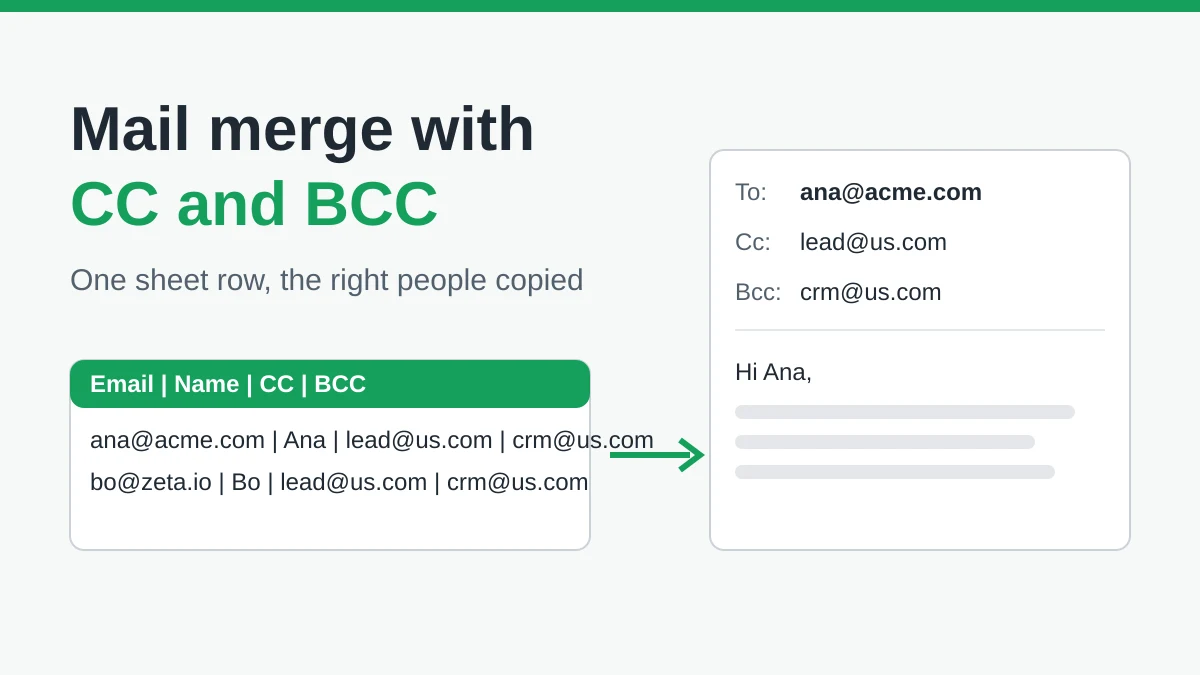
Mail Merge with CC and BCC in Gmail: Copy the Right People on Every Email
Learn how to run a mail merge with CC and BCC from Google Sheets, set up the columns, preview the result and see how copied recipients count toward your daily quota.
Gmail Sending Limit Reached: What It Means and How to Finish Your Campaign
Hit the Gmail sending limit reached error? Learn the real daily limits, when you can send again, and how to split a mail merge into safe daily batches.
Personalized Email Gmail: The Complete Guide
Master your personalized email Gmail workflow. Learn to merge Sheets data, track opens, and scale one-to-one outreach without leaving your inbox.