


















10 Follow Up Email Subject Line Examples
Discover 10 follow up email subject line examples for sales, reminders, networking, and recruiting, plus personalization and A/B testing tips.
What should a follow-up email subject line do besides announce that you’ve sent another email? If it only says “checking in,” it forces the recipient to reconstruct the context and guess why your message deserves attention. A stronger line reflects where the recipient is in the conversation and what you want to happen next, whether that means answering a sales question, confirming an event, continuing a networking exchange, or checking an application status.
The examples below are starting points, not guaranteed open-rate formulas. Subject lines work differently across audiences, sequence stages, and inboxes. Large-scale B2B analysis found that 2–4-word subject lines reached 46% opens, while question-based lines also reached 46%, and personalized lines produced 46% opens versus 35% for generic lines in a dataset of 5.5 million emails (Belkins’ analysis of B2B cold-email subject lines). Use those findings as direction, then test your own audience.
A practical workflow is simple: add only relevant personalization, send a controlled comparison, and use opens, clicks, replies, and unsubscribes to refine the next message. Mail Merge for Gmail may fit this workflow for personalized, trackable campaigns, but verify product-specific details on the official Mail Merge for Gmail website. For broader guidance on campaign fundamentals, see these Big Moves Marketing email tips.
1. The Simple Re-Engagement Subject Line
When the recipient remembers the earlier conversation but has not acted, a clear re-engagement line makes reopening the thread easy. It identifies the previous context and signals why a reply is useful now.
Useful starting points include:
- Following up on my previous email
- Quick question about your needs
- [FirstName], I wanted to reconnect
Adapt the wording to the recipient’s intent. For sales or business development, connect the subject to the unresolved issue the prospect described. “Quick question about your needs” works better when the body addresses that implementation problem instead of starting a new pitch. For a customer reminder, name the specific task, request, or support issue. A recruiter could use “Following up on the [Role] conversation,” while a networking contact may respond better to “[FirstName], I wanted to reconnect after [Event].”
For additional outreach guidance, see these resources on how to write emails that earn replies.
Keep the re-entry easy
Use Mail Merge for Gmail to insert names or other fields from a Google Sheet only when the data is accurate. A correct name adds relevance. A wrong company, outdated role, or forced reference damages trust.
The product’s Mail Merge for Gmail subject-line guidance can help when you build personalized campaign templates. Keep the subject concise, preview it on mobile, and divide your Google Sheets list into comparable segments. Send one version to one segment and another to a similar segment, then compare opens, clicks, replies, and unsubscribes without changing several variables at once.
Practical rule: Re-engagement should reduce friction. Make the earlier conversation clear enough that the recipient can answer without reconstructing it.
2. The Question-Based Subject Line
A genuine question can turn a follow-up from a broadcast into an invitation to think. It works best when the question reflects something the recipient has already said, published, or plausibly experienced. A generic question still feels like a pitch with a question mark attached.
Try variations such as:
- What’s holding back your team’s productivity?
- [Company], still struggling with [pain point]?
- Are you satisfied with your current solution for [need]?
For sales, the question should focus on a business problem that matters to the recipient’s role. For a customer reminder, ask whether they still need help with the specific action they requested. For recruiting, “Are you still considering the [Role] opportunity?” is more appropriate than a question about productivity. In networking, ask about the topic you discussed, such as “Still exploring [Topic]?” That gives the recipient a natural way to reply without committing to a meeting.
Make curiosity accountable
The question must be answered in the email body. If the subject asks what’s holding back a team, the first paragraph should explain why you’re asking and offer a useful next step. Don’t use a broad pain point because it appears in your sales script.
Store relevant context in Google Sheets before you send. A column for role, company priority, earlier conversation, or stated challenge lets you create variants that are specific without pretending to know more than you do. Mail Merge for Gmail’s custom fields can then place those details into the subject and body. Review every populated row before launch, especially if the question includes a sensitive business assumption.
Question-based lines also have a measurable benchmark. The analysis cited by AutoReach’s cold-email subject-line research reports that question-framed subjects clustered around 46% opens, while long subject lines of 10 or more words dropped to about 28%. Treat that as a testing hypothesis, not a promise for your list.
3. The Value-Add Subject Line
A follow-up earns attention more effectively when it offers something useful before asking for time. The value might be a relevant report, a template, a short analysis, or a resource that helps the recipient make progress without entering a sales conversation.
Examples include:
- [Industry] benchmark report for [Company Size] companies
- Free template: [Relevant solution] for [Role/Department]
- Notes for [Company] on [Topic]
Sales teams can use this approach after an unanswered introduction by sharing a resource tied to the prospect’s role. A customer-success team might send an implementation guide. A recruiter could share a concise overview of the interview process, while a networking follow-up could offer the article, event note, or contact promised during the conversation.

Match the resource to the row
Segment the spreadsheet by industry, role, or stated need, then reference the appropriate resource in the subject line. If you attach files, check that each recipient receives the intended document and that the body explains why it’s relevant. A resource that looks personalized but contains generic material creates a sharper credibility problem than a plainly generic email.
The subject should name the value without exaggerating it. “Benchmark report” is clear if you’re sending a benchmark report. “Exclusive insight” is less useful unless the message contains something unique to the recipient.
Track which resources lead to clicks and replies, not just opens. A recipient may open a useful report and still have no reason to contact you. The body should make the next action easy, such as asking whether the recipient wants to compare the finding with their current process.
4. The Time-Sensitive Urgency Subject Line
Urgency can help a follow-up when the deadline is real. It might relate to an event date, application closing date, registration window, or limited availability. It becomes manipulative when the deadline is invented, repeatedly reset, or unrelated to the recipient.
Use examples like:
- [Event Name], early registration ends tonight
- Only a few places remain for [Program]
- Application closes [Date], [FirstName]
For event reminders, put the event and deadline in the subject so the recipient can act from the inbox. A recruiter can use an actual application deadline. A sales team should reserve urgency for a real planning or availability constraint, not an artificial “last chance” message. A networking contact usually doesn’t need urgency unless you’re coordinating a genuine meeting window.

Put the proof in the body
State the exact deadline, what changes after it, and the action link in the email body. If availability is limited, explain what “limited” means in plain language. Don’t hide essential terms behind a dramatic subject line.
Use your Google Sheets data to segment by engagement and priority, then schedule messages around the actual deadline. Send earlier reminders to people who need more time, and avoid repeatedly contacting recipients who already registered, replied, or opted out. Compare engagement by send timing, but don’t sacrifice relevance for a small change in opens.
Urgency should accelerate a decision, not manufacture one. If the recipient can’t tell why the deadline affects them, use a value-add or simple re-engagement approach instead.
5. The Reference and Social-Proof Subject Line
A credible reference can reduce the uncertainty of a cold or dormant conversation. The reference might be a mutual contact, a shared organization, a relevant peer company, or a success example that resembles the recipient’s situation.
Possible lines include:
- [Mutual Contact] suggested I reach out
- How [Industry] teams approach [Challenge]
- A note for [Company] from [Connection]
For networking, name the mutual contact or event and explain the connection in the body. For sales, use a peer-company reference only when the comparison is relevant. A recruiting message might mention a shared professional community, but it shouldn’t imply an endorsement the referrer never gave. Customer updates can use a shared organization or project reference when the recipient will recognize it.
Verify every reference
Before merging the campaign, confirm the contact’s name, relationship, and permission to be mentioned. A Google Sheets column can hold the referral source, connection type, and a short explanation of how the relationship is relevant. Segmenting by reference type helps you compare whether referrals, shared events, or peer examples generate more useful responses.
Don’t turn social proof into an unsupported promise. The subject line should establish context, not claim that the recipient will achieve the same result. Specificity matters because vague phrases such as “Just following up,” “Circle back,” and “Touch base” are identified as poor performers in Woodpecker’s guidance on follow-up subject lines. A real reference gives the recipient a reason to place your message.
If the connection is weak, use a personalized acknowledgment instead. Borrowed credibility only works when the recipient can see why it belongs in the conversation.
6. The Personalized Acknowledgment Subject Line
A personalized acknowledgment starts with something the recipient did. It could be an article they wrote, a company announcement, a project detail, or a point they raised in a meeting.
Use lines such as:
- Loved your article on [Specific Topic]
- [FirstName], congratulations on [Company Achievement]
- Your approach to [Problem] aligns with [Relevant Idea]
A sales follow-up can reference a product launch or operational priority. A networking message can acknowledge the speaker’s point at an event. A recruiter may mention a candidate’s relevant project, while a customer update can recognize a milestone the customer shared. The acknowledgment should lead naturally to the reason you’re writing, rather than functioning as decorative flattery.

Personalization needs a source
Create spreadsheet columns for the detail, its source, and the date you reviewed it. Use public information from a company website, an article, or a professional profile, but don’t imply private knowledge. The detail should be recognizable to the recipient and short enough to survive the subject-line preview.
Mail Merge for Gmail can insert these fields into a campaign template. Before sending, inspect rows with blank fields, unusual punctuation, or stale information. A fallback subject is safer than a broken merge.
For more guidance on the body and context, see how to write a follow-up email. Measure personalized campaigns separately from generic campaigns so you can judge whether the research improves replies, not just whether the subject looks more thoughtful.
7. The Multi-Part Series Subject Line
A series label gives the recipient a map. It tells them the message belongs to an intentional sequence and clarifies what they’re receiving, which can work well for educational outreach, nurture content, recruiting updates, and progressive relationship building.
Examples include:
- [FirstName], part 2 on [Topic]
- Follow-up 2, another view on [Topic]
- [Specific Value], message 2 of 3
For sales, each message should add a different reason to respond. One email might address the operational problem, another might answer an implementation concern, and a later message might offer a low-pressure close. For reminders, a series can move from announcement to practical preparation to final logistics. Recruiting teams can use sequence labels for application updates, but should avoid making candidates feel they’re receiving an automated queue.
Plan the sequence before sending
Map the full sequence in Google Sheets. Add columns for sequence number, intended angle, scheduled date, response status, and stop conditions. Mail Merge for Gmail’s scheduling tools can support planned sends, while spreadsheet statuses help prevent follow-ups after a recipient has replied or opted out.
The suggested cadence should match the relationship and urgency. A short educational series can be spaced several days apart, while a time-sensitive event needs a different schedule. Don’t reuse the same promise in every subject line. A series feels intentional only when each message contributes something new.
A labeled sequence is less suitable for a warm, ongoing thread where continuity matters more than campaign structure. In that case, keep the recognizable thread and make the subject reflect the latest exchange.
8. The Admission Subject Line
An admission can lower resistance because it acknowledges that your earlier assumption may have been wrong. It’s particularly useful after a prospect signals a mismatch, after a recruiter realizes the role may not fit, or when a customer’s situation has changed.
Try:
- I may have misunderstood your needs
- [FirstName], perhaps I came on too strong
- I may have the wrong approach for [Company]
The admission has to be true. If you’re using it only as a curiosity trick, the recipient will notice when the body immediately returns to the original pitch. Explain what prompted the change, then ask a straightforward question or offer a useful alternative.
Use it as a reset, not a gimmick
A sales sender might write that the original message focused on cost when the prospect had emphasized implementation risk. A recruiter could acknowledge that the role description didn’t address the candidate’s experience clearly. A networking contact might admit that a proposed collaboration was too broad and suggest a narrower topic.
Test this approach with a small, clearly defined Google Sheets segment. Record the actual reason for the admission in a campaign note so the message stays grounded. Watch replies and unsubscribes together. A subject line that produces attention but frustrates recipients isn’t a win.
Use the approach sparingly. Repeated admissions make the sender appear careless, while a sincere correction can make the next conversation more useful.
9. The Curiosity-Gap Subject Line
Curiosity can earn an open by leaving a relevant question incomplete. The risk is equally clear: if the email doesn’t resolve the subject’s promise quickly, the recipient may feel manipulated.
Examples include:
- What [Company] may be missing about [Topic]
- [FirstName], one mistake in [Process]
- What most [Role] teams get wrong
For sales, connect the curiosity to a real observation about the prospect’s market or process. For a reminder, curiosity is usually less appropriate because recipients need the date and action plainly. A networking follow-up can tease one useful idea from the conversation. Recruiting messages should use curiosity carefully, since candidates deserve clarity about role, process, and next steps.
Reveal the answer immediately
The first sentence of the body should deliver on the subject. If the line hints at a process mistake, name the mistake and explain why it matters. Don’t bury the answer beneath company background or a long introduction.
Personalize only where the context supports it. A Google Sheet can store role, company, or topic fields, but those fields shouldn’t create assumptions that the recipient never shared. Preview the merged output and test the line with a smaller segment before expanding the campaign.
Monitor unsubscribes as well as opens and replies. The Mixmax guide on cold-email subject lines emphasizes that opens are a weaker proxy as filtering and privacy changes affect measurement, and it identifies replies as the more meaningful conversion signal. Curiosity is useful when it starts a conversation. It’s counterproductive when it merely extracts an open.
10. The Specific Result and Metric Subject Line
A measurable result makes an abstract benefit easier to evaluate. Instead of saying “improve efficiency,” a sender might point to a documented reduction in processing time, a cost change, or a productivity outcome relevant to the recipient’s role.
Examples include:
- [FirstName], increase productivity by 40% with [Solution]
- [Company] saved $250K in annual costs
- Reduce [Process] time from 8 hours to 2 hours
These examples contain figures from the planned examples, but they should only be used when they accurately describe a real result and its context. Don’t copy a metric into a campaign because it sounds persuasive. A recruiter might use a measurable role outcome only if it’s documented and relevant. A customer update can state a verified project milestone. A networking follow-up may be better served by a specific insight than a numerical claim.
Give every number a context
Store the metric, source, timeframe, company context, and approved wording in Google Sheets. “40% within 90 days” means something different from a result achieved over an unspecified period, and a large-company example may not transfer to a small team. The body should explain the baseline, the change, and why the result may be relevant, without implying certainty.
Test a metric-led line against a specific problem-led line. Mail Merge for Gmail’s email subject-line testing guidance can support a workflow where different subject fields are assigned to comparable rows, then reviewed against engagement outcomes.
Use only metrics you can defend. Specificity builds credibility when it clarifies the claim, not when it decorates an unsupported promise.
10 Follow-Up Email Subject Line Comparison
| Subject Line | Implementation Complexity 🔄 | Resource Requirements 💡 | Speed / Efficiency ⚡ | Expected Outcomes ⭐📊 | Ideal Use Cases |
|---|---|---|---|---|---|
| The Simple Re-Engagement Subject Line | Low, template-driven, minimal setup 🔄 | Low, basic personalization (name/merge) 💡 | Very fast to deploy and scale ⚡ | Moderate ⭐⭐📊 Higher opens; modest replies | Sales SDRs, BD, customer success |
| The Question-Based Subject Line | Medium, needs targeted research 🔄 | Medium, pain-point data per segment 💡 | Moderate, customization slows send rate ⚡ | High ⭐⭐⭐📊 Increased opens and engagement | B2B sales, consultants, coaches |
| The Value-Add Subject Line | Medium–High, asset creation & alignment 🔄 | High, relevant content/assets + personalization 💡 | Moderate, prep time per resource ⚡ | High ⭐⭐⭐📊 Builds trust; good reply rates | Content marketers, consultative sales, educators |
| The Time-Sensitive / Urgency Subject Line | Low–Medium, scheduling & legitimate deadlines 🔄 | Low, clear deadlines and segmentation 💡 | Very effective for short windows ⚡ | High ⭐⭐⭐📊 Higher CTRs and conversions | Events, promotions, recruiting, enrollment |
| The Reference / Social Proof Subject Line | Medium, verify and insert references correctly 🔄 | Medium, accurate mutual-connection data 💡 | Moderate, depends on data availability ⚡ | Very high ⭐⭐⭐⭐📊 Strong open & reply lift when genuine | Warm outreach, recruiting, partnerships |
| The Personalized Acknowledgment Subject Line | High, individual research per recipient 🔄 | High, detailed contact records and time investment 💡 | Low, time-consuming; hard to scale ⚡ | Very high ⭐⭐⭐⭐📊 Strong rapport and reply rates | Consultative sales, thought leaders, recruiting |
| The Multi-Part Series Subject Line | High, sequence planning and consistency 🔄 | Medium–High, content calendar + automation setup 💡 | Efficient over time once automated ⚡ | High ⭐⭐⭐📊 Improved engagement across a sequence | Nurture campaigns, marketing, education, events |
| The “I May Have Been Wrong” / Admission Subject Line | Medium, requires authentic, careful wording 🔄 | Low–Medium, contextual info and sincerity 💡 | Moderate, effective but best sparingly ⚡ | High ⭐⭐⭐📊 Exceptional opens; credibility risk if insincere | Relationship-based sales, consultants, complex deals |
| The Curiosity-Gap Subject Line | Low–Medium, craft compelling but credible hook 🔄 | Low, strong copy and a deliverable promise 💡 | Very fast, quick wins with good copy ⚡ | Very high ⭐⭐⭐⭐📊 Exceptional opens; risk if payoff is weak | Marketing, competitive sales, thought leaders |
| The Specific Result / Metric Subject Line | Medium, requires verified metrics and context 🔄 | Medium–High, case studies or tracked data 💡 | Moderate, scalable with a metrics database ⚡ | Very high ⭐⭐⭐⭐📊 High credibility and shareable results | ROI-focused sales, SaaS, consultants, B2B services |
Test the Angle, Then Keep the Signal
The ten approaches work best as a decision system, not as a collection of slogans. Start by identifying the recipient’s intent. Are they deciding whether to revisit a sales conversation, remembering an event, evaluating a candidate, responding to a customer issue, or continuing a professional relationship? Choose the subject line that matches that context, then write the body so it fulfills the subject immediately.
Create two materially different versions. “Quick question about your needs” and “Next steps on [Project]” test different angles, while changing only a punctuation mark doesn’t. Keep the audience, sender, offer, list quality, and send conditions comparable so the result tells you something useful about the subject line itself.
Open rate remains a practical diagnostic, but it shouldn’t be your only success measure. Subject-line benchmarks vary by audience and campaign type. SalesGenie’s summary of subject-line research cites benchmarks in which 64% of recipients decide whether to open based on the subject line, while another cited finding says 47% decide from the subject line alone and 69% may mark an email as spam solely because of it. The same page references Mixpanel’s analysis of 4,680,664,333 sends and 571,967,209 opens between July 1, 2016 and February 13, 2018, with a 12.3% open rate across that period. These figures show why wording matters, but they don’t replace campaign-level testing.
Measure the next action
Track opens, clicks, replies, and unsubscribes together. For a sales campaign, a reply is usually more valuable than an open. For an event reminder, a click or registration may matter more. For recruiting, a clear candidate response can matter more than either an open or a link click.
Cold-email thresholds can help flag problems. Instantly’s follow-up subject-line benchmarks describes 40% to 50% opens as good for cold email, says rates above 30% are decent, and identifies rates below 30% as a possible subject-line problem, with rates below 20% often pointing to subject-line or list issues. Use those thresholds as investigation prompts, not universal pass or fail rules.
Record the winning angle, audience segment, send context, and reply quality in Google Sheets. Over time, the goal isn’t to send more follow-ups. It’s to make each one more relevant, more truthful, and easier to answer. Mail Merge for Gmail can be one option for managing personalized Gmail campaigns, but verify the product details you rely on through the official site.
Use authentic deadlines, verified references, truthful metrics, and personalization the recipient would recognize as useful. Those choices protect trust while giving your testing data a chance to mean something.
Mail Merge for Gmail lets you build personalized, trackable Gmail campaigns from contact data in Google Sheets, with merge fields for subject lines, body content, attachments, and templates. Visit Mail Merge for Gmail to review the workflow and see whether it fits your follow-up testing process.
Ready to send your first campaign?
Install Mail Merge for Gmail from the Google Workspace Marketplace and send up to 50 personalized emails per day for free.
Get started for freeMore reading
More from Guides
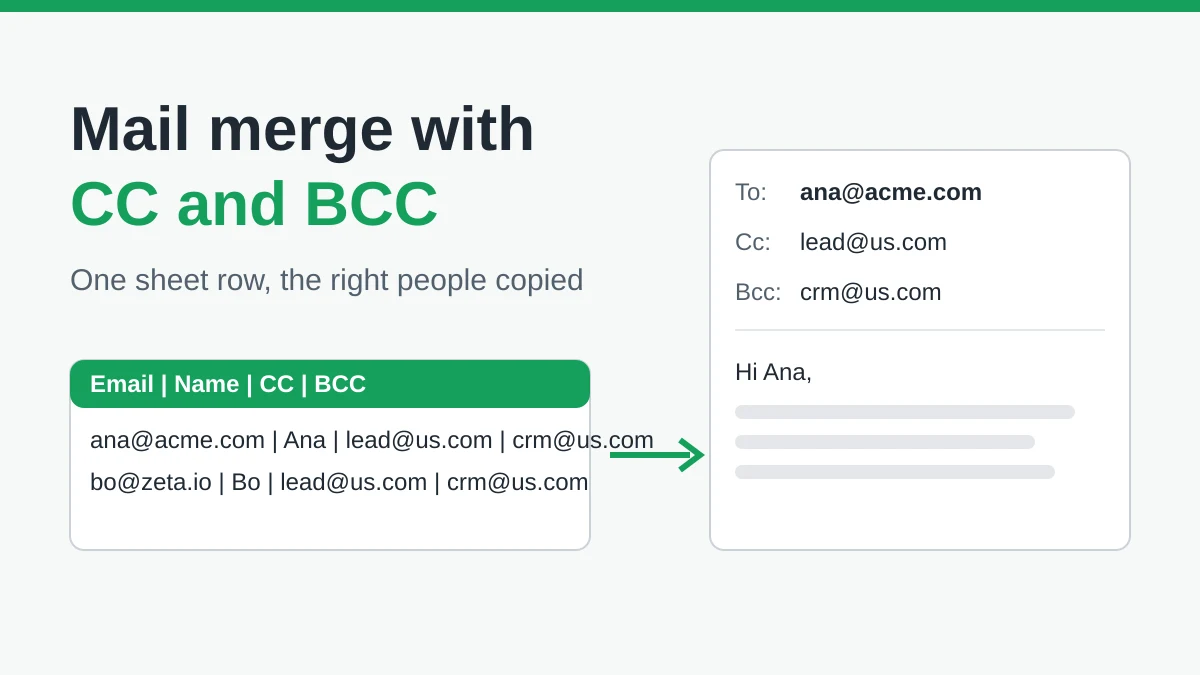
Mail Merge with CC and BCC in Gmail: Copy the Right People on Every Email
Learn how to run a mail merge with CC and BCC from Google Sheets, set up the columns, preview the result and see how copied recipients count toward your daily quota.
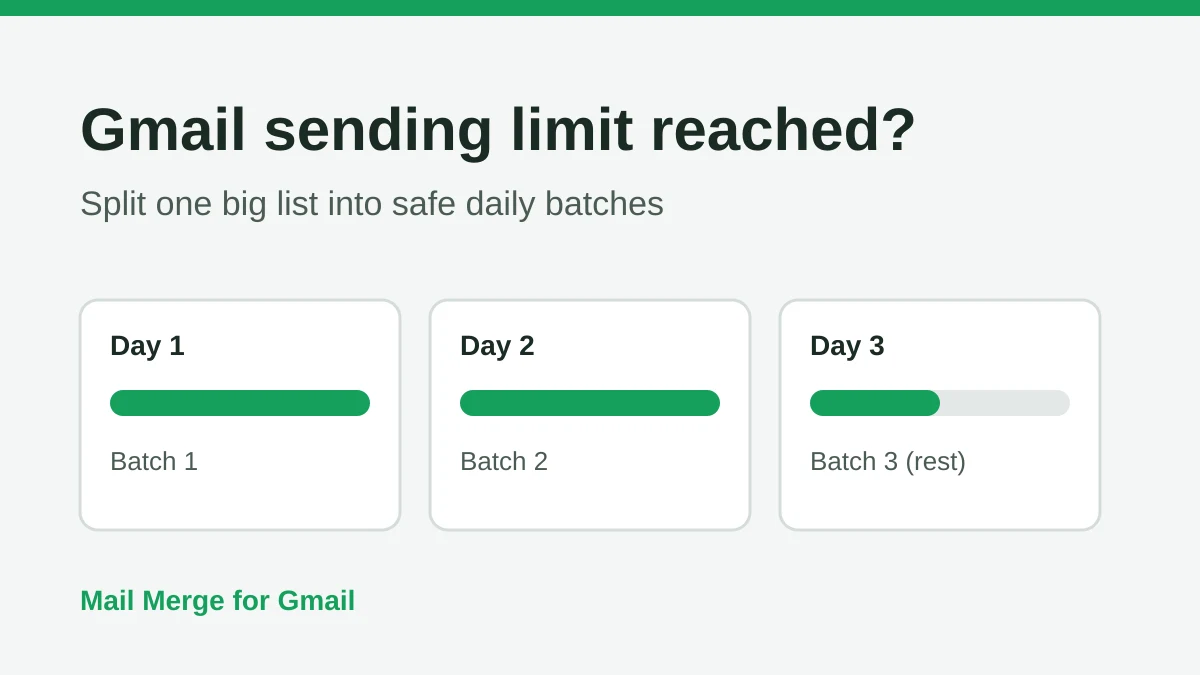
Gmail Sending Limit Reached: What It Means and How to Finish Your Campaign
Hit the Gmail sending limit reached error? Learn the real daily limits, when you can send again, and how to split a mail merge into safe daily batches.
Personalized Email Gmail: The Complete Guide
Master your personalized email Gmail workflow. Learn to merge Sheets data, track opens, and scale one-to-one outreach without leaving your inbox.